# AR Invoice Invoice\Print Invoice works, but Group\Print Invoices doesn't
**Category:** [Vista/Vantage 8](https://www.epiusers.help/c/vantage-8/8)
**Created:** 2016-09-23 12:49 UTC
**Views:** 2682
**Replies:** 8
**URL:** https://www.epiusers.help/t/ar-invoice-invoice-print-invoice-works-but-group-print-invoices-doesnt/35500
---
## Post #1 by @ckrusen
I'm in Invoice entry (with multiple invoices in the group), and when I use "Action\Group\Print Invoices", and choose print preview, I get one just invoice displayed, and it's not even from that group.
I can print each invoice without any problem using "Action\Invoice\Print Invoice".
And no matter which group I choose, trying to print the group of invoices always just displays the same one odd invoice. And that odd invoice (CM 55773 - FWIW) isn't a member of any of the current groups.
Our ARForm report style uses a modified RDD, but the problem occurs even when we use the "Standard" style.
We always leave the default style on the report styles, with the original .rpt and RDD - for debugging. So we know if an issue is with our report and/or RDD, or something in the source data.
Anyone seen this before or can point me to where to look?
Calvin
---
## Post #2 by @nhutchins
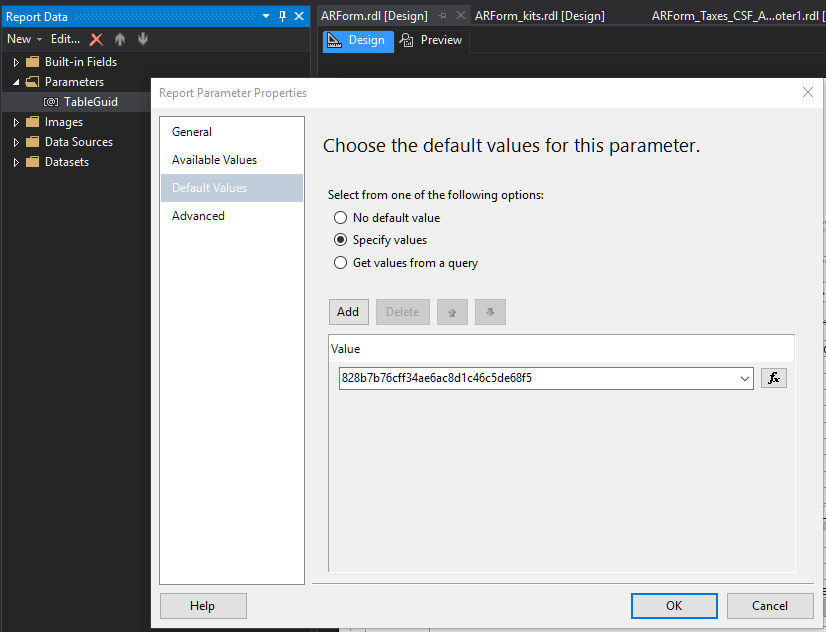
Did you happen to leave a default value for the TableGuid parameter in the
RDL?
Thanks,
Norman Hutchins
System Administrator
Howell Laboratories, Inc.
 ---
## Post #3 by @bderuvo
Calvin,
Vantage 8 with Crystal reports? Sounds like you have a bad table join the RDD or in Crystal.
For the modified RDD, check the Report Relationships to make sure the joins are configured properly. Did you add tables to the RDD?
As for the stanard report, make sure the crystal file has not been modified and standard report stlyle is still pointing to the original RDD. In vantage you cannot edit the original RDD.
Bryan DeRuvo
Director of IT
The VMC Group
---
## Post #4 by @ckrusen
The .rpt and RDD for the style "Standard" are the originals from Epicor.
Printing the Group (using the Standard style) with tracing on yeilds:
Epicor.Mfg.Rpt.ARInvForm
SubmitToAgent
void
9/23/2016 09:28:00:0427114 AM
203.0964
55773
ck-train
false
false
Note the InvoiceNum 55773 (I wish we could bold inside of pre-formatted text)
I may have problems in the customized RDD (that's for another thread), but they're not the cause of this issue.
Calvin
---
## Post #5 by @nhutchins
Oops... sorry I was still in E10 land. Guess I need to pay attention to
the subject line and not the from address.
Thanks,
Norman Hutchins
System Administrator
Howell Laboratories, Inc.
---
## Post #6 by @Matt_Belshaw
Hi Calvin,
Old post I know but did you ever resolve? We're seeing the same thing. An invoice appears in the PDF that was not in the batch
Thanks in advance
---
## Post #7 by @bderuvo
@Matt_Belshaw a common problem is users click save defaults when printing an invoice. Open the invoice print screen and look for a invoice number on the filter tab.
click Remove Defaults to clear this.

---
## Post #8 by @Matt_Belshaw
Thanks for the info Bryan. We're using the Actions > Group > Print invoices within AR Entry. There doesn't seem to be a filter for that screen (unlike others e.g. MRP, PO Sugg etc). I would assume that Epicor should use the list on the screen to print the invoices

---
## Post #9 by @ckrusen
Try what @bderuvo said. When you print a batch, it builds a list of invoices in that group. But it seems to add those to the "saved" list that is created using the Save Defaults.
Try the following as a test
1. Use invoice tracker to pull up an old invoice
2. Print that invoice from within the invc tracker. Before closing the print form, use Save Defaults.
3. In your AR group, use the Group -> Print Invoices.
The invoice from the tracker will probably show up in the group's invoices printed.
---
**Canonical:** https://www.epiusers.help/t/ar-invoice-invoice-print-invoice-works-but-group-print-invoices-doesnt/35500
**Original content:** https://www.epiusers.help/t/ar-invoice-invoice-print-invoice-works-but-group-print-invoices-doesnt/35500