# "Best" way to export data on a schedule
**Category:** [Epicor ERP 10](https://www.epiusers.help/c/e10/5)
**Created:** 2016-11-11 16:38 UTC
**Views:** 20793
**Replies:** 71
**URL:** https://www.epiusers.help/t/best-way-to-export-data-on-a-schedule/36248
---
## Post #1 by @ckrusen
I know there's many ways to skin a cat, but what are few ways to accomplish the following. Note there are kind of two distinct tasks.
Let me explain what I did in V8, and then I'll open it up to for ways to do it better in E10.
1. Need to query the APInvHed table and related tables. That data is then formatted for a text file, and the text file saved to the server.
I did this via a BPM for DynamicQuery.ExportByID.
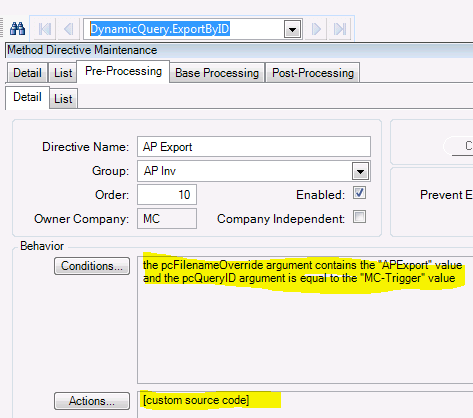 The Actions were 100% 4GL/ABL code to create a text file based on data from APInvHed and related tables.
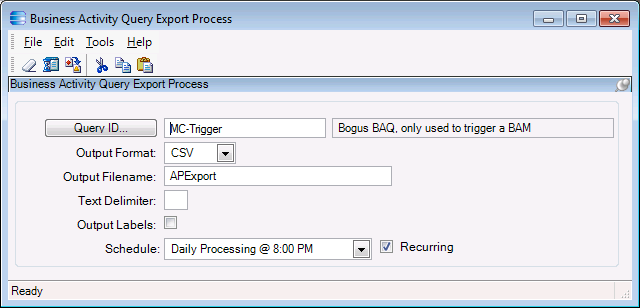
2. Created a BAQ ("MC-TRIGGER") that didn't actually do anything.
3. Ran the BAQ Export Process, with the BAQ ID "MC-TRIGGER" and other fields set for params to pass to the BPM. And scheduled it to run daily at 8:00 PM
 So my questions are:
Better way to generate a text file directly to the server, with no user interaction.?
Better way to have that happen automatically?
---
## Post #2 by @Chris_Conn
Are you opposed to using custom C# code in a bpm to do this? If not I'll
share some code that will get you 90% of the way there
---
## Post #3 by @Bart_Elia
Not to beat the REST drum again but...
You have the BAQ you want to run
Make sure of the url you want and get that going in a browser.
Note how one of the suggested 'try it outs' in the help page is CURL. Command line execution of URLs. (https://curl.haxx.se/).
Get that command line dumping data how you want / where you want.
Have Windows Task Scheduler call your curl command line whenever you want.
*thinking outside of the box*
---
## Post #4 by @Chris_Conn
Sounds neat Bart. Do you have a link to the help page you are referring to?
---
## Post #5 by @Bart_Elia
Should all be in this post
https://epiusers.help/t/rest-overview-novel/36260/1
I do need to play with some cURL examples. I honestly had not considered that use case for cUrl - scheduled 'reports' - really just data dumps. Now I need to play. It's always good to add another tool to the tool belt when considering solutions.
---
## Post #6 by @Bart_Elia
hmmm curl has some interesting issues with SSL. We deploy REST ONLY as HttpS. We try to treat security seriously and encourage that of others. That's why you don't see anything encrypted on the wire as an option anywhere in E10.
Something to play with in the background when not playing with my new vNextNext efforts ;)
---
## Post #7 by @Mark_Wonsil
Understanding the learning curve and all, I’m looking at you PowerShell:
https://blog.vgrem.com/2014/02/27/working-with-the-sharepoint-online-rest-service-via-powershell/
Mark W.
---
## Post #8 by @Bart_Elia
Another interesting alternative. argh... too many toys to play with on a weekend / evening. I need to go paint a room ;)
---
## Post #9 by @ckrusen
Chris - Not opposed to C# at all. Any help would be greatly appreciated.
---
## Post #10 by @Chris_Conn
Ok bear with me - I am sure I may get slapped for sloppy code. Here is some code I use to Link records from part and partmtl tables. You would create a BPM triggered on a data field and then add a C# custom code object using the code below. You could also customize a form, add a button, and place this code on the click event.
```cs
foreach (var mat_iterator in
(from mat_Row in Db.PartMtl.With(LockHint.NoLock) //search thru every record in PartMtl table
where (ttPartTranRow.Company == mat_Row.Company //where these conditions are true
&& ttPartTranRow.PartNum == mat_Row.PartNum
&& mat_Row.UOMCode == "LB")
select mat_Row //get the current record
))
{ //mat_iter - note the code in these brackets occur for each qualifying record
var matRow = mat_iterator; //we are making the previous iterator (data row) accessible for further use
matpn = matRow.MtlPartNum; // i want this data - will use below to 'link' tables
foreach (var partmat_iterator in // we are going to search thru Part table now
(from partmat_Row in Db.Part.With(LockHint.NoLock)
where (ttPartTranRow.Company == partmat_Row.Company
&& matpn == partmat_Row.PartNum) //notice here we are using the previous iterator field to link
select partmat_Row //these records will only be ones that meet that criteria
))
{
matdes = partmat_iterator.PartDescription; // here I getting more data I like
// this area is where you would presumable grab all your data
//Like Part.Field1, Part.Field2, PartMtl.Field1, PartMtl.Field2, etc
}
}
//writing text files can be accomplished in different ways - heres an easy and flexible way
string SUMTEXT = "sum text";
string[] lines = {SUMTEXT, "more text", "last text" }; //as many as you want - could reference you previously captured strings - all of these datas will be written to file (on new line)
string myfilename = @"\\myserver\c$\myfilename.txt";
System.IO.File.WriteAllLines(myfilename, lines);
```
If you wanted to get multiple records - I think I'd store all of those fields per record in one string, maybe comma delimited.
string rec1 = "record1.field1, record1.field2, record1.field3";
string rec2 = "record2.field1,record2.field2, record2.field4";
And feed those to the lines[] variable
---
## Post #11 by @ckrusen
Thanks for all that. I'll build and test it using a button in a custom form.
Now about executing it on a schedule.
In V8 I put the code in a DynamicQuery.ExportByID BPM. Then scheduled a BAQ Export Process.
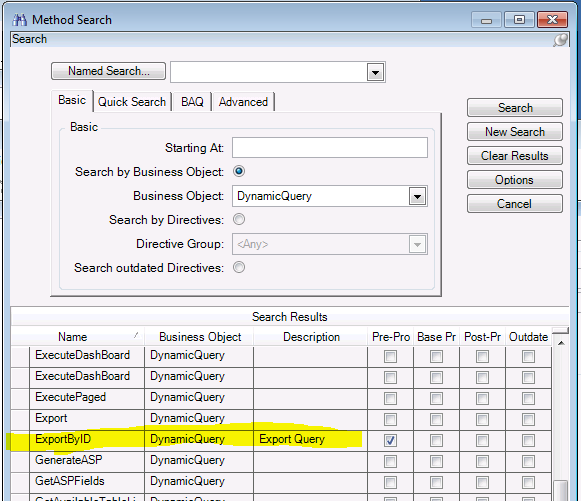 Conditions:
the pcFilenameOverride argument contains the "APExport" value
and the pcQueryID argument is equal to the "MC-Trigger" value
But in E10, there is no DynamicQuery.ExportByID
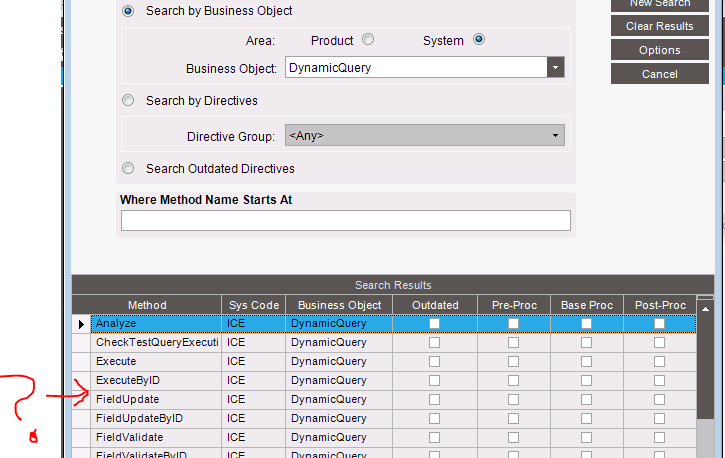 What should I use to schedule it.
FWIW - the BAQ ("MC-Trigger") that the BAQ Export Process ran, does nothing. just used to trigger the BPM.
---
## Post #12 by @Chris_Conn
I imagine E10 has a way to schedule things - but since I don't know about it, I'll give an alternate.
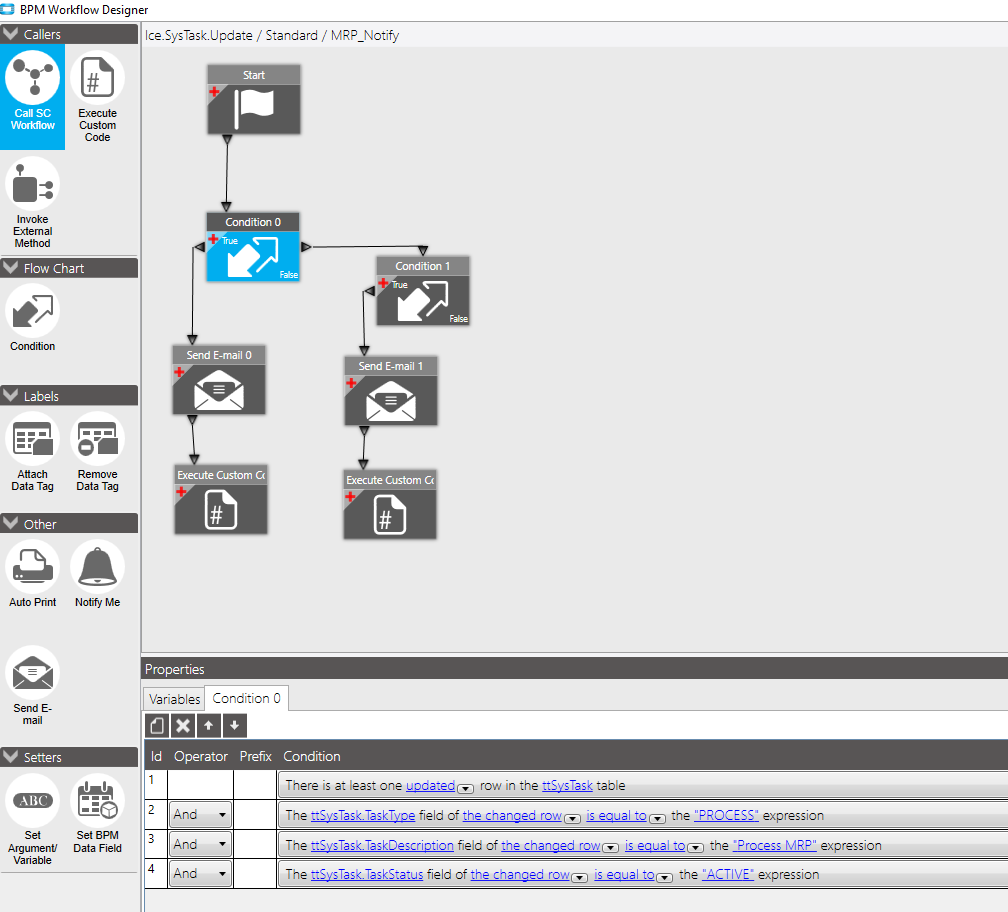
I am by no means broke into the 'best practices' aspect of E10 but I can tell you how I'd do it. If your schedule isn't too picky and you can piggy back it on something else already scheduled, that could be easy. For example, let's assume you had MRP running daily, you can create a DATA DIRECTIVE on the SysTask table and use a condition to look for only MRP events (and only starts, not completions - see screenshot)
 ---
## Post #13 by @ckrusen
I have nothing else to piggy back it on to. That's why I created and scheduled the BAQ Export Process of a BAQ that does nothing.
---
## Post #14 by @Chris_Conn
I am going to ask for some backup - @josecgomez.trigemco @rbucek
Can you teach us how to schedule events proper?
---
## Post #15 by @josecgomez
Short answer is you can't...
The DMT Folks (formerly DotNetIT now Official Epicor) have a custom process you can buy which I assume they still sell? @Edge? That allows you to schedule arbitrary code to execute on a schedule within Epicor.
http://www.dotnetit.co.uk/solutions/solution/user-process-scheduler
That is the best and most "official" way to do this. Other than buying this product you could write your own custom code and schedule it as an external process (using Windows Task Manager). The export BAQ Process as far as I've seen doesn't trigger BPMs I've tried putting BPMs on GetList, ExecuteByID, Execute and none of them will fire.
You could hang it of a System Monitor Task like you suggested and that would work, but again is kind of a hack (though it would work)
---
## Post #16 by @Chris_Conn
Jose,
When you say write you own code and schedule it thru windows - are we talking about writing a custom standalone app to access Epicor, or something else? (i.e, create a connection, authenticate, query)
---
## Post #17 by @josecgomez
Yes,
I have written a utility that will basically run a BAQ that you give it as a config parameter @jgiese.wci did this too I believe.
So you schedule the BAQ to run and then we wrote a BPM that executes the custom code with that BAQ results. So basically all the scheduled task does is called BAQ.Execute() and the BPM takes care of the custom functionality (In my case it puts customers on credit hold that are past due on their invoices)
Then the next time they need to schedule something all you have to do is write the BAQ and the BPM side and schedule the external process to run the BAQ at whatever time.
---
## Post #18 by @Chris_Conn
Nice. Is the bpm just a method directive on baq.execute or something else?
---
## Post #19 by @josecgomez
Correct, though if you are clever you can put all the code in the BAQ itself, make it an "Updatable" BAQ which then triggers a GETLIST event and an Update event and you get write your code in there. To keep it segregated from just standard BAQ.Execute method
So basically the BAQ carries the code with it
---
## Post #20 by @Chris_Conn
Thanks, but let's just assume I'm not clever :smile: That is pretty tricksy, me'sah like it, and apparently it's made me start channeling Gollum (*rubbing my hands together*)
---
## Post #21 by @josecgomez
I say spend the 20 dollars *note not actual price* and get the process scheduling tool from DMT / Epicor
 ---
## Post #22 by @Chris_Conn
lol, I just saw this pop up on my screen and thought that Google ads was getting very smart, and brutally invasive
---
## Post #23 by @josecgomez
I welcome the Google overlords!
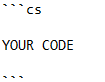
By the way and un-related I saw you posted some code earlier, if you surround it by this tag it will color code correctly
 https://epiusers.help/t/code-syntax-highlighting-in-posts/33519/3
---
## Post #24 by @Chris_Conn
Bahaha
 Thanks for the tip - what about the weird scroll bar thing? nm - The '''cs fixes that too
---
## Post #25 by @jgiese.wci
@josecgomez.trigemco trying to steal my Update-able BAQ thunder!
We built a program to use with windows task schedule with. I command line pass it the BAQ to run. I have the bpm code attached to the called BAQ's GetList method. You then have the choice of using the data returned from the BAQ, or you could if you wanted just return say 1 company record just for the sake of firing it and put whatever code you want in the BPM even if it's not anywhere near related to the BAQ. It's just a means of getting into the BPM code and BAQ seemed the most versatile. It works pretty slick that way. Fairly free flowing.
---
## Post #26 by @josecgomez
I gave you credit @jgiese.wci don't be a cry baby lol
---
## Post #27 by @Bart_Elia
Got the REST cUrl sample working.
https://epiusers.help/t/rest-command-line/36266
---
## Post #28 by @josecgomez
Beautiful @Bart_Elia
---
## Post #29 by @duckor
I'm not sure about the exact parameters you need, but would SSRS/ReportServer and a scheduled subscription work for this?
---
## Post #30 by @Bart_Elia
SSRS is it's own world. I honestly don't know enough about that portion of SQL Server.
---
## Post #31 by @duckor
Yeah, I notice not many people mention it on these forums. That's too bad, it was pretty easy to learn for data dumps and subscribed reporting. It solves so many reporting/data problems for me. I don't think I could work without it.
---
## Post #32 by @Chris_Conn
@duckor, I would love to pick your brain on the issue. In an attempt to avoid hijacking this thread (as my title warns)- Perhaps we could start a new thread or PM. I have tried many times to get SSRS working, and my IT team gave up ages ago.
---
## Post #33 by @Bart_Elia
Oh I know a ton including the current implementation and future plans. I just never investigated CLI (Command Line Interface) options for it. ;)
---
## Post #34 by @Dave_Leannah
I use TOAD for SQL Server. It has an automation scheduler - very easy to use. It can export the query as an excel file(s) or an Excel file with multiple worksheets or CSV files. It can put the file onto a file server. Loads of ways to do it. It is integrated with the windows scheduler.
I run Toad on a little application server - takes very little and is very powerful. If you export more than 65536 rows in Excel it needs to have Excel on the server itself just to get the row counts higher. I've found it to be a fantastic tool.
You can use it to schedule any SQL query/procedure/SQL script.
---
## Post #35 by @balmon
I would agree with SSRS we use that a lot to email reports an a regular basis, you can setup schedules. You could also do something with Service Connect. It's pretty easy to schedule events with that. Then you could dump it in an email or something as well. Just some other thoughts.
-Bobby
---
## Post #36 by @Randy
We have a similar situation. Anyone know if the BAQ Export process accepts wildcards for the name? We have a customer than we need to upload a CSV file to their system. We have a BAQ to pull the data but the customer needs the filename to be unique each upload. We were thinking of using the Date, hopefully in YYMMDD format.
Reading this topic seems like a BPM is an option too and REST looks a bit advanced for what we need, but a great tool.
---
## Post #37 by @ckrusen
I would have suggested making a BPM tied to the Dynamic Query Export. Then inside the BPM, programatically change the file name
`pcFilenameOverride`
is the variable to tweak in the BPM.
Now the very, very bad news..... E10 does not allow you to make a BPM for the Export Process. :rage:
---
## Post #38 by @josecgomez
All the export process does is call ExecuteByID... (however it doesn't appear to trigger BPMs)
---
## Post #39 by @Randy
Thanks, still learning advanced BPM's here but we've been considering a C# program in a Windows scheduled task that'll look for the specific filename BAQExport creates, rename it and move it into the FTP upload queue directory.
---
## Post #40 by @Nancy
Could you maybe make a job on the SQL server agent to run on a schedule and then send query data out to text file using something like this: https://thiagsundar.wordpress.com/export-data-to-text-file/ ?
Nancy
---
## Post #41 by @Randy
SSIS is a possibility but the powers-that-be here aren't comfortable with
it. /sigh/
---
## Post #42 by @Arul
If you have Project Management module, then you can use DataDirective on Project table when u run Project build analysis with Revision update option. It works well.
---
## Post #43 by @utaylor
@duckor makes a great point about using SSRS subscriptions. You can email the results from a report in XML,CSV,PDF,MHTML,Excel,TIFF, and Word.
https://docs.microsoft.com/en-us/sql/reporting-services/subscriptions/subscriptions-and-delivery-reporting-services?view=sql-server-2017&WT.mc_id=email
---
## Post #44 by @knash
What was your final solution? Asking for a friend. :slight_smile:
---
## Post #45 by @Randy
[quote="knash, post:44, topic:36248"]
What was your final solution? Asking for a friend. :slight_smile:
[/quote]
For that solution, I went with a scheduled BAQ Export to a CSV file as we didn't need to trigger any BPMs just pull data to a file for a auto-send to customer report. The wrinkle in that case was it needed to be a specifically formatted CSV file with custom headers for uploading to a customers reporting portal.
If you have APR you could setup a BAQ SSRS Report and routing to do automatic emails. This is the process we use now and I'd probably of tried that with the above case.
---
## Post #46 by @ckrusen
I think I just ended up making a BAQ Report consisting only of the tablix with just the detail row.
Then "printed" the BAQ Report using the send via email, with the output format: "Excel-Data Only", on a reoccurring schedule.

It doesn't create the CSV file directly on the server, but instead sends an XLS file as an attachment to my email (which I have Outlook file it to a specific location).
---
## Post #47 by @Rich
So I have an Option that is not mentioned in this thread: **Buy the Compliance Reporting License.**
The name of the license is horribly misleading but what it actually allows is for you to create Structured Output Reports - XML, JSON, CSV - with numerous code points along the way so you can manage the data and file creation if the base functionality is not enough.
The Structured Output functionality is built on the back of the new BAQ Report creation - that does not require an additional license. That functionality allows you to execute a "set" of BAQs - related or not - with criteria entered on the Report Submission form.
Once built, your fancy new BAQ based Structured Output report can be scheduled or used in Auto-Print. Consider the possibilities:
New Customer is added - Auto-Print creates XML Document of information for transfer to external CRM
Stock level declines to order threshold - Auto-Print creates JSON Document for transfer to Vendor
Scheduled report runs monthly against AP BAQs and CSV file is created for transfer to external payments / analysis system
Your unique Structured output need...
BTW - you can also setup the Report to create a Structured Output document and a human readable document (PDF or any of the SSRS output formats) at the same time. Very cool feature going to waste because of the misleading License name...
I believe the license is relatively inexpensive - you will have to speak with your CAM for actual pricing.
---
## Post #48 by @hkeric.wci
@Rich do you also need the **Print Routing** License in addition to the **Compliance Reporting License**? or is this another name for the so called "SSRS Print Routing / Advanced Routing"
---
## Post #49 by @Rich
@hkeric.wci - Nope, separate and different.
---
## Post #50 by @jott
@ckrusen, what is the application you have in the image here? I have not been able to find the screen you're on, but it looks like it could be helpful to me.
---
## Post #51 by @kylepbsps
SSRS can export CSV on a schedule.

---
## Post #52 by @Mark_Wonsil
[quote="kylepbsps, post:51, topic:36248"]
SSRS can export CSV on a schedule.
[/quote]
Don't think you get here with cloud though.
No access to SSMS. No access to File Shares - unless you use EpicorData or you're @klincecum.
---
## Post #53 by @Mark_Wonsil
It looks like you're cloud @jott, not knowing what you're trying to do, you may want to consider this post.
https://www.epiusers.help/t/rest-api-access-to-partnum-and-partdescription-in-same-table-saas-implementation/81021/2
---
## Post #54 by @jott
I'm trying to send sales reports to external reps. I think I am going to have to use BAQ Report Designer. I'm just trying to figure out what screen he is on where you can choose to send excel data only. I've seen it before but am not able to find it currently.
Basically trying to send this report weekly, but it has to go to 20-30 reps. It also needs to be able to filter the BAQ by each sales reps sales rep code before exporting to CSV and sending it out. I haven't been able to find a good way to do this so far. It's the iterating through the different sales reps that has made it more difficult.
---
## Post #55 by @Camren360
This will take a bit of setup, but I think you will find it worthwhile in the end.
Make a parametric BAQ with the filters you need and make an excel workbook for each of your reps that has the BAQSvc call with applicable parameters. Send that out to each of your reps, and they can refresh it on demand. No more weekly emails.
---
## Post #56 by @jott
I'm not totally against this idea myself, but I've been asked to do it via email. When dealing with this many external partners we want to stick with what they know. I just haven't been able to find a way to pass a parameter to a baq report.
---
## Post #57 by @cnewbould
If this is a BAQ report and not a RDD with a report style, you can do this under the options tab.
Use the **Option Fields** sheet to set up the main user input fields for the report.
Option Fields display on the report window. They enable users to define the range of data that displays when the BAQ report generates. For example, you can use this sheet to set up fields where the user defines a **From** and **To** date range as criteria for running the report.
Any field on the selected BAQ (for example, LaborDtl_ClockInDate) as well as report parameter fields (for example, ReportParam_Date02) can be turned into an input field. Select the field in **Option Field**, enter a **Field Label** that will display in the report, and select the **Compare Operator** that defines what data displays in the report.
---
## Post #58 by @Mark_Wonsil
[quote="jott, post:54, topic:36248"]
Basically trying to send this report weekly, but it has to go to 20-30 reps. It also needs to be able to filter the BAQ by each sales reps sales rep code before exporting to CSV and sending it out. I haven’t been able to find a good way to do this so far. It’s the iterating through the different sales reps that has made it more difficult.
[/quote]
For those who know, I am NOT a big fan of emailing reports. I'll save the reasons for another day. But may I offer an alternative?
In addition to @Camren360's excellent (and frankly better) idea, you could place the report in a repository like ECM or SharePoint. The reps would then subscribe to that event (once) and get notified whenever there is a new report.
Benefits:
- No email distribution list to maintain
- Fewer Kinetic customizations to maintain (including Advanced Print Routing)
- The report is not exposed to Business Email Compromise (BEC) sitting in an email folder
- You KNOW for certain if and when a rep actually downloaded the report
- Reduces email box size requirements
---
## Post #59 by @Randy
[quote="Mark_Wonsil, post:58, topic:36248"]
In addition to @Camren360’s excellent (and frankly better) idea, you could place the report in a repository like ECM or SharePoint. The reps would then subscribe to that event (once) and get notified whenever there is a new report.
[/quote]
https://i.imgflip.com/4pw07x.jpg
---
## Post #60 by @jott
I'm using BAQ report designer, RDD, and report style. The reps receiving the files aren't able to login to Epicor, otherwise I'd just create a dashboard.
---
## Post #61 by @jott
Mark,
I'm not saying emailing CSV's is better than using the API, just that the task I was given is to get these emails setup. I did ask if we're open to using the method you mentioned above, but have not received a response yet.
With that being said, I've attempted to setup an excel document that pulls the data in from an odata feed and am not able to find a way to do this that keeps my API key from being visible. Even making my API key visible I'm running into issues. I have searched and am not able to find a straightforward walkthrough of setting up the API in excel.
I have a url to my BAQ where I've begrudgingly already had to include the API key exposed. Even with the key, my Epicor credentials are still required (I am also prompted to enter the credentials in the browser). In the browser with my credentials and the api key in the URL, I am able to retrieve the data. In Excel with my credential and the api key in the URL, I am getting this error:

Any clue on a way I can do this? These sales reps are not directly employed by my company and do not have their own Epicor logins. I would really prefer them not being able to see the API key as well. In order to keep from making 26 separate BAQs for each rep, we decided to make a master BAQ with all data and would like to pass the repcode as a parameter. If the API key is visible, reps will be able to see information for every rep if they're tech savvy enough.
Thanks for your responses so far.
---
## Post #62 by @Mark_Wonsil
[quote="jott, post:61, topic:36248"]
I would really prefer them not being able to see the API key as well.
[/quote]
That is wise. Having an intermediate service between Kinetic and the Reps would help hide the API-Key from them.
Is your company a Microsoft 365 user? If not, do you use any file sharing services (DropBox, Box, Google Drive) to pass information to the external reps?
---
## Post #63 by @jott
We are on Microsoft 365. But to my knowledge we just communicate with reps via email. Is there a solution you know of using 365 to do what you suggest?
---
## Post #64 by @Mark_Wonsil
Yes. SharePoint or Teams (which is SharePoint under the hood). There are many ways to set this up, but the underlying idea is the same.
Each rep would have a dedicated Document Library and you would invite the rep as a member.
I would [write a PowerShell script (like @josecgomez did here) ](https://www.epiusers.help/t/rest-to-email/58905/2) that runs a BAQ for a given rep and then post the file to the corresponding Document Library for that Rep using the Microsoft Graph REST API.
For files less than 4MB, use this [Graph API for smaller files](https://learn.microsoft.com/en-us/graph/api/driveitem-put-content?view=graph-rest-1.0&tabs=http). For larger files, you'll need to do a little more with this [MS Graph API for larger files.](https://learn.microsoft.com/en-us/graph/api/resources/onedrive?view=graph-rest-1.0)
Personally, I would create a Team for each rep and invite them to it. Add a channel called "Sales." Each channel in Teams gets a Document Library by default. You can get the URL for the Library to use for the MS Graph calls above from the **Copy link** item.

The rep can choose the "Open In SharePoint" link and asked to be notified (Alert Me) when changes occur in the Document Library.

and indicate what, when, and how to be alerted.

Since EpicWeb is a SharePoint site, many users here use this feature to see when Epicor posts patches or changes to documentation.
To setup the ability to see who and when someone viewed a document, follow these steps.
[Allow people to see who views their files or pages - Microsoft Support](https://support.microsoft.com/en-us/office/allow-people-to-see-who-views-their-files-or-pages-ee26dde0-c30e-4eca-b1c3-38922c450967)
That should cover it.
---
## Post #65 by @Randy
[quote="jott, post:60, topic:36248, full:true"]
I’m using BAQ report designer, RDD, and report style. The reps receiving the files aren’t able to login to Epicor, otherwise I’d just create a dashboard.
[/quote]
If they insist on emailed reports then yes using BAQ report with APR to route to email is the way to go. @Mark_Wonsil suggestions are better overall but may not be what your reps want, we have some who insist on emailed reports even though they have a Teams portal to see the latest reports.
---
## Post #66 by @Mark_Wonsil
[quote="Randy, post:65, topic:36248"]
If they insist on emailed reports then yes using BAQ report with APR to route to email is the way to go.
[/quote]
Randy brings up a good point. It they insist on email, you can also use the [MS Graph to send email](https://learn.microsoft.com/en-us/graph/api/resources/message?view=graph-rest-1.0), create a draft of the email for review before sending, send all drafts, etc.
---
## Post #67 by @jott
In this case, is there a way to pass a parameter to the BAQ? I see that I can use the filter, but I have some questions. I am a little confused on what it means by breaking, I must break before I can use the filter and other rules I'd like to use. I am also wondering if there is a way to iterate through a list so I do not have to have a break, filter, and email for all 26 reps. I can copy and paste if need be.
---
## Post #68 by @Mark_Wonsil
[quote="jott, post:67, topic:36248"]
is there a way to pass a parameter to the BAQ?
[/quote]
Yes. See the REST Technical Reference Guide (see page 51) for details but basically, you just pass it in on the URL.

---
## Post #69 by @Camren360
I didn't want to keep necro'ing this thread, but since we are still beating this dead horse:
I would use power automate, make a file somewhere with rep's email and report parameters then iterate through that list to pull the odata, load it into an excel sheet, and then email the rep the excel sheet.
An Epicor Consultant would tell you to spend a bunch of money on automation studio to do the same thing.
---
## Post #70 by @ckrusen
[quote="jott, post:67, topic:36248"]
I am a little confused on what it means by breaking
[/quote]
Normally a report creates a single output. Even reports like printing Invoices. While the data set may be for 5 invoices (pretend they are 1 page each), you get one report containing 5 pages (all 5 invoices in one report).
Breaking allows for multiple reports to be created when usually just one is. What field you break on is what is field is used to group the data before creating individual reports.
In my example of "5 invoices", if you mailed that report to each customer they would get the other 4 invoices too. If you made it break on the customer, then 5 reports would be created. If two of the invoices were for the same customer, then those two would be in a single report (still as two distinct invoices in one PDF), and there would be 3 other reports for the other customers.
---
## Post #71 by @jott
Thank you Calvin, I was able to get mine working. A good first iteration of it at least and I'm getting the hang of it. Really appreciate the response.
---
## Post #72 by @markb_wi
Another thing you can do with APR is make a condition, look for the @ in the email and if it doesn't exist, send the report to someone else with a new template.
That template should say 'when trying to send sales reports, an email was not found.' Have that sent to a person or group so they will set it up properly. Maybe a sales person was not assigned or something like that. This is our common practice with APR.
Also in the past we have sent shipment reports for the last 5 days instead of just one day, that way if something glitches they can just wait a day. Sales people don't care, they just want their $$$
---
**Canonical:** https://www.epiusers.help/t/best-way-to-export-data-on-a-schedule/36248
**Original content:** https://www.epiusers.help/t/best-way-to-export-data-on-a-schedule/36248