# BPM to Form Code conversion help
**Category:** [Epicor ERP 10](https://www.epiusers.help/c/e10/5)
**Created:** 2016-12-14 17:49 UTC
**Views:** 3013
**Replies:** 15
**URL:** https://www.epiusers.help/t/bpm-to-form-code-conversion-help/36609
---
## Post #1 by @Chris_Conn
I love the flexibility I have within a BPM to access the DB. I have become somewhat comfortable with it. I have already ran into instances where I have had to re-work a solution in custom (form) code using adapters instead of the DB access. In this case, I am trying to get a printer name, based on workstation id. What adapters would I use? Any suggestions.
Here is my BPM code:
String prntr= "??";
 var PRINT =  (from WS_Row in Db.Device.With(LockHint.UpdLock) where
			WS_Row.WorkStationID == Session.WorkstationID &&
      WS_Row.Company == callContextClient.CurrentCompany
			select WS_Row).FirstOrDefault();
			if (PRINT != null)
			{
				prntr =PRINT.PrinterID;
			}

 var Result = from D in Db.Device
                                     join P in Db.SysPrinter
                                     on new { D.Company, D.PrinterID }   //link these
                                     equals new { P.Company, P.PrinterID }  // to these
																		 where D.WorkStationID == Session.WorkstationID
																		select P.NetworkPath;
prntr = Result.FirstOrDefault();
---
## Post #2 by @josecgomez
There is a printer maintenance screen run that with Tracing on and you'll see the name of the adapter.
---
## Post #3 by @Chris_Conn
OK and where might I find this elusive: Ice.Proxy.BO.SysPrinterImpl?
I assume I need to add it's reference to my custom code
---
## Post #4 by @Chris_Conn
Should I refer to this YouTube video from this cool dude I know and use a BAQ to get this done easier?
https://www.youtube.com/watch?v=8u0504kqLM8
SIGH..... So I think in your video I see the light - I can find the SysPrinterAdapter using the Wizard. I normally manually add the references
---
## Post #5 by @srossberg
You can get at it using the Workstation adapter GetById method and retrieve the Device table.
---
## Post #6 by @Chris_Conn
@srossberg I have to get the network path of the printer so I have to actually query the printer table for that. I do use the printer name from the Workstation though to get the right printer.
---
## Post #7 by @josecgomez
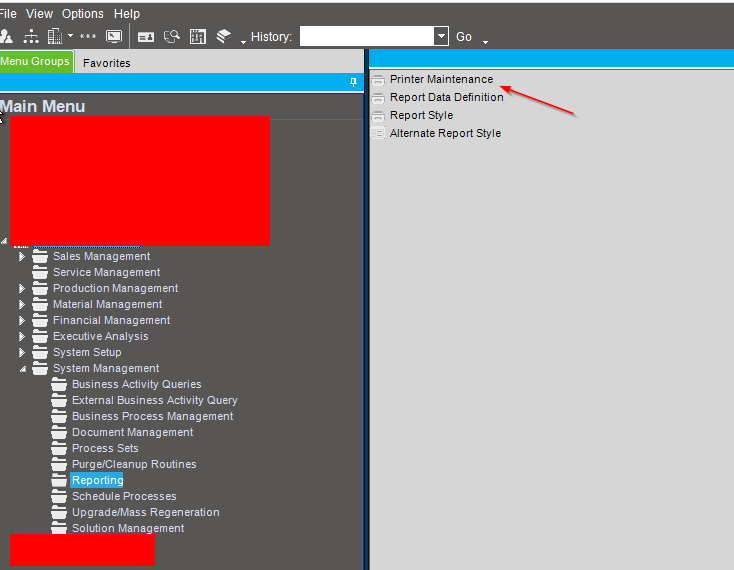 ```xml
Ice.Proxy.BO.SysPrinterImpl
GetRows
SysPrinterTableset
12/14/2016 19:16:05:2219272 PM
6
```
---
## Post #8 by @Chris_Conn
Yea I got that far but I couldn't find the BO DLL to reference (add
reference). Ultimately I realized I could find it in Wizard but I decided
to use a BAQ
---
## Post #9 by @markdamen
Just an observation with your BPM code. You’ve used LockHint.UpdLock. Does it require that if you’re only reading data not writing?
Mark Damen
ERP System Manager
[cid:BVDairy-OfficialLogo_bbec4553-4e4a-43e7-baef-7ba65e6481021111111111111.png]
MarkDamen@bvdairy.co.uk
Mobile: +44 (0) 7790 806926
BV Dairy ι Wincombe Lane ι SHAFTESBURY ι Dorset ι SP7 8QD ι UK
Switchboard: +44 (0) 1747 851855
Fax: +44 (0) 1747 851002
[cid:AllAccresiationsSmaller_4bf6f6e3-ead2-41e2-b71d-38d2d164062f.jpg]
[cid:images(4)_4a6fa08f-4dbb-4b8b-bd23-476e43b9b462.jpg]
Everyone at BV Dairy would like to thank you for your custom and support in 2016. We wish you all a very Merry Christmas and a Happy New Year.
This year we will be making donations in lieu of Christmas cards and their postage to a local charity. We hope you understand and can appreciate the benefit that this will bring.
This message is intended for the use of only the person(s) ("Intended Recipient") to whom it is addressed. It may contain information that is privileged and confidential. Accordingly any dissemination, distribution, copying or other use of this message or any of its content by any person other than the Intended Recipient may constitute a breach of civil or criminal law and is strictly prohibited. If you are not the Intended Recipient, please contact the sender as soon as possible.


 ---
## Post #10 by @Chris_Conn
I don't believe so since we aren't performing an update - I just figure better safe than sorry :)
Also for anyone looking (and questioning my sanity): The first block of code is actually unused. I was looking for the printer ID but then ultimately found I needed printer network path. I leave it in there because my Epicor runs too fast (i'm kidding, or am I @josecgomez.trigemco)
**Final Solution was to:**
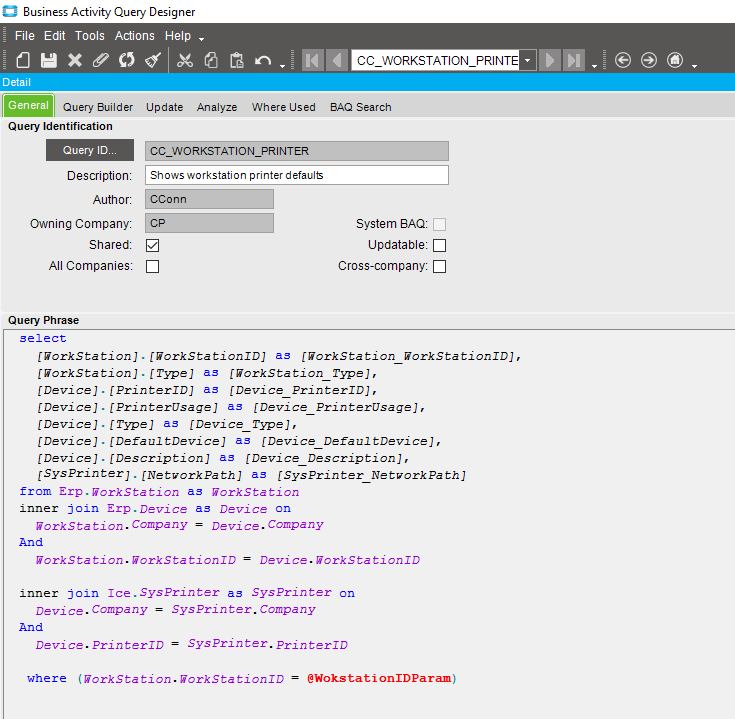
Create a shared BAQ that links the tables just like I did in my BPM code and filters WorkstationID with a parameter. I then used the video linked above from our resident Guru-In-Chief Jose Gomez to call my BAQ from code and use those results. It was WAY easier.
```cs
DynamicQueryAdapter dqa = new DynamicQueryAdapter(oTrans);
dqa.BOConnect();
QueryExecutionDataSet qeds = dqa.GetQueryExecutionParametersByID("CC_WORKSTATION_PRINTER");
qeds.ExecutionParameter.Clear();
qeds.ExecutionParameter.AddExecutionParameterRow("WokstationIDParam",((Ice.Core.Session)oTrans.Session).WorkstationID,"nvarchar",false,Guid.NewGuid(),"A");
dqa.ExecuteByID("CC_WORKSTATION_PRINTER",qeds);
//MessageBox.Show(dqa.QueryResults.Tables["Results"].Rows.Count.ToString());
if(dqa.QueryResults.Tables["Results"].Rows.Count > 0)
{
prntr = dqa.QueryResults.Tables["Results"].Rows[0]["SysPrinter_NetworkPath"].ToString();
}
else MessageBox.Show("No printers configured. Contact C.Conn");
```
 ---
## Post #11 by @josecgomez
[quote="Chris_Conn, post:10, topic:36609"]
EpiWhore
[/quote]
I don't know how I feel about this one.... :confounded:
---
## Post #12 by @Manasa
I am at a loss for….
Manasa
---
## Post #13 by @Chris_Conn
Well I can't unsay it :blush: But I did edit the post. Apologies if I've offended anyone. We all know Jose is a monogamous ERP solutions provider.
---
## Post #14 by @josecgomez
I don't know about that... I've been known to dabble... in other ERP's.... However once you go Epicor you can't go back
---
## Post #15 by @Chris_Conn
:innocent:
[quote="josecgomez.trigemco, post:14, topic:36609"]
once you go Epicor you can't go back
[/quote]
Hopefully it's not because you wake up with a headless server wrapped in newspaper on your pillow. Epicor Mafia? C'mon it's FRIDAY!!!!!!
 ---
## Post #16 by @Manasa
God knows I needed the laugh….
M. Manasa Reddy
P: 703.471.7145 x454
manasa@euclidsys.com
---
**Canonical:** https://www.epiusers.help/t/bpm-to-form-code-conversion-help/36609
**Original content:** https://www.epiusers.help/t/bpm-to-form-code-conversion-help/36609