# Change Costing Method: Remove popup warning?
**Category:** [Epicor ERP 9](https://www.epiusers.help/c/e9/7)
**Created:** 2017-02-07 18:26 UTC
**Views:** 4488
**Replies:** 34
**URL:** https://www.epiusers.help/t/change-costing-method-remove-popup-warning/37180
---
## Post #1 by @Adam
When changing a part costing method, we get a popup that says, "Do you want to refresh the part plant record with the changes?". Our answer is ALWAYS "yes", but some users have been accidentally clicking "no". How would we go about removing this popup and always defaulting to yes behind the scenes? Using a method directive? Any guidance much appreciated.
---
## Post #2 by @Adam
Any general direction would be appreciated. Thank you.
---
## Post #3 by @ckrusen
How about a BPM that triggers on the change of Part.CostMethod, and compares it to PartPlant.CostMethod. If PartPlant.CostMethod <> Part.CostMethod (where PartPlant.PartNum = Part.PartNum), then update the PartPlant.CostMethod.
You'd still get the prompt, but answering NO should trigger the BPM.
I've probably over simplified it. Not sure if that BPM would then trigger a cost change if the part's costs varied between type (ex: if AvgCost = 1.23, and LastCost = .99)
---
## Post #4 by @Adam
I think that would work, but the greatest desire is to remove the popup prompt. Any suggestions on how to go about that?
---
## Post #5 by @josecgomez
Adam,
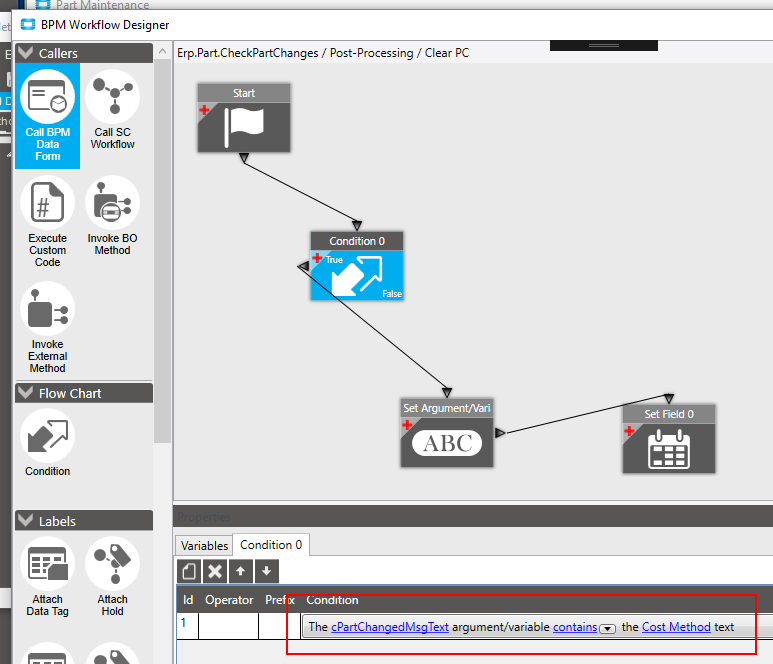
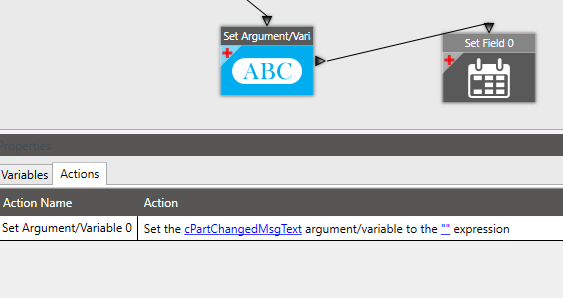
The CheckPartChanges Method has 2 output variables the variable named cPartChangedMsgText is the one that Triggers the PopUp. If you were to put a Post Processing BPM on CheckPartChanges and set the value of cPartChangedMsgText="" then the popup won't happen... However that means you have to account for what clicking YES does. This means you'll have to set the UpdatePartPlant flag = true in the same BPM.
 ---
## Post #6 by @Adam
This is VERY helpful! I am Epicor 9, but I am following. What action should I select to set the UpdatePartPlant flag = true? Would this be right along side the set cPartChangedMsgText post-processing action?
Thank you!
---
## Post #7 by @josecgomez
Right
---
## Post #8 by @Adam
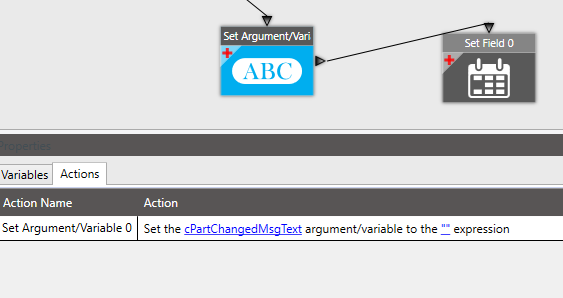
What I can't figure out is what action to use. I think your third screen shot was going to show me, but it looks like a duplicate of your second screen shot.
Thanks.
---
## Post #9 by @josecgomez
Is the SetField action...
---
## Post #10 by @Adam
I only see two with set, but neither of these work. (I am using Epicor 9)
"set the specified field of all rows identified by the designed query to the specific expression"
"set the specified field of the BPM Data to the specified express"
---
## Post #11 by @josecgomez
Thank you @jgiese.wci for the screenshot
 ---
## Post #12 by @Adam
Thank you. I don't have that option on the post-processing dropdown. I tried adding the following to pre-processing, but the update didn't work:
"set the Part.UpdatePartPlant field of the changed row to the true expression"
Thoughts? Many thanks.
---
## Post #13 by @josecgomez
Nope, can't do it in Pre-Processing.... Since its set in the method. Are you an ADvanced BPM User? Check your permissions.
---
## Post #14 by @Adam
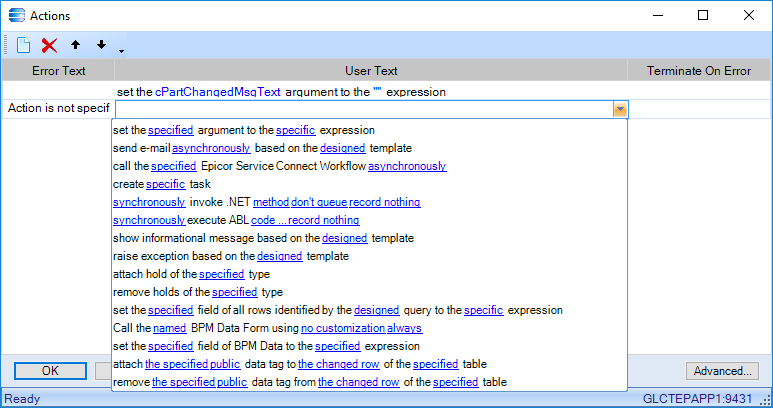
Yes, my user is set to advanced BPM. Below is the dropdown options when trying to add this Post-Processing action:
 ---
## Post #15 by @josecgomez
Try the one that says Set the specified field in all rows identified by the designed query to the specific expression... and just pick the Field that you want in that BAQ.
---
## Post #16 by @Adam
I don't think I am able.. When clicking specified I get "The specified query is empty or doesn't contain any temp-table reference".
---
## Post #17 by @josecgomez
You have to design the query first I believe.... I am not sure why you don't have that option.... its there in 9
---
## Post #18 by @Adam
Okay. So it looks like I may need to create a separate BAQ just to run this update?
---
## Post #19 by @josecgomez
You write the BAQ in there... I think I dont have 9 handy
---
## Post #20 by @jgiese.wci
@Adam try this export from my 9 Export.bpm (9.7 KB)
---
## Post #21 by @Adam
Thank you for the BPM. I haven't tried importing yet (not sure where to actually). I am trying to figure out how to ues the action. Any chance you could look at this and not where I've gone wrong?
"set the **ttPart.UpdatePartPlant** field of all rows identified by the **ttPart** query to the **true** expression"
For the ttPart query I have:
**for first ttPart no-lock where ttPart.RowMod = 'U'**
---
## Post #22 by @jgiese.wci
the BPM i sent shows how to use it. Go to Directive import and bring it in.
---
## Post #23 by @josecgomez
Remove the NO-LOCK and it should work
---
## Post #24 by @Adam
Neither change worked.
I tried removing NO-LOCK, but when changing Costing Method on the Part Screen it still didn't update the costing method on the Plants screen.
Then I deleted my BPM and imported Joshua's, enabled, and it still didn't change the plants costing method.
Any random thoughts to help guide?
Thank you.
---
## Post #25 by @Adam
When I compare the log between my BPM and without, I see that without will fire the ChangePartPlantSourceType method. Do I need to add this somehow in my BPM?
---
## Post #26 by @josecgomez
It should do that on its own.... but maybe it doesn't in 9, if that's the case you'll have to write some ABL code for that.. FUN TIMES
---
## Post #27 by @Adam
Not what I wanted to hear. :) Thank you for all the help up to this point. Hopefully I can come across some example that will get me close...
---
## Post #28 by @Adam
Joshua, are you aware of any way that I can fire ChangePartPlantSourceType? It seems my BPM won't fire this. Thanks.
---
## Post #29 by @jgiese.wci
The BPM doesn't fire anything it just fires along with whatever is triggered in the UI.
What does the trace say as far as params in and out during the actions you described in your original post.
What you are trying to do might not even be possible. Sometimes there are flags in the methods that you can set to bypass message like that, sometimes you will have to write custom code, sometimes you are straight up SOL and it's not worth the time and materials.
---
## Post #30 by @Adam
To test, I change the costing method on a part from Avg to Std.
**Using non-BPM way:**
When clicking save I get "You have changed the following fields: Cost Method. Do you want to refresh the part plant records with the changes?".. I click "Yes".
Action #10: Part.CheckPartChanges - The params are CostMethod=S, UpdatePartPlant=F, and DBRowIdent.
Action #17: Part.ChangePartPlantSourceType - The params are CostMethod=S and DBRowIdent.
Action #22: Part.Update - The params are CostMethod=S, RowMod=U, and DBRowIdent.
**Using the BPM you provided (along with adding set cPartChangedMsgText = ""):**
Action #10: Part.CheckPartChanges - The params are CostMethod=S, and DBRowIdent
Action #15: Part.Update - The params are CostMethod=S and DBRowIdent
---
## Post #31 by @jgiese.wci
in my bpm set the field UpdatePartPlant=F
---
## Post #32 by @Adam
I tried that (just double-tried) and the same actions/params exist:
**(when set to false)**
Action #10: Part.CheckPartChanges - The params are CostMethod=S, and DBRowIdent
Action #15: Part.Update - The params are CostMethod=S and DBRowIdent
---
## Post #33 by @Adam
Do I need a pre-processing hook of some kind to fire the post-processing?
---
## Post #34 by @josecgomez
All right buddy here you go... troubleshooting that was a damn nightmare... you owe @jgiese.wci and I a few beers!! LoL
SupressPPUpdate.bpm (23.2 KB)
---
## Post #35 by @Adam
Incredible! Thank you! I learned a lot through this process and thank both of you very much.
---
**Canonical:** https://www.epiusers.help/t/change-costing-method-remove-popup-warning/37180
**Original content:** https://www.epiusers.help/t/change-costing-method-remove-popup-warning/37180