# Creating a new labor detail (the right way)
**Category:** [Epicor ERP 10](https://www.epiusers.help/c/e10/5)
**Created:** 2017-01-30 16:38 UTC
**Views:** 13138
**Replies:** 46
**URL:** https://www.epiusers.help/t/creating-a-new-labor-detail-the-right-way/37071
---
## Post #1 by @Chris_Conn
First my intention - I am adding a scrap button to my MES which will allow me to report scrap on the fly. Currently, there is only one scrap record per labor detail and you access it when you end activity on a job. I hope to create a new labor detail simply to record a scrap value.
I get my LaborHead:
```cs
tring whereSeq = string.Format("ActiveTrans = TRUE and EmployeeNum = '{0}' and COMPANY = '{1}'",((Ice.Core.Session)oTrans.Session).EmployeeID.ToString(),((Ice.Core.Session)oTrans.Session).CompanyID.ToString());
opts.NamedSearch.WhereClauses.Add("LaborHed",whereSeq);
```
Then I get a new Labor Dtl using the LaborHeadSeq:
```cs
adapterLabor.GetNewLaborDtl(Convert.ToInt32(lbr.Tables[0].Rows[0]["LaborHedSeq"].ToString()));
```
I change a bunch of fields (not all shown), most importantly:
```cs
adapterLabor.LaborData.LaborDtl[dtlcnt].RowMod = "A";
adapterLabor.LaborData.LaborDtl[dtlcnt].ScrapQty = qty;
adapterLabor.LaborData.LaborDtl[dtlcnt].ScrapReasonCode = "SCRAP";
adapterLabor.LaborData.LaborDtl[dtlcnt].LaborNote = scrapreason;
```
I Update the record, then end activity:
```cs
adapterLabor.Update();
adapterLabor.LaborData.LaborDtl[dtlcnt].RowMod = "U";
adapterLabor.EndActivity();
```
It seems to work. Are there any special considerations I am overlooking (and will pay for later)?
---
## Post #2 by @Beth
Have you looked at the production detail report to see if everything recorded properly? Also, I see that you Ended Activity. If this is to report scrap on the fly, is there a way to do it without having to end activity on the job for the user?
---
## Post #3 by @Chris_Conn
The end activity doesn't affect the user. I created a new labor detail simply to report the scrap, that labor detail is what I am ending (closing would seem to be a more accurate description). So within MES they are still logged into whatever jobs they are in, but clicking scrap makes a record against the same labor header.
I haven't looked at the production reports yet, I am currently trying to figure out how E10 is determining the payroll date (I assume it may be based on the job). Also, I'm going to need to get someone who knows what it's supposed to look like - I wouldn't know either way :blush:
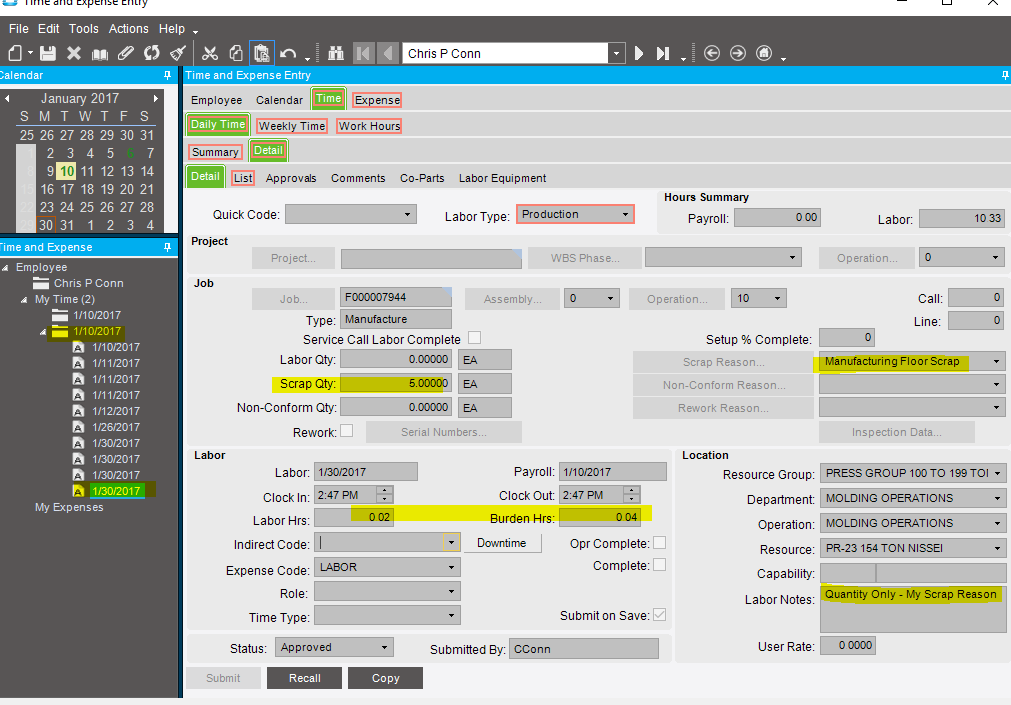
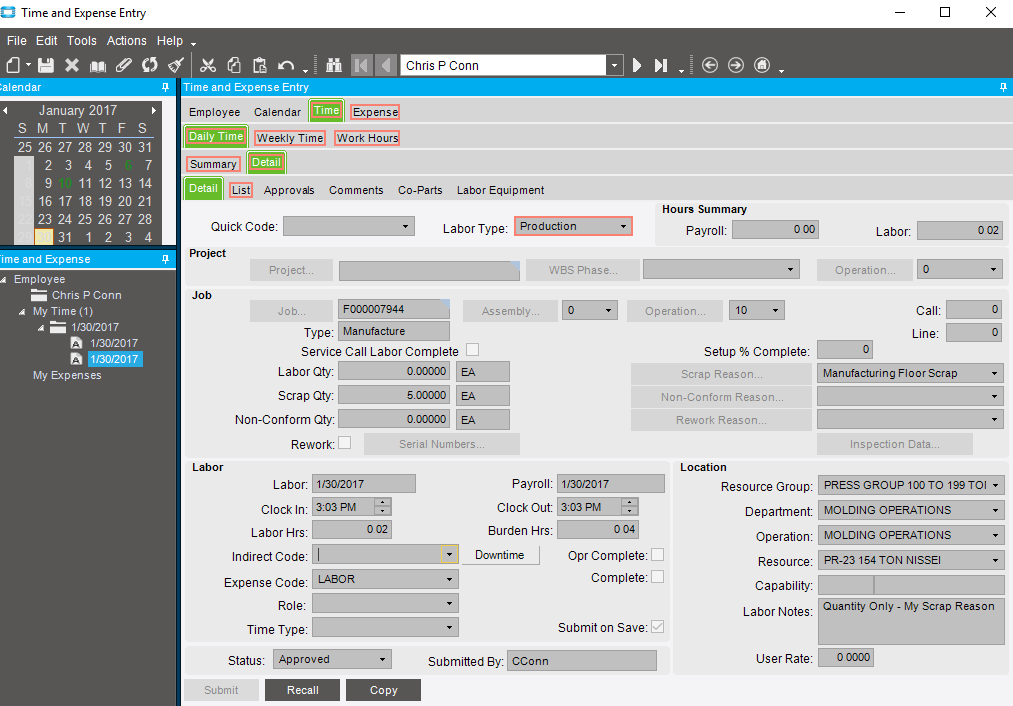
Here is a T&E result from a test I just did (1/30, note the payroll date is 1/10 and makes it weird to view in T&E)
 ---
## Post #4 by @Beth
The payroll date should be based on the date of that the user clocked into the system, not the date that the user clocked into the job. So if you clocked completely out of MES, then clocked in under today's date and entered more scrap, it would show the payroll date as today.
I do see that it seems to be capturing Labor and Burden hours. It is splitting the labor, but not the burden. Interesting. Are you clocked into more than 1 job?
---
## Post #5 by @Chris_Conn
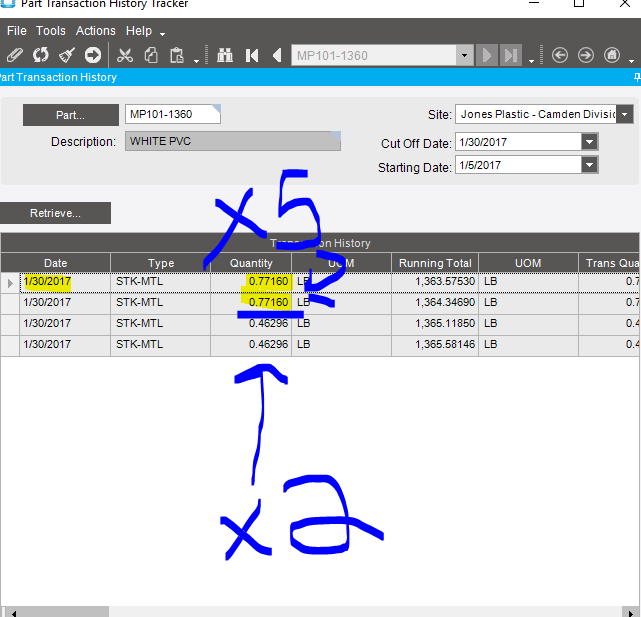
I see, that could explain things - in my testing I rarely clock in/out so I wouldn't be surprised. Is there some other way I could view the scrap on besides T&E. I am going to write a BAQ to show transactions against a job but I am wondering if there is something already in place.
On a side note, I verified my backflush is working properly off of those scrap transactions! Woohoo!
 ---
## Post #6 by @Beth
You're getting there! Good job! I don't think you want to split labor hours though. We'll need to work through that.
---
## Post #7 by @Chris_Conn
You are correct, I logged out and back in and can see the change. I was able to also report scrap for a job I wasn't logged in to - I could limit that but I kind of like it.
Regarding labor - we only calculate based on reported quantities so I *think* that doesn't affect us in this case. Do you agree?
I was only clocked into 1 job BUT, the process of reporting scrap logged me against the existing labor header. I am not actually STARTING ACTIVITY, like I do on my Job Queue mod so it doesn't appear in the queue (even if it did, it immediately logs out once posted). I couldn't log into the job twice (as in Start Activity), which makes sense - good job Epicor.
Reading back over this makes me realize I am not verbalizing this very well - feel free to ask for clarification lol
---
## Post #8 by @Beth
I'm just curious what this did to the labor dollars though. I'm wondering if it split the dollars behind the scene. Run a Production Detail and take a look to see if the labor dollars are 1/2 of what they should be. We will have to look at how it "costed" out the scrap.
Just saw your edit...that is why the labor is split! Did you say you ran the test again after "clocking out" and back in??
---
## Post #9 by @Chris_Conn
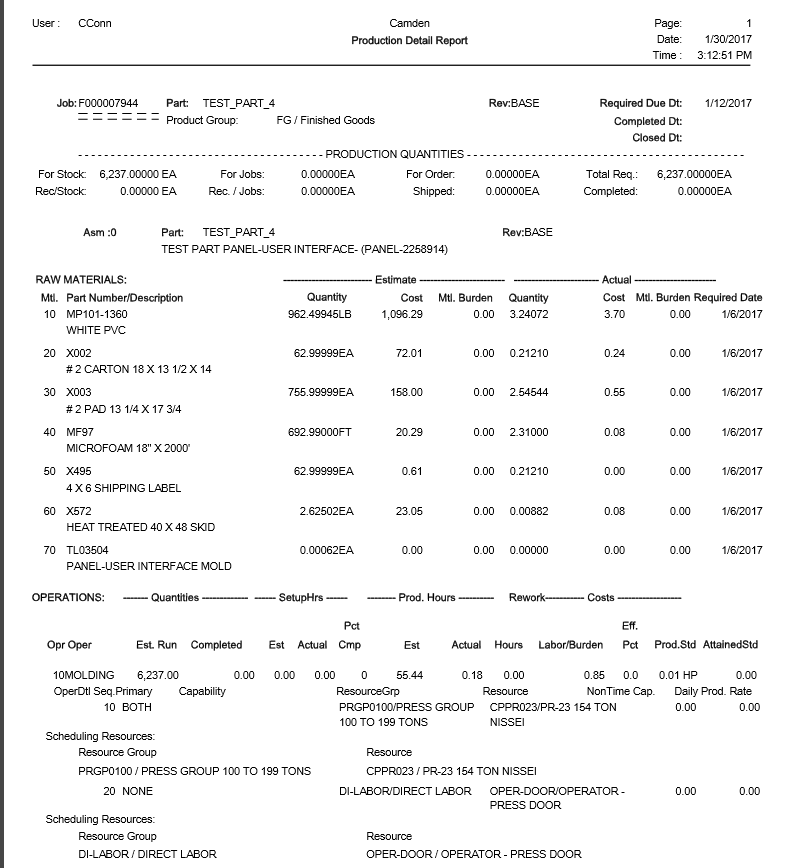
Page 1
 Page 2
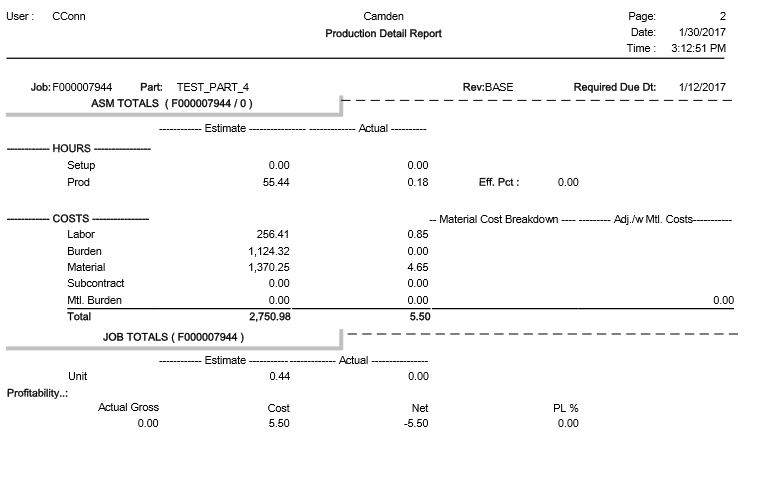 Latest Test (logged out, back in - then logged out of job *end activity*, THEN reported scrap
 ---
## Post #10 by @Beth
Interesting. It looks like there is labor cost and material cost but no burden cost. Material cost looks accurate. I'm looking at the operations and the resources. I'm not sure how it is getting .85 since you have no rates set up for either resource. I should say, no rates that I can see in the production detail report. Do you have a labor rate set up on your employee record? There has to be something driving it to get .85 worth of labor.
You would want the labor rate for parts, but you would also want the burden rate. Is there a burden rate set up for the machine that you used?
---
## Post #11 by @Chris_Conn
There is a labor rate against my employee ID and also one for the Resources (machine press). It's not apparent to me yet where the value of 0.85 is coming from.
``Ok looks like its using the burden rate of the machine.
---
## Post #12 by @BoostERP
I think that the MES report quantity button will allow you to report
quantity without ending activity.
Brad
---
## Post #13 by @Chris_Conn
It does Brad, but it doesn't allow you to report scrap/
---
## Post #14 by @Beth
Hi Brad,
Chris is correct on this. It allows you to report quantity only. We need to report scrap on the fly. I also need to report different types of scrap (more than one scrap code).
---
## Post #15 by @Beth
what is the burden rate set up for the machine?
---
## Post #16 by @Chris_Conn
I have it set to 20.28 and my costing labor to 9.25 (not sure if that's the same as MY labor rate, which coincidentally I also have set to 9.25)
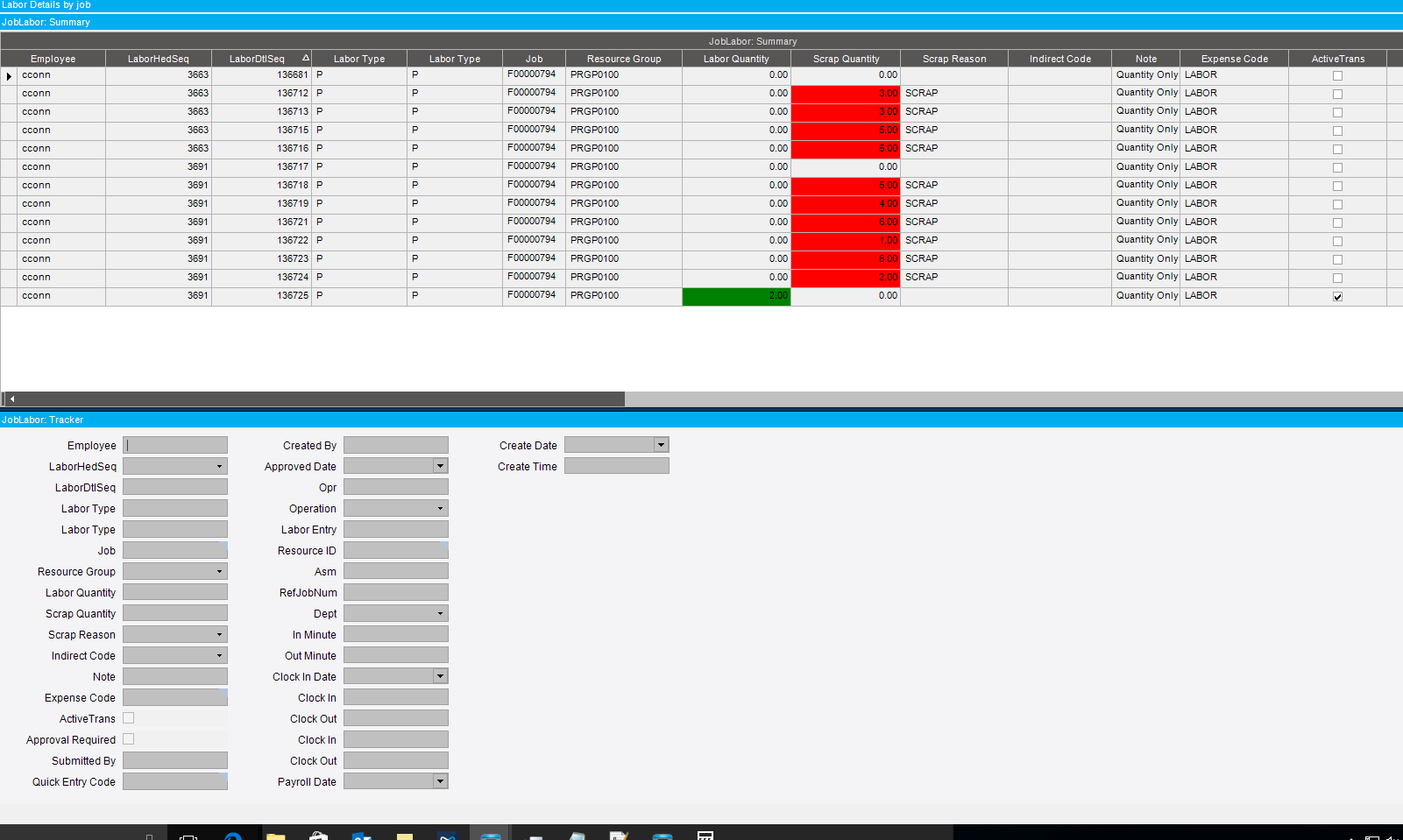
Here is a BAQ/Dashboard I made to view the labor against a specific job number:
 ---
## Post #17 by @Beth
The burden should be: 20.28 x .04 = **.8112** and the labor should be 9.25 x .02 = **.185**
.8112 + .185 = .9962
I'm not sure why your labor is half of your burden. Do you have split burden checked on your resource group?
---
## Post #18 by @Chris_Conn
Yep, apparently so.
---
## Post #19 by @Beth
The cost of the scrap should stay in the job and not be cleared until the job is completed and closed - which it looks like this is happening on this job.
I would like to see what it does to labor and burden when more time goes by and scrap is reported. I'm thinking that it is only pulling in enough time on the scrap entry to do the transaction, not the actual/estimated amount of time it would take to complete those parts.
And that might not be a problem if you aren't trying to analyze scrap cost from this entry. If so, you probably would want to do that cost calculation manually.
---
## Post #20 by @Chris_Conn
If it helps your analysis, I think the parts have a 32s cycle time.
---
## Post #21 by @Banderson
Does anyone know if it would be easier to add the scrap functionality somehow into the report quantity screen? I see that the transaction for the quantity complete show on the same lines as the scrap. Couldn't another field in the report quantity be added that adds a record with a quantity in the scrap column instead of the completed column? Also, Beth had mentioned (I think in another thread) that she wanted more detail on why the scrap was happening, that seems like a good candidate for UD fields added and those extra classifications can be added the the report quantity screen. That would be much simpler than going through the whole non-con process and bring decisions to the lowest possible level like a good company does.
If this is a ridiculous idea, just say so, I don't have the knowledge to do this, it just seems like a clean solution.
 ---
## Post #22 by @Banderson
So I just walked through some of the steps and realized that report quantities basically makes a holding record that shows up in the labor transactions, but doesn't create a labor detail record until you end activity. If you report quantities, it fills in that number on end activity. It also doesn't backflush the material until you end activity. So if that's important to backflush it real time, that wouldn't work. However, I still think it would be nice to add scrap to the report quantities, because you can still create dashboards and alerts that would help notify people when the scrap happens because it could show up in the labor transaction tables, and then get written to labor detail upon end activity.
I would assume they wrote it that way to reduce the amount of labor detail transactions that are written in the system which makes sense to me.
---
## Post #23 by @Chris_Conn
*If* you wanted an immediate backflush, you could do something similar like I am doing with scrap, but for production quantity. Like you mention, you'll have a ton more transactions. (Although I am getting more transactions with my scrap method as well). I did repurpose a comment field to contain MY scrap reason. The REAL scrap reason is still the standard/generic MFG FLOOR SCRAP, but you can get the scrap details in the comments.
I do plan on moving my scrap reporting to the report qty screen eventually. Currently, I have a custom job queue where I have a scrap button. For each job selected, I can scrap against it. I use that job queue to easily find, and select a job based on resource (as opposed to resource group like Epicor does) - you can even log into multiple jobs simultaneously.
The only downside of placing the report scrap on the report qty screen is that you can only scrap against a job you are logged onto. Not a big deal, but I like the flexibility of being able to simply report scrap without having to log into a job.
---
## Post #24 by @mcfreedombaby
Sorry know this has been dormant for a while but I came across this thread when looking for something else. Backflush on report quantity can happen right away if the shop employee record | Production Info | Report Quantity | Override Job field is checked. Type job, assembly and op and the quantity and the material will backflush real time.
Not checking this box effectively sees report quantity require start production activity, report quantity and then end production activity. Checking the box means that report quantity does all three. Works even if only some of the required quantity is completed.
---
## Post #25 by @AaronGDL
Can you go into more detail on how you're achieving this? I've only gotten as far as creating a Button on the MES and linking it to open another menu.
I'd like to do something similar, to allow scrap reporting during production.
---
## Post #26 by @Chris_Conn
The best place to start is by running a trace and then reporting scrap. This will show you all of the business objects used, what methods, parameters and even the data in\out of those calls.
---
## Post #27 by @AaronGDL
Are these SQL Server Profiler traces or traces within Epicor?
Sorry, I'm more familiar with SQL than I am Epicor. I've only found maybe two or so videos that pertain to Event Wizards inside of Epicor as far as customization goes.
---
## Post #28 by @Chris_Conn
You'll use the epicor tracing


Make sure you turn off tracing when done. PS - using Notepad++ in XML is epic for these traces
---
## Post #29 by @AaronGDL
Thanks, I'll look into it!
After that, I would do something along the lines of using the Event Wizard triggered by a Click Event on a button?
The furthest I have gotten is setting a button up to open another screen.
---
## Post #30 by @Chris_Conn
Yes, that would be the start, but it goes way more in depth. You'll be using adapters for business objects. Look in EpicWeb for the ICE Tools manual and Customization Manual
---
## Post #31 by @Chris_Conn
For posterity:
https://epicweb.epicor.com/doc/Docs/EpicorICETools_UserGuide_102100.pdf
https://epicweb.epicor.com/doc/Docs/EpicorCustomization_UserGuide_102200.pdf
---
## Post #32 by @TobyLai
Hi, I am trying to create new labor detail, so how do I go about using the code?
Is this a BPM ?
---
## Post #33 by @pchestnut
We will need some more information. Do you have a plan or a list of what you want to build? Are you just wanting to add a detail to an existing form?
---
## Post #34 by @TobyLai
I am creating a dashboard for workers to estimate their hours. Our workers do not have time to clock in and out of MES.So using the Dashboard, they can estimate the time they spent on the overall job. After that, I will create a time and expense entry for them when they save the actual hours. What my question is, where do you put the code that OP posted?
---
## Post #35 by @pchestnut
Sounds like you need a UD table to work up the estimated time. Once it is ready I would use a button to process the time, verify the job is complete and update the time and expense. A BMP would be more in line to verify a process on a field entry or Exit in my opinion. I think of a BMP as automation without a button.
---
## Post #36 by @tellico
Chris,
How has this real-time scrap project worked out? Success I hope?
I also have interest of a more real-time scrap recording. I noticed that labor qty adjustment records are in the labor detail table. I would expect the scrap records to look very similar.
Is there any reason that a real-time LaborQty would not work?
Shawn Williams
---
## Post #37 by @Chris_Conn
Shawn,
It worked out. The end solution was I gave the user a way to report scrap seperately (since scrap was reported after the fact)
"Is there any reason that a real-time LaborQty would not work?"
I dont understand the question.
---
## Post #38 by @tellico
Restated:
I work at a machine shop. Operators must collect all the parts they produce and input the labor qty when they clock off a job.
You have validated creating an additional labor detail record adding a scrap qty to a job. Correct? Is there any reason this cannot be done for Labor Qty?
---
## Post #39 by @Chris_Conn
Oh, I see. No problem at all.... BUT, keep in mind you end with a larger LaborDtl table since you are going to be making more records. I am not saying that's necessarily a problem, just a side effect
---
## Post #40 by @tellico
Thanks for the confirmation.
Shawn
---
## Post #41 by @jasond
I know this is a rather old thread but I've been banging my head against the wall trying to get the final piece of this to work. I can get the detail record in and I thought everything was fine until I took a closer look at the transactions. No matter what I try I can't seem to get the Burden and Labor Hrs to populate. The Earned hours populate just fine but the others stay blank.

The first row is a standard manual transaction. The last 2 are done through my customization.
Here's the relevant bit of code:
SearchOptions optsl = new SearchOptions(SearchMode.AutoSearch);
optsl.NamedSearch.WhereClauses.Add("LaborHed",whereSeq);
optsl.SelectMode = SelectMode.SingleSelect;
optsl.DataSetMode = DataSetMode.RowsDataSet;
LA.InvokeSearch(optsl);
LA.GetNewLaborDtl((Convert.ToInt32(LA.LaborData.LaborHed.Rows[0]["LaborHedSeq"].ToString())));
int rCount = LA.LaborData.LaborDtl.Rows.Count - 1;
decimal quant = Convert.ToDecimal(quantNE.Value);
LA.LaborData.LaborDtl[rCount].LaborQty = quant;
LA.LaborData.LaborDtl[rCount].LaborType = "P";
//LA.LaborData.LaborDtl[rCount].Rework = false;
LA.LaborData.LaborDtl[rCount].JobNum = jobTB.Text;
LA.LaborData.LaborDtl[rCount].OprSeq = opSeq;
LA.LaborData.LaborDtl[rCount].OpCode = operationCode;
LA.LaborData.LaborDtl[rCount].JCDept = jcDept;
LA.LaborData.LaborDtl[rCount].ResourceGrpID = rgID;
LA.LaborData.LaborDtl[rCount].ExpenseCode = expCode;
LA.LaborData.LaborDtl[rCount].LaborNote = "Quantity Only";
LA.EndActivity();
EBA.ClockOut(ref employee);
LA.Update();
---
## Post #42 by @Chris_Conn
There are probably some helper methods you are missing. Start a trace and then run the process manually to figure out what is missing.
---
## Post #43 by @jasond
Thanks for the reply. I have run a trace of the Report Quantity (MES) process and it could honestly not be less helpful. There is almost no mention of the Labor tables at all. That's why I've had to dig around through here in order to get as far as I have. You mentioned in your original post that there were some fields that you changed that were not shown. Do you happen to notice any particular fields that I'm missing? Were there any helper methods you needed to use since your labor and burden hours both posted in your example here? Thanks again.
---
## Post #44 by @Chris_Conn
You should trace a qty report within T&E. ReportQty works a little differently.
Also, are you setting RowMod = "A"?
---
## Post #45 by @jasond
I'll try that. Thanks.
I have tried with and without the rowmod.
---
## Post #46 by @A.Baeisa
Hi @Chris_Conn, @jasond
is not missing [LaborDtlSeq] ?, it is a required parameter to create LaborDtl record as well as [LaborHedSeq] and i can not see it in your code

---
## Post #47 by @Chris_Conn
The DetailSeq is autogenerated for you when you GetNew
---
**Canonical:** https://www.epiusers.help/t/creating-a-new-labor-detail-the-right-way/37071
**Original content:** https://www.epiusers.help/t/creating-a-new-labor-detail-the-right-way/37071