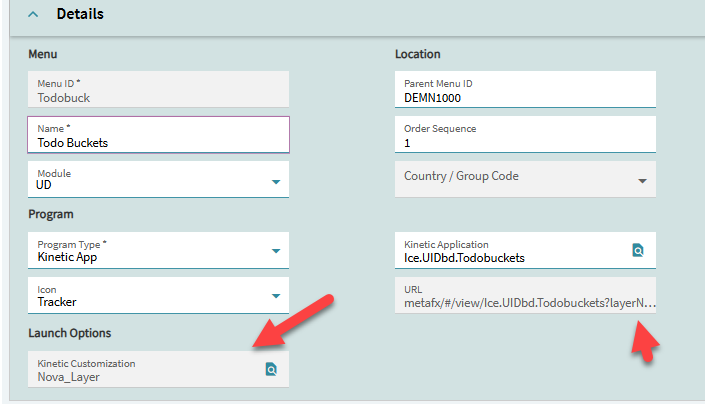
There’s no separate deploy step for a dashboard built in App Studio, and Layer Control isn’t needed.
Open Application Studio, open your dashboard (Ice.UIDbd.), point the data view at the changed BAQ, and fix any columns that changed. Then Publish. Saving or committing a draft isn’t enough; users only get what’s published.
In Menu Maintenance, open the row you launch from:
Program Type = Kinetic App
Kinetic Application = Ice.UIDbd.
Launch Options > Kinetic Customization = nova_layer
If that last field is blank, the menu launches the base app without your layer, which is why you saw “Layer Version = Base App Version”.
Sign out and back in before you test. Menu rows and published apps are cached per session.
You only change the menu if the dashboard ID changed.
My best guess is the redeploy. A layer doesn’t store a copy of the dashboard. It stores a list of changes, and each change is tied to a specific control on the dashboard. If the redeploy with the new BAQ rebuilt those controls, the layer still loads but nothing in it lines up, so you get the plain dashboard and no error. It still shows as published in App Studio, which makes it confusing.
Your menu setup looks fine, so I don’t think that’s it.
Quick way to test it: in App Studio, make a new layer on the dashboard as it is now and change one simple thing, like a label. Publish it and point the menu at it. If that change shows up, the old layer is the problem, and you just need to redo your changes in the new layer.
You’ll probably have to do that again any time you redeploy, if that is the issue. I haven’t been able to prove the redeploy part on our end, so let me know what you find.