# Data Directive to send an email only works for specific user
**Category:** [Epicor ERP 10](https://www.epiusers.help/c/e10/5)
**Created:** 2016-12-14 16:50 UTC
**Views:** 6318
**Replies:** 35
**URL:** https://www.epiusers.help/t/data-directive-to-send-an-email-only-works-for-specific-user/36606
---
## Post #1 by @ckrusen
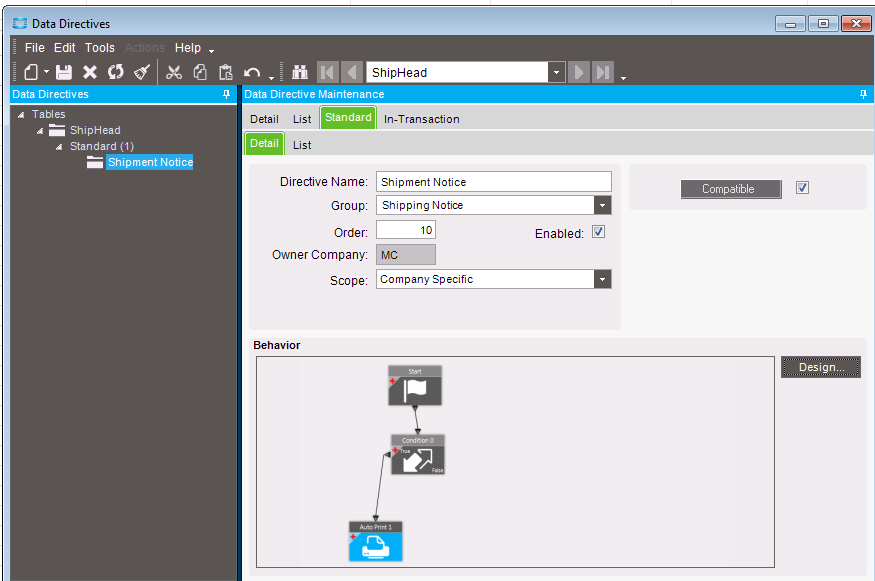
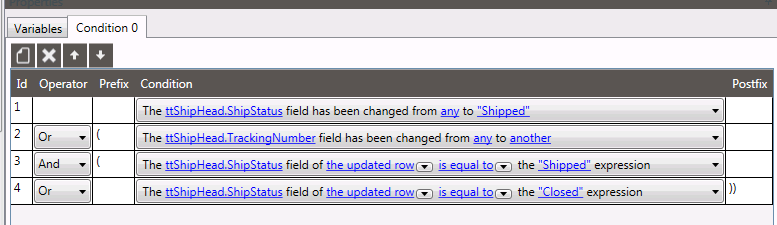
I created a data directive to email a copy of the Packer after either the Shipping Status changes to "Shipped", or if the Tracking Number of an already shipped packer is changed.
Works fine if I'm the one that sets the packer to Shipped" or changes the tracking number. But nothing happens for any other user.
Thoughts on where to look?
Calvin
---
## Post #2 by @jgiese.wci
Does it include customer information your data your working with and do you have the CRM module enabled?
Joshua Giese
Technology Solutions : CTO
Direct Phone: 920.593.8299
Office Phone: 920.437.6400 x342
[http://wcibags.com/email/emailFooter4.jpg]
[http://68c6d48672d1935cd6dd-141aaade86a30aeaf83cb6aee3728aaa.r82.cf1.rackcdn.com/images/global/Holiday-Schedule-2016.jpg]
---
## Post #3 by @ckrusen
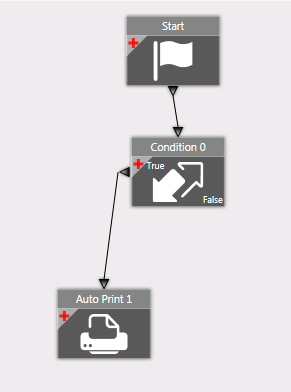
It simply calls the AutoPrint (which is configured to send an Email) when the desired conditions are met. Some details below.
If I could display a message box in a data Directive, I'd remove the AutoPrint and just have it show a message for debugging.
 ---
## Post #4 by @Chris_Conn
Message Box in BPM:
```cs
this.PublishInfoMessage("My Message",
Ice.Common.BusinessObjectMessageType.Information,
Ice.Bpm.InfoMessageDisplayMode.Individual,
"Chris Title", "Chris Comments");
```
Also, I see it's set to Company Specific - are you in the same company as your other intended users?
Do the intended users have rights to close the record?
---
## Post #5 by @ckrusen
Since I'm still new to E10's BPM interface, how exactly do I implement that code?
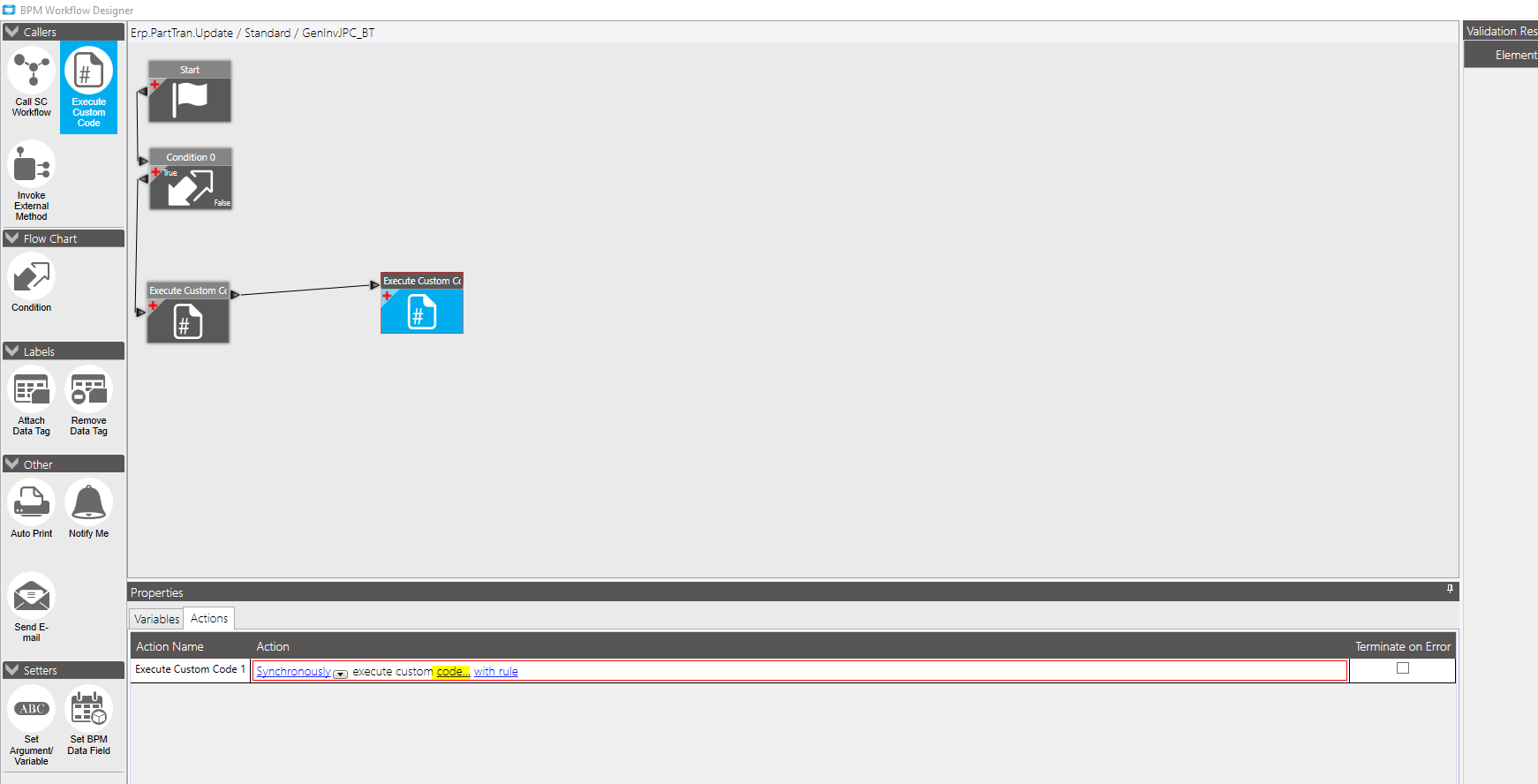
Replace the AutoPrint object with a "Execute Custom Code" ? Can I just put the ExecCustCode object between Condition0 and AutoPrint1 ?
---
## Post #6 by @Chris_Conn
Create a Custom Code object and enter the code (click the cod> link in the action bar)
 ---
## Post #7 by @Chris_Conn
Yes, you can insert the code into the chain. Note that since it's synchronous, the events after that block wont occur until after you dismiss the message. As I recall, you CANNOT run the message box in a asynchronous context
---
## Post #8 by @Chris_Conn
Just making sure you saw these comments above:
[quote="Chris_Conn, post:4, topic:36606"]
Also, I see it's set to Company Specific - are you in the same company as your other intended users?
Do the intended users have rights to close the record?
[/quote]
I think if I wanted to track down the issue, I would separate all of my conditions into separate blocks, with a debug statement after each condition is met - this way you can tell what conditions aren't being met (assuming you are firing the BPM at all - debug message at start could solve that)
---
## Post #9 by @ckrusen
I added a debug message between the Start and Condition 0, and another between Condition0 and the AutoPrint.
I get each message, and the email when **I run it.**
Now to see what others get...
---
## Post #10 by @ckrusen
Had another user do the thing that triggers the BPM. They saw both messages (one after Start and one after the Condition).
But no email was sent.
---
## Post #11 by @Rick_Bird
My guess is the issue is with AutoPrint, do you have other AutoPrint BPM's that are working for other users?
I had a terrible time getting AutoPrint to work properly in 10.0. Most of my issues seemed to stem from needing to host the printer share on the app server and then making sure users had access to the printer share.
---
## Post #12 by @Chris_Conn
Try using this code instead of the automailer:
```cs
var mailer = this.GetMailer(async: true);
var message = new Ice.Mail.SmtpMail();
message.SetFrom("email@email.com");
message.SetTo("email1@email.com;email2@email.com");
//message.SetCC()
//message.SetBcc()
message.SetBody("
MyMessage Here
");
Dictionary attachments = new Dictionary();
attachments.Add("MyFirstAttachment", @"\\MyServer\myFolder\MyFile.pdf");
mailer.Send(message, attachments);
```
Thanks goes to @josecgomez.trigemco for his code
---
## Post #13 by @ckrusen
Thanks Jose (via Chris)
I was trying to get something working fast by emailing via the AutoPrint. Probably harder to trouble shoot that than to just build the whole report in the body of email message.
Calvin
---
## Post #14 by @josecgomez
This is likely a permissions issue CRM... Can the user that is NOT getting that emails open up this customer in Customer Entry? #Curious
---
## Post #15 by @ckrusen
We don't have CRM. And when the user that normally creates the Packer runs it, no one gets an email. But when I create the packer, everyone does.
---
## Post #16 by @josecgomez
That doesn't make a lick of sense.... even if you use the custom code if the problem is with the underlying piping... it still won't work.
Do you see any errors in the EventLog?
---
## Post #17 by @ckrusen
On which machine? The App Server, the DB server, or the client machine?
---
## Post #18 by @josecgomez
App Server
---
## Post #19 by @ckrusen
I see a few
`Program Ice.Services.Lib.RunTask raised an unexpected exception with the following message: RunTask: User Account is not set to 'Allow Session Impersonation'`
Do individual users need to have their "allow impersonate" set? I thought just the user setup for the SystemAgent.
---
## Post #20 by @josecgomez
Yes it should be for the system agent only... are you sure that's set?
---
## Post #21 by @bordway
>> email to me only..
Already ruled out external issues?
e.g. SMTP, firewall, anti virus/spam software, etc..
I get a surprise by one of these occasionally.
---
## Post #22 by @ckrusen
Yup. it's set. And if it wasn't wouldn't that affect normal printing?
---
## Post #23 by @josecgomez
If you are seeing that error there is clearly something up... (Assuming the error is recent)
Check that the account setup in the system agent matches that of the system agent configuration ... etc.
---
## Post #24 by @ckrusen
Bordway - Yes. Email addresses include my corporate one and a personal one. I get them on both. Others get them when I initiate it. But no one gets them when others initiate it.
---
## Post #25 by @ckrusen
Kind of sucks that the Event doesn't include which App generated it as we have 4 Apps running (Our Prod App, Epicor Demo, and two test companies)
---
## Post #26 by @Chris_Conn
I agree with @bordway - lot's of strange email service related issues can sneak in. For example - if your "From" address isn't valid - i.e. a lot of email services attempt to block spoofing. Is your test email static (the fields like from, to, etc don't change)?
Also for the sake of argument? Is this action being performed in the main program or something like MES/Handheld?
---
## Post #27 by @ckrusen
I'm using the email/Fax option in the AutoPrint. So all fields are static. They have the same value regardless of who initiates the auto email via the BPM.
---
## Post #28 by @Chris_Conn
Is it possible to share a pic of your autoprint config?
---
## Post #29 by @jkane
Should you try setting one person to have "allow session impersonation" allowed and then see what happens when that person does something to trigger it?
---
## Post #30 by @ckrusen
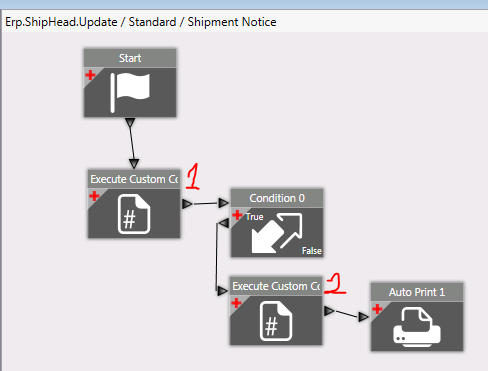
Here's my BPM (DataDirective)
ExecCustCode_1 and ExecCustCode_2 just display messages for debugging.
Both I and other users see both of them.
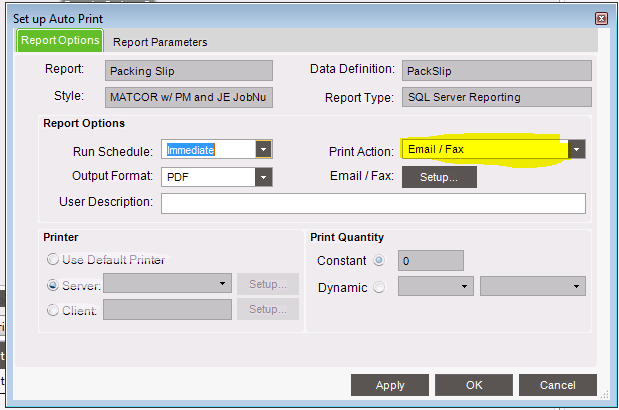
 AutoPrint
 Auto Print _**selected**_ options "Report Options" tab
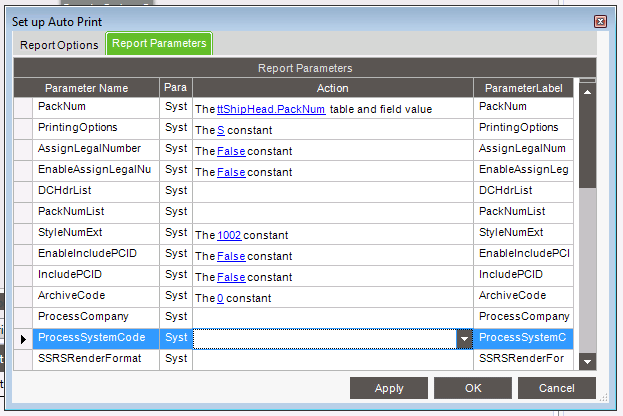
 Auto Print _**selected**_ options "Report Parameters" tab (not shown are :
PrintReportParameters : False
SSRSEnableRouting: False
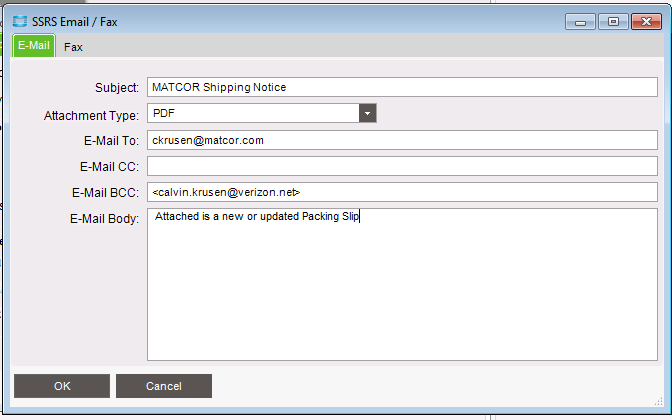
 SSRS Email / Fax setup
 ---
## Post #31 by @Chris_Conn
Report permissions for the user? I am grasping at straws here.
Also I vaguely remember an issue I had with autoprint and bartender where I HAD to run the task queued (Run Schedule) otherwise I had weird results.
---
## Post #32 by @ckrusen
Here's what I've done, and the results...
* Created a user with all rights the same as typical users (Sec Mngr: NO, Allow Imp: NO)
* This test user can send email using the email option in print dialogs (pict below)
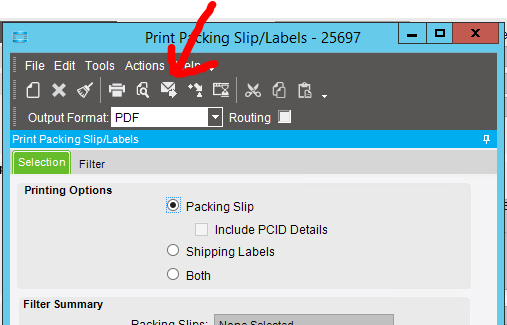 * Task Status in the Sys Monitor says COMPLETE, and email was received
* Test user triggers BPM (verified by message boxes), but the Sys Monitor shows the task status of ERROR
* Task Error details:
`Program Ice.Services.Lib.RunTask raised an unexpected exception with the following message: RunTask: User Account is not set to 'Allow Session Impersonation'`
* Changed test users acct setting to Allow Imp: YES (Sec Mgr is still NO)
* Closed test users session and re-launched (to make sure changes to user account settings are applied)
* Test user triggers BPM (verified by message boxes), but the Sys Monitor shows the task status of ERROR, with the same details from above
* Changed test users acct setting to Allow Imp: YES , Sec Mgr: YES. Closed test users session and re-launched (to make sure changes to user account settings are applied)
* Test user triggers BPM (verified by message boxes), but the Sys Monitor shows the task status of ERROR, with the same details from above
**NOTE:** Test user account has a domain and OS ID assigned to it. But it is not an actual AD account.
To make sure this wasn't an issue, I tried all the above with another user account which is tied to an AD account. And got the same results.
---
## Post #33 by @srossberg
In Task Agent setup in the Epicor Admin Console what is the username for the task agent in the app server you are using and does that user have impersonation rights?
---
## Post #34 by @ckrusen
The task agent uses a user created specifically for the System Agent.
**In User Acct Maint:**
User ID: print
Domain:
Domain User ID:
Allow Session Impersonation: TRUE (checked)
**In the System Agent:**
System App Server User Name: print
System App Server Password: *****
AutoStart: Checked
Status: STARTED
**In the Task Agent Configuration form the Epicor Admin Console on the App Sever:**
UserID: print
password: *****
Any user can email from a Print dialog window (like the "Print Packing Slip/Labels..." shown in post #32 of this thread). But emails generated from a BPM only work for the MANAGER account.
---
## Post #35 by @Rick_Bird
I know this is an old thread, but I was reading through it and I was first wondering if this was ever resolved as I didn't see any indication that it was.
I also had a thought/question, is the user that is testing using a SSO (Single Sign On) app server and your account is not SSO for testing?
The reason I ask is because we had a terrible time getting Auto Printing to work until we found that Auto Print does not work when the user is using an SSO App Server, never figured out exactly why, but we switched them to non SSO and the Auto Printing works. Like you, if they printed/emailed manually on SSO, it would work, but if through a BPM it wouldn't.
Just a thought.
---
## Post #36 by @Chris_Conn
Well played sir. Thanks for additional info
---
**Canonical:** https://www.epiusers.help/t/data-directive-to-send-an-email-only-works-for-specific-user/36606
**Original content:** https://www.epiusers.help/t/data-directive-to-send-an-email-only-works-for-specific-user/36606