# E10.1.500 Client Installer opens MES and not full Epicor by default
**Category:** [Epicor ERP 10](https://www.epiusers.help/c/e10/5)
**Created:** 2016-11-21 22:58 UTC
**Views:** 4419
**Replies:** 20
**URL:** https://www.epiusers.help/t/e10-1-500-client-installer-opens-mes-and-not-full-epicor-by-default/36381
---
## Post #1 by @kfierce
We migrated to E10.1.500.7 Friday and have noticed the E10Client.exe installs to open MES and not full Epicor.
Path initially: C:\Epicor\ERP10.1Client\Client\Epicor.exe /config=E10-Nov16.sysconfig /MES.
This is easily corrected once installed by updating the Target line in the short cut properties but of course we rather not have to do this. This will be the third time we have migrated (2 prior times to 10.1.400).
Anyone else experiencing the same issue when installing 10.1.500.7 on a Client machine?
---
## Post #2 by @josecgomez
I've installed and deployed several 500 without this issue.
---
## Post #3 by @bw2868bond
Happened to me
---
## Post #4 by @aidacra
If someone can duplicate this behavior again, please contact Support as we are definitely interested in getting to the root cause. I just checked the e10client.exe installer from base 10.1.500 GA and base 10.1.500 Controlled Release installs and they have the same MD5 hash so that wouldn't be the X factor.
 ---
## Post #5 by @hkeric.wci
It did happen to me, it looks like the Installer did not even create a MES Shortcut - but instead a single Shortcut pointing to MES which should have pointed to the Full Client.
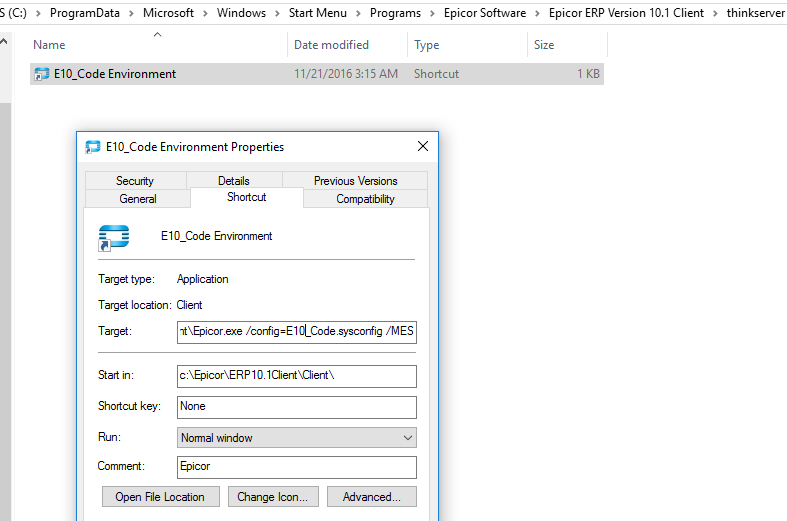 E9.702A -> E10.1.500.7
As you can see there is no "E10_Code MES Environment"
**Screencast Video:** http://screencast.com/t/CptwTOS2E8w4
---
## Post #6 by @kfierce
I'll create a call with Support this morning.
---
## Post #7 by @rbucek
ditto, did not experience this, but i went from 10.1.400 -> 10.1.500.7
---
## Post #8 by @hkeric.wci
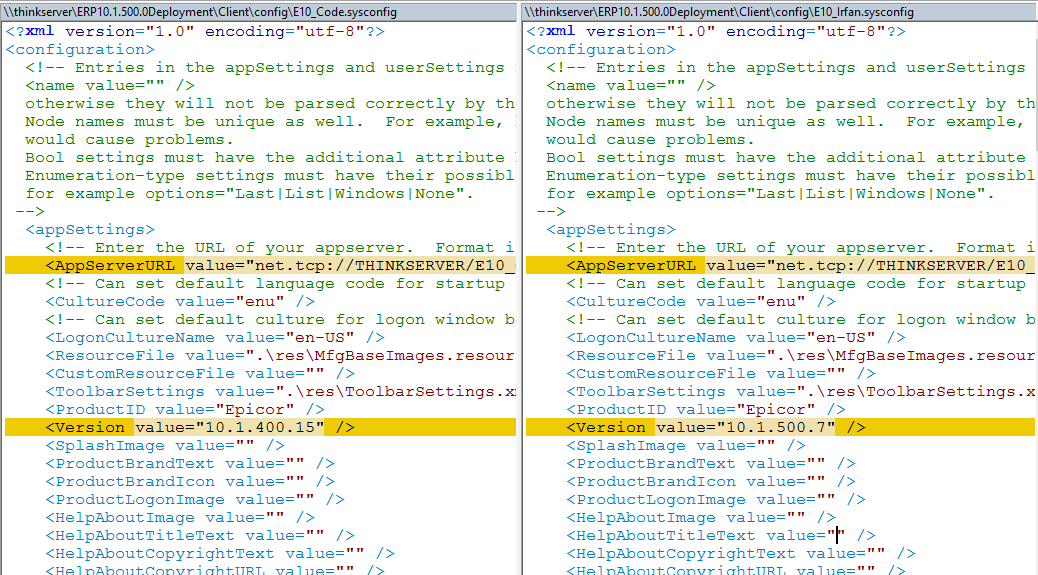
Another thing I would like to point out is that when Updating an existing AppServer Instance, the Client config files do not get updated on the server.
E10_Code = 10.1.500.7 (Updated from 10.1.400.15)
E10_Irfan = 10.1.500.7 (New Instance)
However within **..\ERP10.1.500Deployment\** the config file remained at 10.1.400.15 - causing Clients to continue to AutoUpdate constantly.
 ---
## Post #9 by @rbucek
it still does that? I noticed that when we went from 10.0.700 -> 10.1.400 seems to be an ongoing issue.
---
## Post #10 by @kfierce
I reported this issue on call 3437891ESC. It seems I am the first one to report this so please also place a call to support to report the same issue so they can react to it knowing there are more users dealing with the same issue.
---
## Post #11 by @jeromy
I just submitted a clas as well - 1830488PSC
---
## Post #12 by @aidacra
FYI: Support has been able to duplicate this behavior (as of t+13 minutes ago) in one of our internal environments. Need to do some additional analysis before we know the root cause. Stay tuned.
---
## Post #13 by @EpicorUser
I just submitted a call (1832328PSC).
For us this appears when the Upgrade was performed from 10.0.700.4 to 10.1.500.0.
---
## Post #14 by @aidacra
FYI: SCR 196298 was created for this issue which will be included in 10.1.500.11 and available on Jan 18th.
---
## Post #15 by @aidacra
UPDATE: the updated client installer is included in 10.1.500.11 but it requires a manual step to apply.
What I needed to do after applying 10.1.500.11:
1. Navigate to \ERP10\ERP10.1.500.0\Updates\ERP10.1.500.11\ClientDeployment\ClientInstaller.
2. Copy the E10client.exe.
3. Navigate to \ERP10\ERP10.1.500.0\ClientDeployment\ClientInstaller.
4. Paste and overwrite existing E10client.exe.
5. When you install new clients from \\[servername]\ERP10.1.500.0Deployment\ClientInstaller, this client will now create separate shortcuts for MES and office.
 This isn't documented in the update guide, so Support will see if it's possible to have the patches auto apply updated client installers in the clientdeployment directory when there is a change and/or document this in the upgrade guides.
---
## Post #16 by @will
We are experiencing the same problem. Did they find a fix for it. Thanks
---
## Post #17 by @Randy
It still happens, we updated our pilot server to 10.1.500.12 We're
planning to go live with that one since we're deep into our pilots now.
You can edit the shortcut and remove the /MES from the end of the line.
---
## Post #18 by @aidacra
even after going through the process listed here: https://epiusers.help/t/e10-1-500-client-installer-opens-mes-and-not-full-epicor-by-default/36381/15?u=aidacra ?
---
## Post #19 by @Randy
We'll have to try that, we haven't. Just been editing the shortcut post client install.
---
## Post #20 by @hkeric.wci
[quote="aidacra, post:14, topic:36381, full:true"]
FYI: SCR 196298 was created for this issue which will be included in 10.1.500.11 and available on Jan 18th.
[/quote]
Will there be another SCR? There should be no Manual steps needed, its a installer that creates shortcuts =)
---
## Post #21 by @aidacra
At this point I'm unable to speak to whether or not there will be another SCR to change how updated client installer files are delivered, _but_, I can say that the base delivered 10.1.600 client installer works as expected :grin:
---
**Canonical:** https://www.epiusers.help/t/e10-1-500-client-installer-opens-mes-and-not-full-epicor-by-default/36381
**Original content:** https://www.epiusers.help/t/e10-1-500-client-installer-opens-mes-and-not-full-epicor-by-default/36381