# GL Controls with Multi-Site
**Category:** [Epicor ERP 10](https://www.epiusers.help/c/e10/5)
**Created:** 2016-12-19 16:35 UTC
**Views:** 11025
**Replies:** 30
**URL:** https://www.epiusers.help/t/gl-controls-with-multi-site/36660
---
## Post #1 by @ckrusen
We're in the process of implementing Multi-Site, as a single company with multiple sites (plants). Accounting wants to use different Departments for the different sites, instead of different divisions.
Is this possible?
And by possible, I mean without jumping through hoops with either customizations or complex custom GL Controls.
FWIW -
* Created new GL Accts to be used for the other site's inventory
* I added the "Plant" and "Plant Config" business entities to the "Inventory COS & WIP" GL Control Type
* I Setup a GL Control code for each site, to specify the Inventory account it will use
* In Site Maintenance, I added a "Inventory COS and WIP" GL Control Type (with the Control code for the site). Repeating for each site
* In Site Configuration, I added an Inventory GL Control Type similar to the step above (but for the Plant Config business entity)
Testing with a Transfer order does not give the expected results. The same GL is used for Inventory, by all sites. I expected the receipts to Site B to go to the GL acct specified by the GL Control controls I configured.
---
## Post #2 by @spulsifer
We went through the same thing. Accounting was using the division for the Products. Multi-site organically uses the division for the site. Accounting had to re-structure all the accounts to use the department for the products and the division for the sites.
It was a hard sell for us, but we got it done. Our situation was a bit different from yours, though. However, Accounting still had to change.
I'm sure you could pull it off with posting rules, but you would be fighting the system.
---
## Post #3 by @ckrusen
Thanks for the info.
How do you set things up to have each site use a specific Div?
Does that segment need to be setup special (like "Use Business Entity", or be dynamic)? I hope not, because those options are grayed out (probably because GL Accts exist).
Is the following the basic setup?
1. Create the Segment values for the division segment.
2. Create the required GL Accts with the new divisons.
3. Create GL Controls of Type "Division" for each division. Set the GL Acct to one with the correct Div segment. For example: 1000-01-01, 1000-02-01, 1000-02-01, etc... (assuming middle segment is Div)
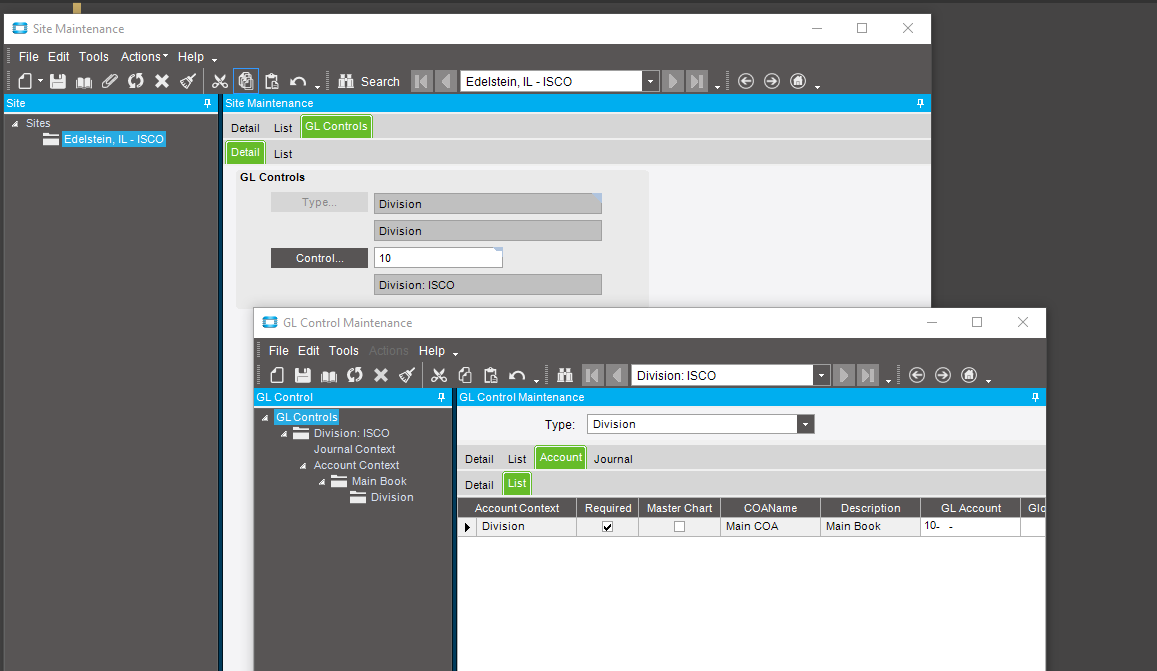
4. Add a GL Control of type Division in Site Maintenance, to each site, using the controls created in step 3.
Are GL controls required to be setup in the Site Configuration program too?
I have "Inv COS and WIP" GL control setup in the Company Configuration. Are these overridden by GL controls in the Site configurations? Or do GL Controls setup at in the Company Config always supersede similar GL controls setup at lover levels?
---
## Post #4 by @spulsifer
You have to set everything up manually. All the segments have to be created. The way it works is through the GL code tied to the site Maintenance.
We tested a bunch before implementing in live. Make sure to check the edit lists in AP and AR. For transactions run the capture wip report.
[cid:image001.png@01D25AA4.13C0BB20]
Thanks,
Sharon Pulsifer
318.371.6347
 ---
## Post #5 by @ckrusen
So in the GL Control Maintenance, only populate the Div segment?
Control Type: "Division"
ID: '01'
Name: 'Site 01 Division"
"Division" \ Account: ____-01-__
And in the other GL Controls (like "Inv COS and WIP") do I leave the div segment blank in those?
Control Type: "Inv COS and WIP"
ID: 'Default'
Name: "Default Inv, COS & WIP Accts"
Accounts (not all shown):
AP Clearing: 3324-__-01
AR Clearing: 1127-__-01
Inventory: 1151-__-01
Inventory Adj: 6303-__-01
etc...
---
## Post #6 by @jschaefer
For the Divison GL Control, you are correct that you only populate the Division segment.
For your other GL Controls, you will populate the full account and the division segment will be replaced with the appropriate division segment.
You will want to make sure you are using the "Standard" GL Posting rules since they include the division substitution. You will also want to test this through thoroughly. The Division segment does not get substituted on all transactions so need to understand where it does and where it doesn't and make sure your accounting people are happy with it.
The Epicor Transaction Hierarchies are excellent tools for showing you which transactions will substitute the division and/or department segments.
---
## Post #7 by @ckrusen
Quick question, since the substitution happens during posting, what shows on the WIP Recon report of unposted items? The pre-substitution acct or the post-sub acct?
I ask because i'm doing tests by just doing a Qty Adjustment (in a site other than the main one), then running the WIP/Recon report to see if the Inventory acct used has the Div substituted. **Which it is not.**
---
## Post #8 by @jschaefer
The ADJ-QTY transaction type should substitute the Division segment and it should show up correctly on the WIP Recon Report.
Did you verify that the Standard Posting Rules are being used?
---
## Post #9 by @ckrusen
I've verified the Standard posting rules are in use.
I'm certain that I don't have the GL Controls set up properly.
The Company Config screen allows adding a "Inventory COS and WIP" GL Control. We setup a GL Control Code (named 'Default') for the "Inv COS & WIP" type, and set GL accts in there. That's working as expected in our live company (which just has one site)
The documentation infers that I can add GL Controls in the **Site** Config screen. but when I try, there are no GL Control Types available. I can make the "Inv Cos & WIP" and "Division" GL Types available by adding "Plant Config" to as a Business entity in GL Control Type maintenance.
But I'm hesitant to do so.
---
## Post #10 by @acicala
You need to assign the division GLC to the site in Site Maintenance, not Site Configuration.
Adding the Division will not really hurt anything. When Epicor goes to post, it first checks to see if the GL account with the division in place exists. If it does not, it defaults to what is setup in the GLC (say product group).
Note that by adding division to site, you are only effecting inventory, WIP, Revenue and COS transactions. It does not affect AR or AP.
Andy Cicala
Partner
[TGem_final]
Delivering Effective Business Solutions
Mobile: (973) 615-5033
www.trigemco.com
Acicala@trigemco.com

 ---
## Post #11 by @Alejandro
Hello all, I'm new in EPICOR (10), I'm currently doing some tests for COS and WIP.
We have multi-site with multi-warehouse, finacial need to have the COS and WIP kind of:
(where the second segment is the site and the third segment is the warehouse)
1104-01-0001
1104-01-0002
1104-02-0001
1104-02-0001
Until now I can have the second segment substitution but not the third one, someone can help me on how I must configure the GLC to have the third segment substitution? has to be in the warehouse GLC?
I'm using the standard posting rules.
Thank you!
Alex
---
## Post #13 by @ckrusen
You probably need to add a "Warehouse" Business Entity to the "Department" GLC Type
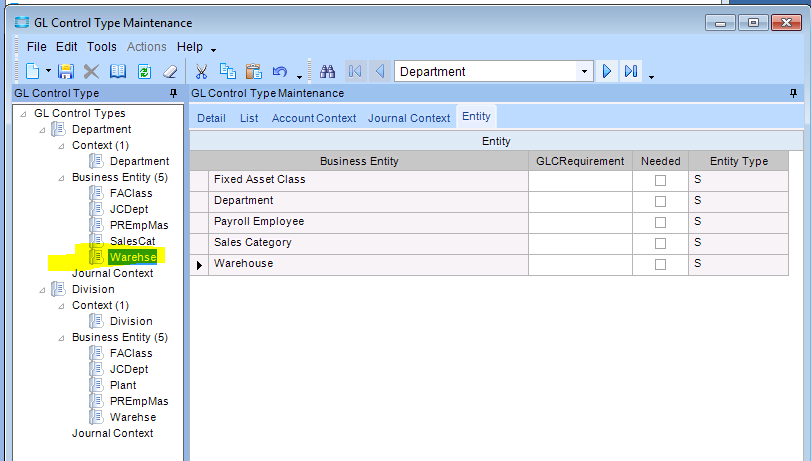 Create a GLC Code for each Warehouse (like you did for each Site/Plant). But GLC Type will be "Department", not "Division". Set the GL acct with blanks for the first two segments (like you did for Div, but this time only the Dept segment is populated)
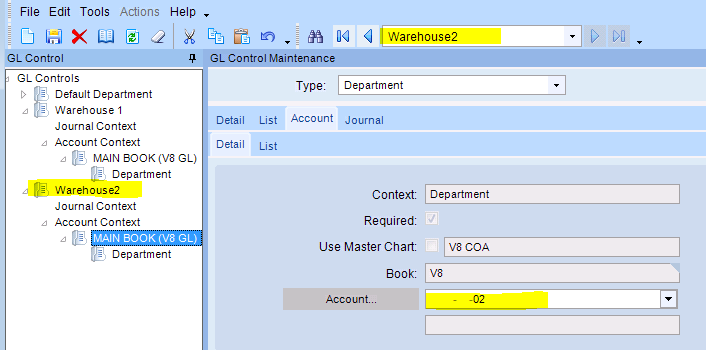 Then in the Warehouse Maintenance, add a GLC (type = "Department"), and select the GLC Code you created above. Repeat for each warehouse..
I'm sure I've made it sound simpler than it is (and probably missed some important step). I really struggled getting the Div segment to be site specific, when we went to Multi-Site.
Hopefully that gets you going in the right direction.
P.S. I can't stress enough how much this should be done in a test company first. Even then, when you go to repeat it in the live company, you'll probably miss a step and struggle. These are the types of things Epicor really needs to provide step-by-step instructions for.
---
## Post #14 by @Naveen_Kumaar_P
Hi Ckrusen,
I'm trying this, it's not working. Kindly let me know.
Same all GL Control types I'm doing. the division is not coming in COS WIP place.
Kindly help me on this.,
Regards,
Naveen Kumaar P
---
## Post #15 by @ckrusen
One thing to keep in mind, is that the GL Control is applied at the time of transaction. So you have to make a test transaction AFTER the GLC is updated.
What exactly is your situation? Just Multi-Site? And you want the Div segment of the GL account to be substituted based on the Site?
---
## Post #16 by @Naveen_Kumaar_P
Hi Ckrusen,
Thanks for the info.
One more info needed, we need to update "Division" or "Inventory COS and WIP" GL Control in site configuration only or site maintenance also.
Regards,
Naveen Kumaar P
---
## Post #17 by @ckrusen
Here's what I did for our Multi-site setup.
1. Added the new Div Segments. Our original (single site) Div was `-00-`. We added 4 more: `11`, `16`, `17`, and `18`.
2. Created the GL accounts that will use the Div field. Originally, we only had `1151-00-01` for our inventory, So accts `1151-11-01`, `1151-16-01`, `1151-17-01`, & `1151-18-01` were created.
3. Created 4 new GLC's of type `Division`. With GLC Codes `11`, `16`, `17`, & `18`. Setting the Account like:

(that's for Div `11`)
4. In Site Maintenance, add the GLC to each Site:

If the GL account defrived by the GLC, doesn't exist, the original GL Account will be used. For example, If we had a GL Acct `1153-00-01` for our Finished Goods Invnetory, but forgot to create `1153-11-01`. Any transactaions that should use 1153-11-01 will fall back to use 1153-00-01 (because 1153-11-01 doesn't exist)
---
## Post #18 by @Naveen_Kumaar_P
Hi,
i'm already linked in Site maintenance division wise but, i'm not added “Inventory COS and WIP” GL Control need to update this and also site configuration Inventory gl controls need to update or not .
---
## Post #19 by @ckrusen
"Inventory COS and WIP" is GLC Type, that is used in the Company Configuration:

My GLC (`Default` for Type `Inventory COS and WIP`) looks like:

Note that the Acct for the context `Inventory` is entirely filled in (all three segments entered)
If I had no Division type GLC's then every part tran that hits inventory would use Acct `1151-00-01`. Regardless of the site.
The Division Type GLC's specify just the Division segment (ex:`____-11-__`).
I'm pretty certain that the Divison GLC would replace the Div segment on any Account when the transaction happens at that site.
edit
====
I have no GLC's specified on the Site Configuration window. Only specified on Site Maintenance
---
## Post #22 by @Naveen_Kumaar_P
Hi,
Based on your info. I'm trying from this site ___-010-__ Division also linked but after posting the invoice, we are getting the default what we selected in inventory cos wip .
**After Posting AR Invoice** GL hitting ___-000-__ default site. not a correct division site.

**Inventory COS -WIP**

If you know why it is not coming let me know.
---
## Post #23 by @ckrusen
Are you using Dynamic GL Accts? Because the 2nd screen shot shows that the GL Acct structure has many more fields than you entered:

Maybe the Division GLC doesn't work right with those?
Also, the GLC is used when the PartTran happens (or earlier), not when it is posted.
For example, The GL Account used for a PO Receipt, comes from the PO Release. The Acct set at the time the PO is created. Adding or changing a GLC after the release is created, won't change which Acct is used upon receipt. So that acct will be used when posted. The posting process does not re-calc GL accts based on GLC's
---
## Post #24 by @Naveen_Kumaar_P
FYR, please find the below screenshot of COA

---
## Post #25 by @Arul
Are you using Standard Posting Rule or Extended Posting Rule?
---
## Post #26 by @ckrusen
Okay. I see that you do have dynamic GL Accts. The first 3 segments are required and the last 5 dynamic. I don't know if this affects the Division substitution.
If all other GLC's are setup the way mine are, then maybe it's in the GL Transaction Type settings. I think it has to use the Standard Posting Rules, and I may have had to re-import them. Sorry that I don't recall all the details. I think there's something about it in the Multi-Site / Multi-Company Guide.
Open up GL TRan Type Maintenance and load the `COSAndWIP` type. Does it show `Std` or `Adv`?

Expand the `ADJ-CST/ADJ-QTY` node under Posting rules. Does it look like the following:
(particularly the highlighted part, where `Plant Division` is referenced)

edit
===
Just realized that you have 5 more segments than me (and they're all dynamic), so that might make the Booking Rule look much different than mine.
---
## Post #27 by @ckrusen
One more thing.... See you have GLC's applied to your warehouse (in Warehouse Maintenance). You'll have to do it for each warehouse, in each site.
We have no GLC's applied to any warehouses.
---
## Post #28 by @JasonMcD
I sure can't speak to dynamic segments (but wow I wish we knew about them 4 years ago).
But when we went multi-site, I know I had to do a lot of trial and error to get the division to work as intended, and I guess the big thing for us was the department.
While our original site (RID) has roughly a dozen departments and accounts to boot, the new site (PDC) has only one (62), which does not even exist in any the RID accounts. So the flex does not work in that case. In other words, I wanted:
* 7535.RID.24 -> 7535.PDC.62 and
* 7535.RID.26 -> 7535.PDC.62 and
* 7535.RID.42 -> 7535.PDC.62, etc.
I had to create five custom posting rules on COS/WIP to say "If the flex gives you [PDC] for the division, then make the department be [62] every time." I was glad it was only 5.
And then PO Release was its own animal, as we have been talking about lately here as well.
Maybe not your situation, but that was the big hurdle for me. It was months of testing to get this all figured out.
This is from my notes:

---
## Post #29 by @ckrusen
[quote="JasonMcD, post:28, topic:36660"]
I had to create five custom posting rules on COS/WIP to say “If the flex gives you [PDC] for the division, then make the department be [62] every time.” I was glad it was only 5.
[/quote]
I wonder if the following would have worked for you:
1. Add `Plant Config` to the Entity list of the GL Control Type `Inventory and COS`

2. Create a GLC of type `Inventory and COS`, for the other plant.

3. Set the Accts, using the desired chart and dept

4. Now add that GLC to the Plant Config:

Wouldn't the posting engine grab the Acct from the Site Config's `Inventory and COS` GLC first, and then use the Site Maint's `Division` GLC to do the substitution?
---
## Post #30 by @JasonMcD
Calvin,
Off the top of my head, one problem is that we use GL controls on part classes.
[quote="ckrusen, post:29, topic:36660"]
Wouldn’t the posting engine grab the Acct from the Site Config’s `Inventory and COS` GLC first, and then use the Site Maint’s `Division` GLC to do the substitution?
[/quote]
OK, but how does that do anything to the *department* segment?
Also, I know you can have some success with Sales Categories for flexing departments, but it doesn't work with part classes. I sure tried. Consultant agreed also.
---
## Post #31 by @ckrusen
[quote="JasonMcD, post:30, topic:36660"]
OK, but how does that do anything to the *department* segment?
[/quote]
The department segment in the GLC used by Site Config, would be the one you want for that site. I assumed that the PE would grab the whole acct from the GLC. and then only sub the Div segment.
Company Config GLC's:
* Type: Inv&COS, GLC Code: `default`, Inventory Context Acct: `1151-00-01`
Site Maint GLC's:
* Site: `MfgSys`
* Type: Division, GLC Code: `default`, Division Context Acct: `____-00-__`
* Site: `GUTH`
* Type: Division, GLC Code: `11`, Division Context Acct: `____-11-__`
An inventory trans in site GUTH, first grabs the acct from Company Config -> `1151-00-01`
Then applies the Division override. Making the Acct -> 1151-**11**-01
Had I added the Site Config GLC, I'd have thought aAn inventory trans in site GUTH woukd:
1. First grab the acct from Company Config -> `1151-00-01`
2. Override that with the acct from the Plant Config -> `1151-00-02`
3. Applies the Division override. Making the Acct -> 1151-**11**-02
---
## Post #32 by @JasonMcD
No, I'm pretty sure that is the first thing I tried, too.
The part class thing is I think the gotcha. It jumps ahead of company, and there is no mention of site.

(They really need to get rid of the BTO part. PUR-STK is any PO receipt.)

---
## Post #33 by @ckrusen
Yeah, I was just spit-balling ... The more I think about it, adding Entities to a GLC Type, probably doesn't actually do anything without creating posting rules to take advantage of them.
And there's a recent thread (not sure if you were involved) about BTO purchases and shipments.
Seems that a BTO item on a an order, that has a part entry (with BTO=Y, QtyBearing=N and NonStock= N), will create a PUR-UKN upon receipt, but a STK-CUS upon shipment.
While a OTF BTO part makes PUR-UKN and UKN-CUS transactions
---
## Post #34 by @Arul
Balance sheet accounts need to use a shared department (like 00, 000) as a department (profit centre/cost centre) is related to revenue and costs. Epicor got Sales Category for that purpose in the revenue side in sales order and transfer order. Rest of the areas like PO, AP Invoice and manual journals, user need to select the department. I never found an issue with std. posting rules except in Fixed Assets where Epicor picks department for Accumulated Depreciation.
---
**Canonical:** https://www.epiusers.help/t/gl-controls-with-multi-site/36660
**Original content:** https://www.epiusers.help/t/gl-controls-with-multi-site/36660