Hello,
This weekend, we added new UD fields, as we have done many times before.
More specifically, ShortChar01 and ShortChar02 were added to the ERP.Task table (TASK_UD).
We have encountered a similar issue in the past, notably with RcvDtl, but were never able to identify a permanent solution.
To ensure that no steps were missed, we followed the KB0032229 procedure in its entirety. Unfortunately, the issue remains. When an action is performed in the Case Entry screen, we receive the following error message:
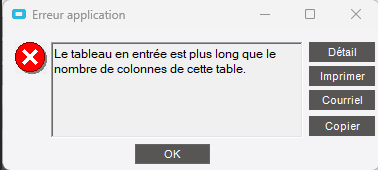
Translation: Input array is longer than the number of columns in this table.
When we verify the configuration in UD Column Maintenance, the table appears to be properly synchronized.

I do not understand why this issue occurs intermittently. When I check the DLL files on the application servers, everything appears to be up to date based on the date and time of the most recent Data Regeneration.


On the client workstation, performing a Clear Client Cache resolves the issue temporarily. However, once Epicor is restarted, the problem returns and another cache clear is required.
We have already investigated a similar issue reported in the following forum post:
Unfortunately, none of the suggested solutions seem to address our situation. The issue persists even after following KB0032229, verifying the UD table synchronization, and performing a Data Regeneration.
At this point, I am running out of ideas. Is there something I may be overlooking? Are there any additional areas you would recommend checking?
For additional context, we are running Epicor 10.2.700 with two application servers pointing to the same live database.
The primary production server hosts the Task Agent and is the server from which we executed the Data Regeneration and performed the IIS recycle.
A second application server also points to the live database but is used exclusively in a read-only capacity by an external service. No Task Agent is installed on this server. We did, however, perform an IIS recycle on it as well.
Given this configuration, could the presence of the second application server be contributing to the issue in any way? Is there anything else that should be refreshed, regenerated, or synchronized across both servers after adding new UD fields?
Thank you in advance for your assistance.
Best regards,
Alexandre