Labor Edit Report for previous day

Hey

im trying to set a filter on the Labor Edit Report so that i run a daily process to automatically email the dept. managers the report on the previous day.

I dont know much about this report but it looks like a system report that doesnt have an underlying BAQ dataset or BAQ report

In the report style break, i am unable to add a filter that suits my need either.

There is a collection of Calculated Fields that i dont know the construction of so, is there any documentation that describes them that would allow me to re-create the dataset in a BAQ to filter it? Otherwise, what would be a good way to filter the report?
Thanks

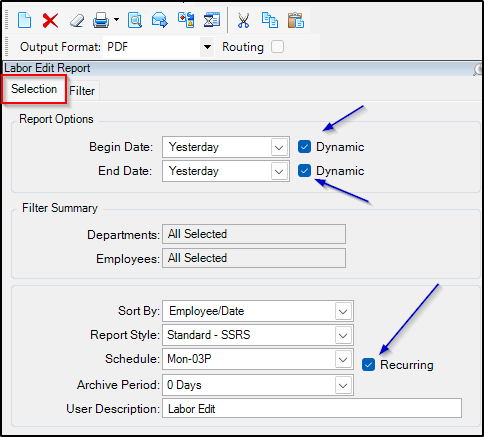
Set the Begin Date / End date dynamically to Yesterday.
Put it on a schedule
make sure to check the recurring check box

image

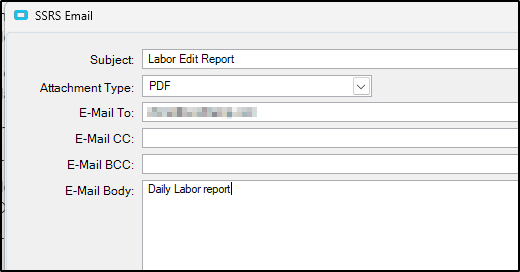
Click on the send email option
Fill in your email details

image

Click OK

thanks for that. the report recipient is conditional to the department to which there are 14 depts split over 2 managers

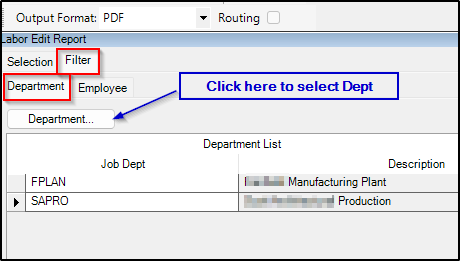
Use the department filter and send one email to each manger with just their depts

Set them both on the same schedule.

Thanks

Im not that knowledgeable with these functions… Do you mean that i need to set this twice? i dialog for manager A and then again for manager B?

Yes,
You will set up the report twice
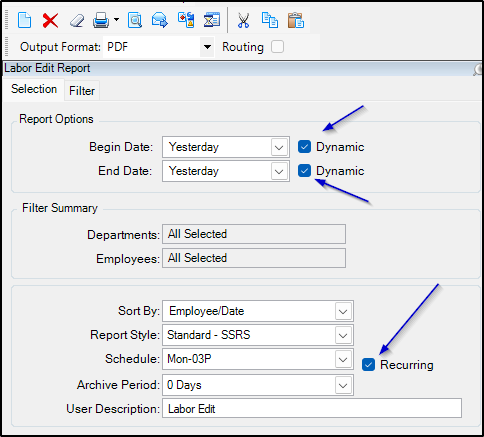
The Selection Tab will be the same for both
image

Then for the Filter tab select the dept’s for manager A
image

Then click on the send email icon and fill in the information for Manager A.

Do all this again for Manager B

1 Like

ok mate, i appreciate the time taken to answer me thoroughly.

Best