We had a customization in Epicor 9 and need to use the same customization in e10, however I am a noob and can’t seem to figure out how to “load” the customization. Any direction will be greatly appreciated.
I’ve never used Epicor 9, but did you export your customization in E9?
If not, go into developer mode, go into the menu you want to export the customization from, right somewhere in the middle and hit customization. In the customization tools dialog window, click file > export.
Then in E10, go into developer mode, open the menu you want to add the customization to, a “select customization” window should pop up, import your customization and open it. Then save it and close it.
Go to Menu maintenance, find the menu item you want to add the customization to, find the customization box, if your customization doesn’t show up, right click and refresh the box, then select the customization you want. Save and restart epicor.
Not sure if E9 and E10 are similar, but I’m using E11 and so far E11 has been super similar, especially since I’m using the classic mode.
Hope this helps.
if you upgraded it should have been converted ish and possible marked as outdated.
if you turn on developer mode it should be in the list when you open that menu and you will have to fix any code issues.
I did see it as outdated and updated accordingly. I don’t see it in menu maintenance to select.
Attached is the error I get.
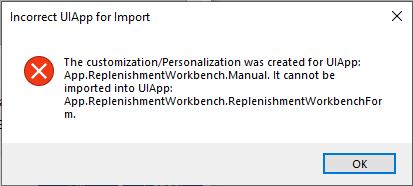
That looks like they moved your cheese and you will need to create a customization in 11 and copy as much as you can and recreate the rest.