# Tree Grid view in Epicor?
**Category:** [Epicor ERP 10](https://www.epiusers.help/c/e10/5)
**Created:** 2016-12-05 01:30 UTC
**Views:** 2173
**Replies:** 5
**URL:** https://www.epiusers.help/t/tree-grid-view-in-epicor/36501
---
## Post #1 by @bmanners
Is it possible to create a tree grid view in Epicor like this.
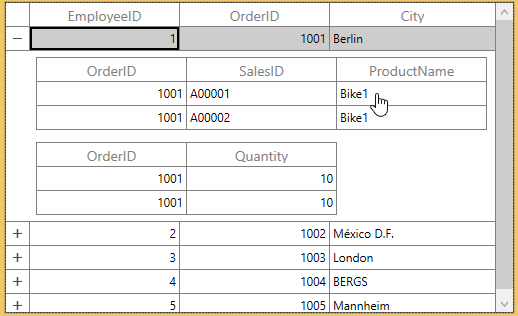 I don't think the EpiUltraGrid can do that but it would be useful if it could.
Cheers
Brett
---
## Post #2 by @josecgomez
Yes ultra grid supports parent child table and multiple bands.
Get Outlook for iOS
---
## Post #3 by @bmanners
Happy Days!
Is there any documentation on that?
Brett
---
## Post #4 by @josecgomez
Sure Google for UltraGrid multiple tables parent child etc
Get Outlook for iOS
---
## Post #5 by @bmanners
Indeed google is your friend :slight_smile:
I learnt a few new things but haven't got the child tables to show yet. I didn't know about DataRelations within DataSets, also figured out that the epiUltraGrid is derived from an Infragistics UltraGrid so searching for help on the Infragistics grid provided some help.
I will keep digging tomorrow and see what I can figure out.
Here is the code I am using to test with.
DataTable dt1 = new DataTable("dt1");
dt1.Columns.Add("Id", typeof(int));
dt1.Columns.Add("Value", typeof(string));
dt1.Columns.Add("Description", typeof(string));
DataTable dt2 = new DataTable("dt2");
dt2.Columns.Add("Id", typeof(int));
dt2.Columns.Add("ParentId", typeof(int));
dt2.Columns.Add("Items", typeof(string));
int h = 0;
for (int i = 0; i < 10; i++)
{
dt1.Rows.Add(i, "Value " + i.ToString(), "Description " + i.ToString());
for (int j = 0; j < 10; j++)
{
dt2.Rows.Add(j, i, "Item " + j.ToString());
}
}
DataSet ds = new DataSet();
ds.Tables.Add(dt1);
ds.Tables.Add(dt2);
DataRelation dr1 = new DataRelation("dr1",ds.Tables["dt1"].Columns["Id"], ds.Tables["dt2"].Columns["ParentId"], true);
ds.Relations.Add(dr1);
epiUltraGridTest.SetDataBinding(ds,"");
epiUltraGridTest.DisplayLayout.ViewStyle = Infragistics.Win.UltraWinGrid.ViewStyle.MultiBand;
epiUltraGridTest.DisplayLayout.Override.ExpansionIndicator = Infragistics.Win.UltraWinGrid.ShowExpansionIndicator.CheckOnDisplay;
epiUltraGridTest.Update();
---
## Post #6 by @Jkinneman
All Epicor controls are based on Infragistics controls, so a good source of information for working with them is as you found is on the Infragistics website. Epicor adds some properties/methods to the base infragistics object and ignores some of the existing Infragistics properties/methods. For example Epicor only handles Display Band 0 and to do the tiered approach you want you need to use the UltraGrid object instead of the EpiUltraGrid.
The data relationship items are straightforward Microsoft .net stuff when building the dataset
---
**Canonical:** https://www.epiusers.help/t/tree-grid-view-in-epicor/36501
**Original content:** https://www.epiusers.help/t/tree-grid-view-in-epicor/36501