Well, that is what I expected to see in your screenshots. But if that’s a red herring, then I do want to understand it for real.
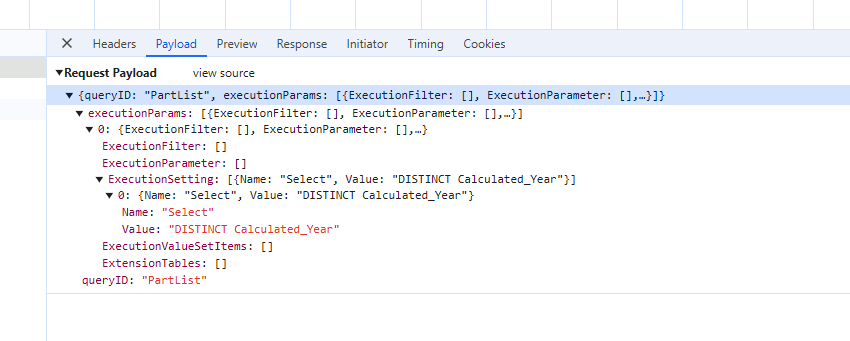
OK, so this statement here - I think the point is that it is like it’s making a new query wrapped around the BAQ. Even though you didn’t have to add FROM or any other syntax. Wild.
Think of the BAQ as a SQL table. The Rest call is making a SELECT statement to that “table” for just the one column. Similarly, you could do the same with the Part table without bringing back all N number of columns.
The row in the view setup is a column in the data, so I had to wrap my head around what you were saying here. (Not rows of data; rows that represent columns.)
I think I get it. I would never have thought of this before, but this makes sense.
More like some orientation-based dyslexia.
I’m going to blame it on the fact that when you set up a Dataview, the columns are presented as rows in the grid.
Well, in my case I was just attempting to use the BAQ svc in the reusable combo without creating a DataView… but perhaps that’s where this method falls apart.
Indeed. I’ve poked some Epicor people about the lack of consistency for what you can do with a BAQ between the erp-baq widget, the provider model on a grid, and the combo control. The widget seems to be leagues ahead of the others in functionality.
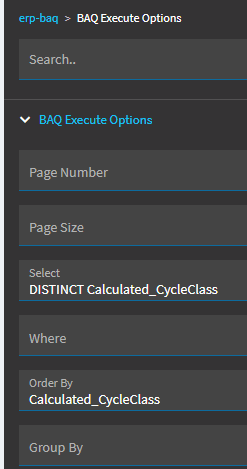
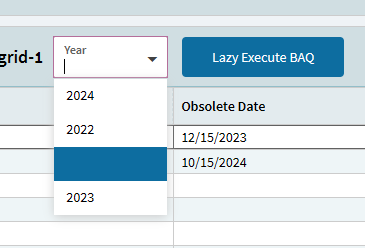
However, nothing came up at first. So I stared at this picture:
You had an “Order By” (which I mean, yeah, of course you want the years in order), but I did not at first have any “Order By” as it was not in the screenshots.
So I added that (in the event) and it worked.
At first I thought the problem was that my BAQ had a parameter, but no, that was fine.
Well… I can’t say you are wrong - and the pics even prove you are right.
But it was rather repeatable. I deleted the group-by and tested and it failed, and re-added it and it worked, etc.
Also, very unrelated, I still have no idea why we are using the reaction. I like him and all - reminds me of a Beanie Baby I have (Baldy). [Wait, this is public?] So I’m using it, but I still don’t know why.
In case anyone else is having issues and just can’t get it working, try removing anything you have in the “Sort Order” for the BAQ.
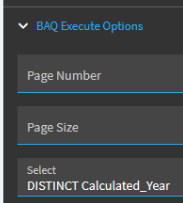
Took me a while to find this out but Epicor is not structuring their SQL commands correctly when you put a DISTINCT in the Select box there. It works fine without the DISTINCT but breaks with it.
The logs give a
Ice.Common.EpicorServerException: Query Id: baqNameHere. ORDER BY items must appear in the select list if SELECT DISTINCT is specified.
If anyone can find a way to do both that would be awesome, but I think I’m gonna throw my computer out the window if I keep working on this issue.
May be unnecessarily adding to the thread, but to add onto my reply after doing some testing, you don’t necessarily have to remove the “Sort Order”, but if you are sorting and you want to use distinct, you must do DISTINCT field1, field2 where either field1 or field2 is what you are sorting on in your BAQ.
It may not be ideal to do that since its possible in your case that none of the combinations of those 2 were unique to begin with which was the problem you were trying to solve. You also are not able to solve the problem with a “Group By” as the results of that grouping are also implicitly sorted for you.
That’s cool ExecuteBAQ select param handles DISTINCT and makes sense you can only ORDER BY fields in Select list when DISTINCT is used - that’s valid SQL rules.
FWIW, there is a hidden property on combo component called showDistinct for this purpose so you can do it for any combo type like so:


 reaction. I like him and all - reminds me of a Beanie Baby I have (Baldy). [Wait, this is public?] So I’m using it, but I still don’t know why.