I haven’t made many UD tables, so I don’t know if there’s a limited amount you can make… However, can’t you make a bunch of UD tables and then create a script which transfers the data from the custom objects into the UD tables via Rest?
Yes and then just rewrite every piece of front end code to reference the migrated data. Should be done in a week tops lol.
Unless the same dumpster fire is recreated in the upgraded version, one would have to do something like this anyway, no?
While I get where you are coming from, @masuphiber, that would be quite the undertaking. Here are the full stats of what I am working with in this system:
- 93 Custom SQL Tables
- 1,232 Custom SQL Views
- 381 Custom BPM’s
- 141 Menu Customizations
- 1,587 User Defined Columns spread across 78 %_UD Tables
- 713 BAQ’s
Trying to fix all of that is going to be one hell of an task.
EDIT: Just for fun, I challenge someone to provide info on their environment that makes my situation look like a cakewalk…it would be nice to know that I did not walk into what could be classified as "the worst of the worst’, heh.


Reimplementation time!!!

I thought we’d have you beat on custom fields but I just looked at custom Fields and we only have
1001
the other stuff isn’t even close sorry bud
Pretty sure you did.
This going to be one hell of an Insights presentation one day.

Now you have me sitting here thinking about how to make this into a story worth telling.
This one actually doesn’t seem that bad. I’ve probably got about that many, mostly because I’ll customize (say) Job Tracker (which shows up in a dozen places out of the box) and copy it to a few other menu folders so users don’t have to go out of their “home” folder (e.g. QA people stay in the QA folder). It adds up quick.
Having said that, I’ll likely nuke it all once we’re on Kinetic.
This one screams “I don’t want to pay Epicor for Modules X and Y, so I’m going to kludge together some bootleg equivalent.” Is there a homebrew product configurator in there?
I repeat: 
That is partly the case here. The Menu Customizations (that are strictly layout based) are the least of my concerns…the ones that have a few hundred (thousand) lines of code in them are the ones that are going to cause some issues.
We have a product configurator, yes. Using the Product Configurator module…not a homebrew one. What these all pertain to are changes that were made to how the system works in an effort to cater to/please the user, rather than train the user.
EDIT (To further my thought process on things): I should go through the BPM’s and Customizations and add a small snippet to them logging when they are used. That’ll tell me which ones were for a “single use” and never touched again, and which are used on a regular and ongoing basis. After a few months (encompassing a fiscal quarter and fiscal year as well as one or two inventory cycles), enough data should be gathered to give me fairly clear idea of what is actually needed.

I’ve got a BPM + BAQ for the customization side of it. Its in a bit of a messy state because I was trying to also capture Kinetic customizations before realizing they were stored and called elsewhere.
BPM - PreProcessing on method directive Ice.BO.GenXData.GetByID
using(var UD23svc = Ice.Assemblies.ServiceRenderer.GetService<UD23SvcContract>(Db))
{

    bool x = false;

    var key1sub =  key1.Substring(0, key1.Length > 50 ? 50 : key1.Length);
    var key2sub =  key2.Substring(0, key2.Length > 50 ? 50 : key2.Length);
    var key3sub =  key3.Substring(0, key3.Length > 50 ? 50 : key3.Length);

    UD23Tableset ds = UD23svc.GetRows($"Key1 = '{key1sub}' and Key2 = '{key2sub}' and Key3 = '{key3sub}' and Key4 = '{Session.UserID}'", "", 0, Int32.MaxValue, out x);


    if (key1 != Session.UserID && key1.Length > 1)
      if (ds.UD23.Count < 1)
      {
          ds = new UD23Tableset();
          UD23svc.GetaNewUD23(ref ds);

          ds.UD23[0].Key1 = key1sub;
          ds.UD23[0].Key2 = key2sub;
          ds.UD23[0].Key3 = key3sub;
          ds.UD23[0].Key4 = Session.UserID;
          ds.UD23[0].Date01 = DateTime.Now;
          ds.UD23[0].ShortChar01 = DateTime.Now.ToString("MM/dd/yyyy hh:mm:ss tt");
          ds.UD23[0].ShortChar02 = productID;
          ds.UD23[0].ShortChar03 = typeCode;
          ds.UD23[0].ShortChar04 = cgCCode;
          ds.UD23[0].Character01 = key1;
          ds.UD23[0].Character02 = key2;
          ds.UD23[0].Character03 = key3;
          ds.UD23[0].Number01 = 1;
      }
      else
      {
          ds.UD23[0].Key1 = key1sub;
          ds.UD23[0].Key2 = key2sub;
          ds.UD23[0].Key3 = key3sub;
          ds.UD23[0].Key4 = Session.UserID;
          ds.UD23[0].Date01 = DateTime.Now;
          ds.UD23[0].ShortChar01 = DateTime.Now.ToString("MM/dd/yyyy hh:mm:ss tt");
          ds.UD23[0].ShortChar02 = productID;
          ds.UD23[0].ShortChar03 = typeCode;
          ds.UD23[0].ShortChar04 = cgCCode;
          ds.UD23[0].Character01 = key1;
          ds.UD23[0].Character02 = key2;
          ds.UD23[0].Character03 = key3;
          ds.UD23[0].Number01 += 1;
          ds.UD23[0].RowMod = "U";

      }

    UD23svc.Update(ref ds);
}
BAQ - MostUsedProcesses.baq (55.8 KB)
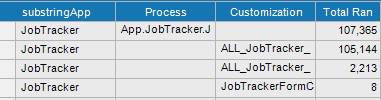
You will probably need to change out which UD table it’s using judging by your environment description…
CustomizationDetails.baq (84.3 KB)
And this one is always a fun one for helping identify which Customizations to tackle first in moving to Kinetic / updating in general. Not perfect but I tried to categorize the changes.
By no means are these optimized, and run terribly slow, but it gives information at least. I feel bad for your predicament
Just curious… How are the - eh em - “custom tables” integrated?
Direct access via custom code in BO’s?
That is correct. Oh, and some 3rd party applications connect tot hem as well! (outside of the Epicor API…just direct SQL Integration). She also has countless Access databases that connect to those tables in the Epicor DB (as well as to the base Epicor tables such as Part, OrderHed, PartPlant, etc.) and she is directly manipulating data that way.
The more I look into this, the greyer my hair becomes.

That is by far the best reaction I could have seen to that. Kudos, my friend! 
This is just me spouting off but why not create a virtual test system with your current Epicor database, perform your major upgrade and see what happens. At least you’ll know where you stand.
I only had to deal with one Access DB here. It housed all of our corrective actions since the canned CA app is less than worthless for anyone doing actual QC work. The db sat on some shared drive, and users connected via the little Access client apps you can make. It took weeks and a thousand lines of code just to clean the data, because everything was free-form string fields, full of typos and I needed the whole history moved over. It’s now a UD app inside the ERP.
I’m hoping, for your sake, if your nemesis went to the trouble of shoving this into the DB, that they at least have typed data and maybe some proper native/foreign keys to tie the mess together. Please tell me it’s not all strings too.
I’m going to join @klincecum with the Popcorn because…yeah…the exact words to me were: “No, I don’t do any data validation. I just put in the data that is given to me.”