Shoot, sorry. That is correct, you want to pull the CTE in. It will contain all of the data from both.
Recursion’s always a bit of a mind bender to learn. Kind of like double entry accounting, part of your mind has to break and then it makes sense.
The recursive part of the query is expecting you to provide recursion instruction. So, in the recursion half of your query instead of and JobAsmbl1.AssemblySeq <> 0 you might say and JobAsmbl1.AssemblySeq = JobsCTE.Calculated_Hierarchy + 1. The first will always return something. The latter will increment the assembly ID until it doesn’t find one, and that’s the end of your recursion.
Not necessarily relevant to this query, but in other cases you might control the recursion path in the where statement. In this one technically you could say where JobAsmbl1.AssemblySeq = JobsCTE.Calculated_Hierarchy + 1 but it’s just easier to read what’s going on if that’s in the join conditions.
edit…
Here’s perhaps the easiest possible example: Count to 3
with AhAhAh as(
	select 1 as theCount
union all
	select AhAhAh.theCount + 1 as whatever
	from AhAhAh
	where AhAhAh.theCount < 3
)
The query before the union all returns the value 1.
Note that the query after the union all is selecting from the CTE - which includes itself. This time it works just like we’re used to and returns the first value + 1. That’s 1 and 2
Here’s the tricky part: Because it’s querying itself it also receives the value it just returned! And so it runs again, returning the last value + 1, union all’d to the prior results. That’s 1 and 2 and 3
It doesn’t stop there, it receives the value it just returned again. But this time it sees where theCount < 3 and so it returns nothing, which means it receives nothing from itself, and that’s the end of this ride.
2 Likes
Here is an example I just threw together.
jfghd.baq (33.0 KB)
1 Like
I can get your simple examples to work, but I am missing the hierarchy part.
I think I would like the output to be something like this:
| Job | AsmChain | Part | Op |
|---|---|---|---|
| 12345/1 | 0> | abc123 | 10 |
| 12345/1 | 0> | abc123 | 50 |
| 12345/1 | 0> | abc123 | 900 |
| 12345/1 | 0>1 | def123 | 10 |
| 12345/1 | 0>1 | def123 | 50 |
| 12345/1 | 0>1 | def123 | 900 |
| 12345/1 | 0>1>2 | ghi123 | 10 |
| 12345/1 | 0>1>2 | ghi123 | 50 |
| 12345/1 | 0>1>2 | ghi123 | 900 |
| 12345/1 | 0>1>3 | jkl123 | 10 |
| 12345/1 | 0>1>3 | jkl123 | 50 |
| 12345/1 | 0>1>3 | jkl123 | 900 |
Where AsmChain is like the hierarchy path. Here you can see most parts are children of the previous Asm. But Asm 3 is a child of Asm1, not Asm2. I want to see that relationship, regardless of how many levels deep it goes. Does this make sense?
Yes. All that is is a simple sort. Sort the results by the Parent and then Asm.
Like this?
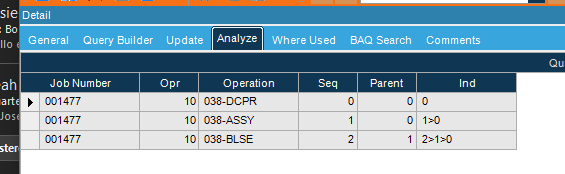
1 Like
Yeah sort of like that!
rearranged the calculated field to this.
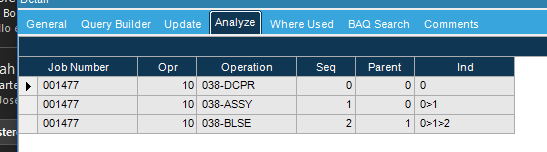
/*
 * Disclaimer!!!
 * This is not a real query being executed, but a simplified version for general vision.
 * Executing it with any other tool may produce a different result.
 */

with [MyCTE] as
(select
	[JobOper].[JobNum] as [JobOper_JobNum],
	[JobOper].[OprSeq] as [JobOper_OprSeq],
	[JobOper].[OpCode] as [JobOper_OpCode],
	[JobOper].[AssemblySeq] as [JobOper_AssemblySeq],
	[JobAsmbl].[Parent] as [JobAsmbl_Parent],
	(convert(varchar, JobAsmbl.AssemblySeq)) as [Calculated_Ind]
from Erp.JobOper as JobOper
inner join Erp.JobAsmbl as JobAsmbl on
	JobOper.Company = JobAsmbl.Company
	and JobOper.JobNum = JobAsmbl.JobNum
	and JobOper.AssemblySeq = JobAsmbl.AssemblySeq
where (JobOper.JobNum = '001477'  and JobOper.AssemblySeq = 0)
union all
select
	[JobOper_union].[JobNum] as [JobOper_union_JobNum],
	[JobOper_union].[OprSeq] as [JobOper_union_OprSeq],
	[JobOper_union].[OpCode] as [JobOper_union_OpCode],
	[JobAsmbl_union].[AssemblySeq] as [JobAsmbl_union_AssemblySeq],
	[JobAsmbl_union].[Parent] as [JobAsmbl_union_Parent],
	(convert(varchar, MyCTE.Calculated_Ind +'>'+ convert(varchar, JobAsmbl_union.AssemblySeq))) as [Calculated_Ind2]
from  MyCTE  as MyCTE
inner join Erp.JobAsmbl as JobAsmbl_union on
	MyCTE.JobOper_JobNum = JobAsmbl_union.JobNum
	and MyCTE.JobOper_AssemblySeq = JobAsmbl_union.Parent
inner join Erp.JobOper as JobOper_union on
	JobOper_union.Company = JobAsmbl_union.Company
	and JobOper_union.JobNum = JobAsmbl_union.JobNum
	and JobOper_union.AssemblySeq = JobAsmbl_union.AssemblySeq
	and ( JobOper_union.AssemblySeq <> 0  ))

select
	[MyCTE_top].[JobOper_JobNum] as [JobOper_JobNum],
	[MyCTE_top].[JobOper_OprSeq] as [JobOper_OprSeq],
	[MyCTE_top].[JobOper_OpCode] as [JobOper_OpCode],
	[MyCTE_top].[JobOper_AssemblySeq] as [JobOper_AssemblySeq],
	[MyCTE_top].[JobAsmbl_Parent] as [JobAsmbl_Parent],
	[MyCTE_top].[Calculated_Ind] as [Calculated_Ind]
from  MyCTE  as MyCTE_top
The CTE just has the original, it’s the “anchor” in this case.
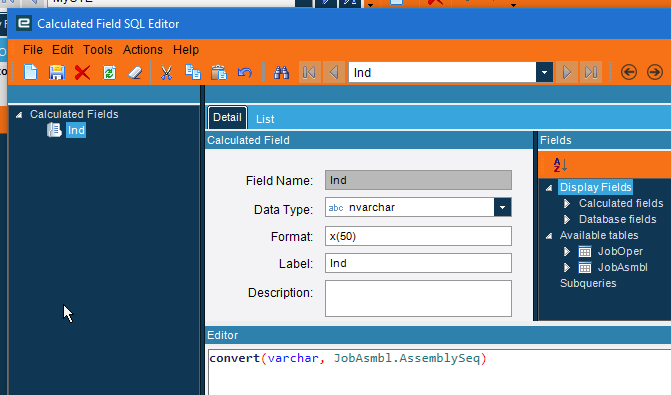
Then the union all has this
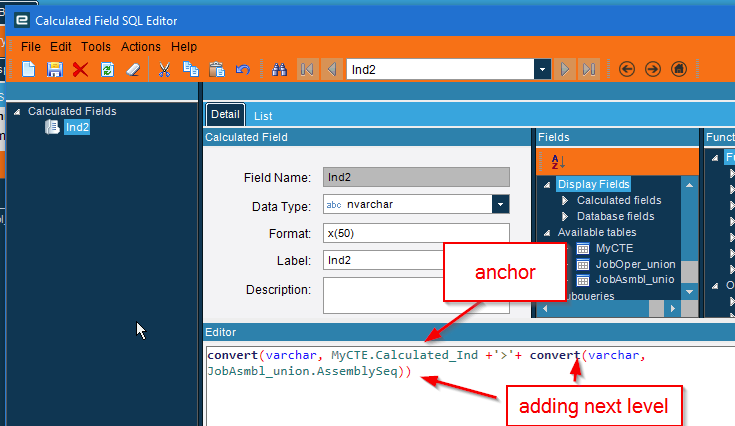
the example over complicated things and muddies the waters.
1 Like
I got the results I wanted. I used your suggestions and brute force. This is the SQL I ended up with that shows the data like I expect.
with [JobsCTE] as
(select
	[JobOper1].[JobNum] as [JobOper1_JobNum],
	[JobOper1].[OprSeq] as [JobOper1_OprSeq],
	[JobOper1].[AssemblySeq] as [JobOper1_AssemblySeq],
	[JobAsmbl].[Parent] as [JobAsmbl_Parent01],
	[JobAsmbl].[PartNum] as [JobAsmbl_PartNum],
	(convert(varchar, JobAsmbl.AssemblySeq)) as [Calculated_Ind]
from Erp.JobOper as JobOper1
inner join Erp.JobAsmbl as JobAsmbl on
	JobAsmbl.Company = JobOper1.Company
	and JobAsmbl.JobNum = JobOper1.JobNum
	and JobAsmbl.AssemblySeq = JobOper1.AssemblySeq
where (JobOper1.JobNum = 'MYJOBNUM'  and JobOper1.AssemblySeq = 0)
union all
select
	[JobOper2].[JobNum] as [JobOper2_JobNum],
	[JobOper2].[OprSeq] as [JobOper2_OprSeq],
	[JobAsmbl1].[AssemblySeq] as [JobAsmbl1_AssemblySeq],
	[JobAsmbl1].[Parent] as [JobAsmbl1_Parent],
	[JobAsmbl1].[PartNum] as [JobAsmbl1_PartNum],
	(convert(varchar, JobsCTE1.Calculated_Ind + '>' + convert(varchar, JobAsmbl1.AssemblySeq))) as [Calculated_Ind2]
from  JobsCTE  as JobsCTE1
inner join Erp.JobAsmbl as JobAsmbl1 on
	JobsCTE1.JobOper1_JobNum = JobAsmbl1.JobNum
	and JobsCTE1.JobOper1_AssemblySeq = JobAsmbl1.Parent
inner join Erp.JobOper as JobOper2 on
	JobAsmbl1.Company = JobOper2.Company
	and JobAsmbl1.JobNum = JobOper2.JobNum
	and JobAsmbl1.AssemblySeq = JobOper2.AssemblySeq
	and 0 <> JobOper2.AssemblySeq)

select distinct
	[JobsCTE].[JobOper1_JobNum] as [JobOper1_JobNum],
	[JobsCTE].[JobOper1_OprSeq] as [JobOper1_OprSeq],
	[JobsCTE].[JobOper1_AssemblySeq] as [JobOper1_AssemblySeq],
	[JobsCTE].[JobAsmbl_Parent01] as [JobAsmbl_Parent01],
	[JobsCTE].[JobAsmbl_PartNum] as [JobAsmbl_PartNum],
	[JobsCTE].[Calculated_Ind] as [Calculated_Ind]
from  JobsCTE  as JobsCTE
order by JobsCTE.JobOper1_JobNum, JobsCTE.JobOper1_AssemblySeq, JobsCTE.JobOper1_OprSeq
OpListForFixtures.baq (42.6 KB)
Thank you @jkane, @kananga, and @Banderson for all your patience and advice!
Why are you using distinct? You shouldn’t need that, figure out why you’re getting duplicates.
2 Likes
I thought so too! I had way too many records before I put that in there. I can’t figure out what the duplicates are from. 
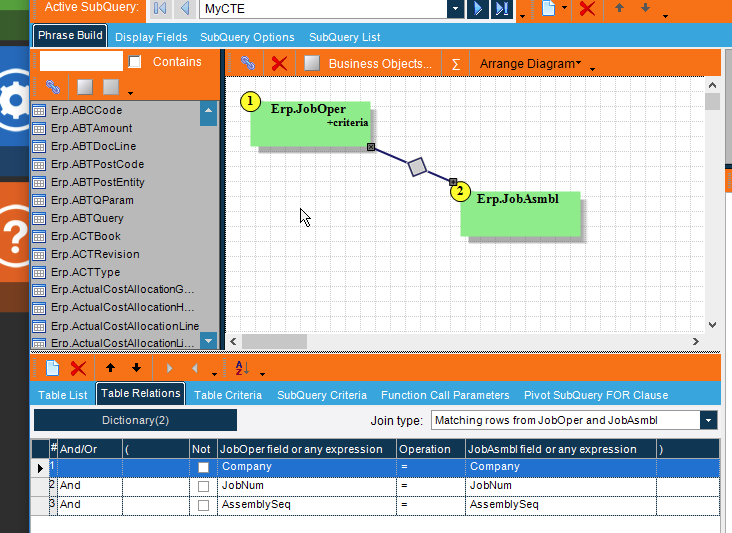
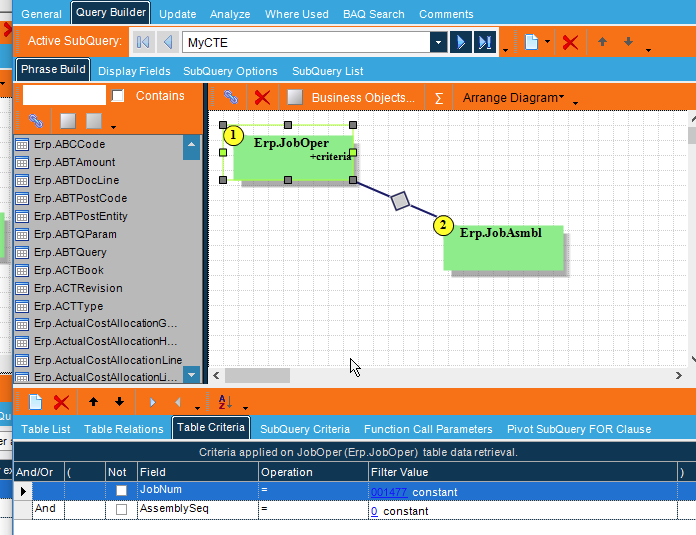
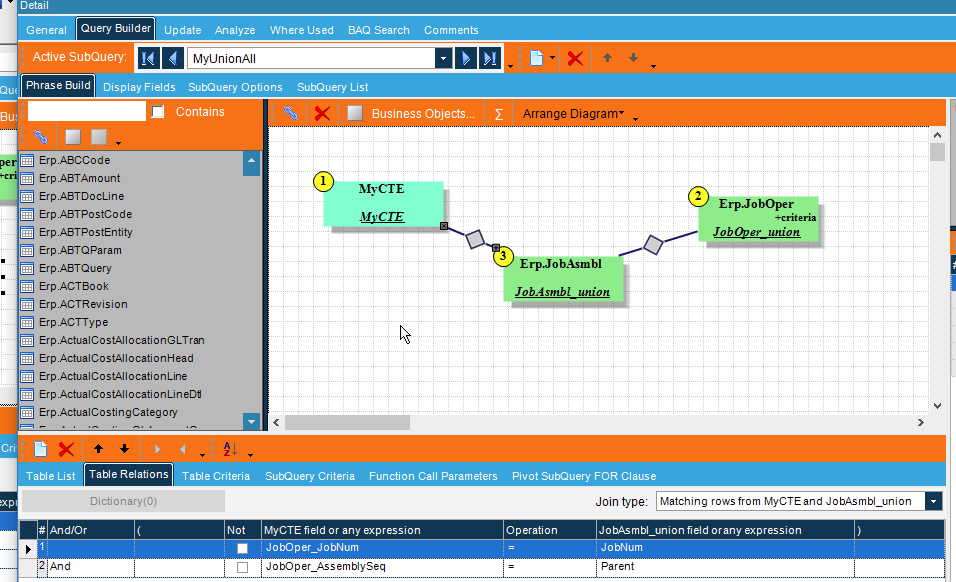
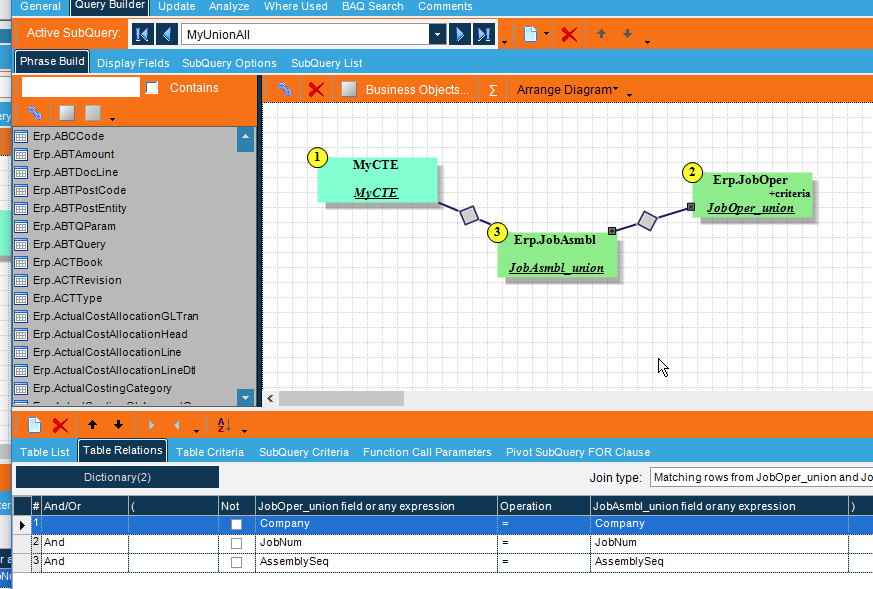
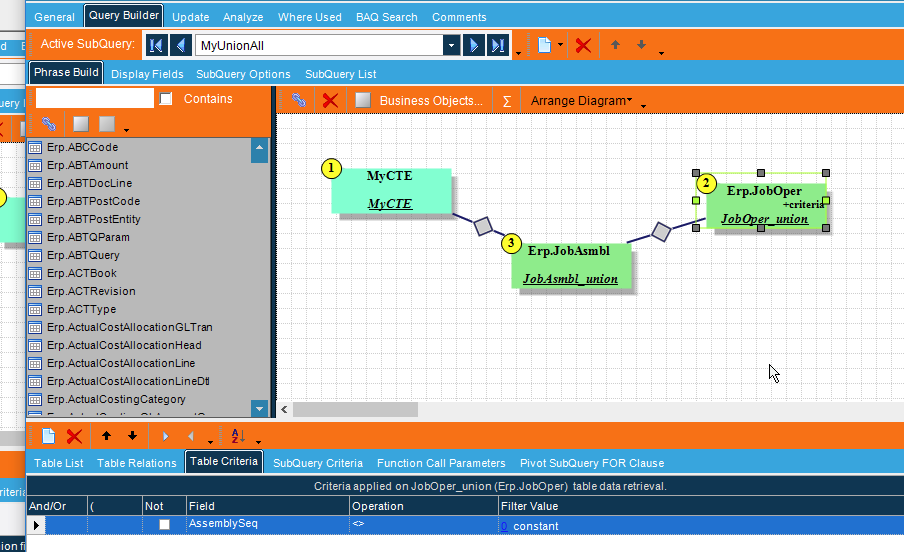
I made a couple small adjustments to match your joins. Now I am still getting duplicates in my result.
OpListForFixtures.baq (42.6 KB)
with [JobsCTE] as
(select
	[JobOper1].[JobNum] as [JobOper1_JobNum],
	[JobOper1].[OprSeq] as [JobOper1_OprSeq],
	[JobOper1].[AssemblySeq] as [JobOper1_AssemblySeq],
	[JobAsmbl].[Parent] as [JobAsmbl_Parent01],
	[JobAsmbl].[PartNum] as [JobAsmbl_PartNum],
	(convert(varchar, JobAsmbl.AssemblySeq)) as [Calculated_Ind]
from Erp.JobOper as JobOper1
inner join Erp.JobAsmbl as JobAsmbl on
	JobAsmbl.Company = JobOper1.Company
	and JobAsmbl.JobNum = JobOper1.JobNum
	and JobAsmbl.AssemblySeq = JobOper1.AssemblySeq
where (JobOper1.JobNum = '31976/2'  and JobOper1.AssemblySeq = 0)
union all
select
	[JobOper2].[JobNum] as [JobOper2_JobNum],
	[JobOper2].[OprSeq] as [JobOper2_OprSeq],
	[JobAsmbl1].[AssemblySeq] as [JobAsmbl1_AssemblySeq],
	[JobAsmbl1].[Parent] as [JobAsmbl1_Parent],
	[JobAsmbl1].[PartNum] as [JobAsmbl1_PartNum],
	(convert(varchar, JobsCTE1.Calculated_Ind + '>' + convert(varchar, JobAsmbl1.AssemblySeq))) as [Calculated_Ind2]
from  JobsCTE  as JobsCTE1
inner join Erp.JobAsmbl as JobAsmbl1 on
	JobsCTE1.JobOper1_JobNum = JobAsmbl1.JobNum
	and JobsCTE1.JobOper1_AssemblySeq = JobAsmbl1.Parent
inner join Erp.JobOper as JobOper2 on
	JobAsmbl1.Company = JobOper2.Company
	and JobAsmbl1.JobNum = JobOper2.JobNum
	and JobAsmbl1.AssemblySeq = JobOper2.AssemblySeq
	and ( JobOper2.AssemblySeq <> 0  ))

select
	[JobsCTE].[JobOper1_JobNum] as [JobOper1_JobNum],
	[JobsCTE].[JobOper1_OprSeq] as [JobOper1_OprSeq],
	[JobsCTE].[JobOper1_AssemblySeq] as [JobOper1_AssemblySeq],
	[JobsCTE].[JobAsmbl_Parent01] as [JobAsmbl_Parent01],
	[JobsCTE].[JobAsmbl_PartNum] as [JobAsmbl_PartNum],
	[JobsCTE].[Calculated_Ind] as [Calculated_Ind]
from  JobsCTE  as JobsCTE
order by JobsCTE.JobOper1_JobNum, JobsCTE.JobOper1_AssemblySeq, JobsCTE.JobOper1_OprSeq
It has to do with the operation info added. That needs to be removed and added to the top level. (we established that at the beginning, I just forgot when I did my example)
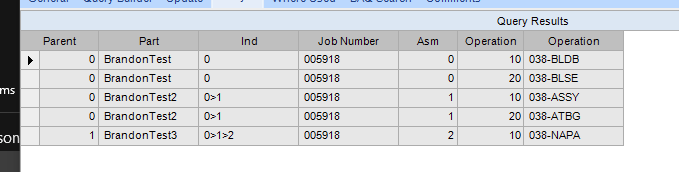
So do everything without the operation information, then at the top level join the operation information.
(get the company in there to join as well, I forgot and am too lazy to fix it)
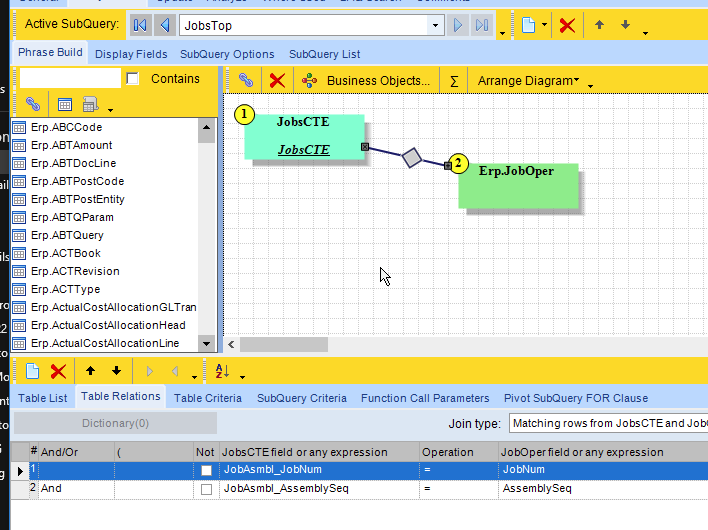
Here’s the “Fixed” query. You’ll need to adjust your sorting again, but this should work.
OpListForFixturesFixed.baq (39.5 KB)
3 Likes
Yes! This is great! So confusing! I think this exercise has given me a better understanding of CTE recursion. Thank you!
1 Like