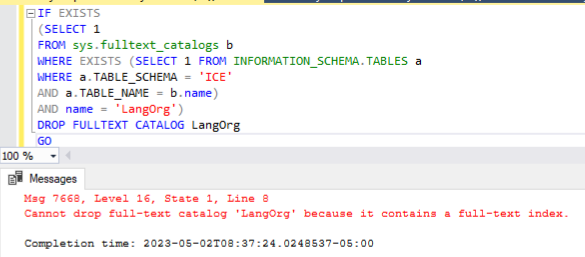
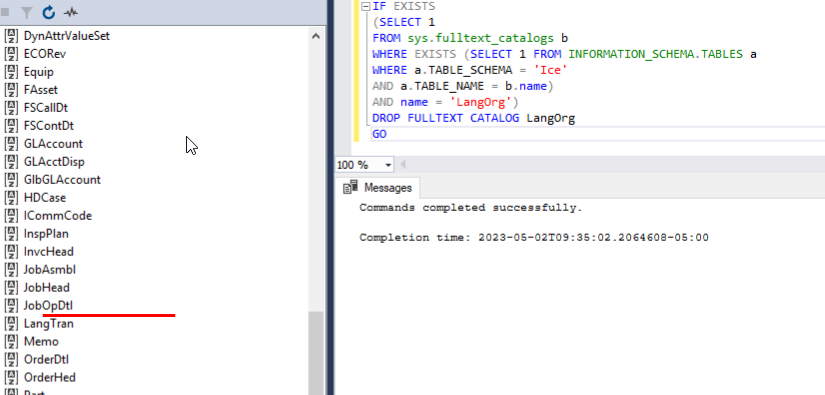
Now that you’ve dropped the full text index, it should now be able to drop the catalog.
IF EXISTS
(SELECT 1
FROM sys.fulltext_catalogs b
WHERE EXISTS (SELECT 1 FROM INFORMATION_SCHEMA.TABLES a
WHERE a.TABLE_SCHEMA = ‘ICE’
AND a.TABLE_NAME = b.name)
AND name = ‘LangOrg’)
DROP FULLTEXT CATALOG LangOrg
GO
I have the full-text service stopped also in case it was regenerating.
Also, I have our old copy from E10.2.600 I was going to play with and see if the results are different. Maybe I can compare the two tables and figure it out.
I’m loading a copy of it now for me, but I cannot distribute it. Demo database does not have these same issues, and support say’s they can run the upgrades and SQL commands. I’ve loaded new VM’s for APP and SQL but no change.
I’m going to run the two simple drop index and catalog commands on E10 database and see how it reacts.
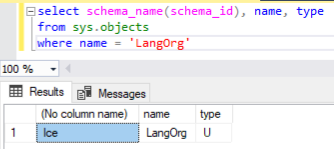
Ok, at least we know there is only one object in your database with the name LangOrg. I am aware that you can only have one full text index in any table or view. I will continue looking into this.
New information.
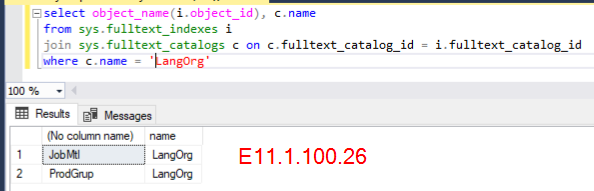
Upgrade from 10.2.600.33 to 11.1.100.0 works successfully with the Epicor Admin Console. I do not see the same SQL script in the log, perhaps thats why.
I’ll advance to 11.2 next and see what happens.
That script was delivered in 4.1.200 release. It will run going from 11.1.100.0 to 11.2.nnn.
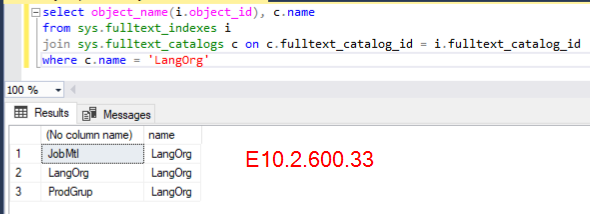
We can also try to see what object does it sees that has the catalog name of LangOrg.
select object_name(i.object_id), c.name
from sys.fulltext_indexes i
join sys.fulltext_catalogs c on c.fulltext_catalog_id = i.fulltext_catalog_id
where c.name = ‘LangOrg’
Maybe a customization we paid for between JobMtl and ProdGrup might be part of the culprit. I cant fully recall what it was but might have used these tables.
Well, that is why we can’t drop the catalog. There are two other objects that use the same catalog names. This is very odd.
We definitely did not create any full text index on the Erp.JobMtl and Erp.ProdGrup tables in Kinetic. Definitely a customization. Are they something that can be dropped from your database so that you can successfully do the upgrade?
Our Erp.ProdGrup table has total of 6 records. It is used on every part # as a category of sorts.
Erp.JobMtl is native I believe. There is a JobMtl_UD also.
I don’t care if we drop index/catalog from both of these if thats what you’re suggesting.
I was suggesting of dropping the full text index on those two tables. We not going to drop any indexes other than the full text index created on these objects. These are not part of our base product.
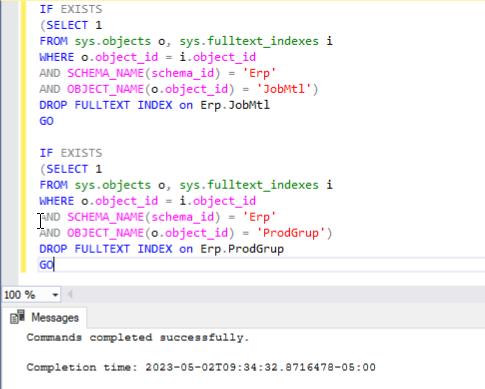
IF EXISTS
(SELECT 1
FROM sys.objects o, sys.fulltext_indexes i
WHERE o.object_id = i.object_id
AND SCHEMA_NAME(schema_id) = ‘Erp’
AND OBJECT_NAME(o.object_id) = ‘JobMtl’)
DROP FULLTEXT INDEX on Erp.JobMtl
GO
IF EXISTS
(SELECT 1
FROM sys.objects o, sys.fulltext_indexes i
WHERE o.object_id = i.object_id
AND SCHEMA_NAME(schema_id) = ‘Erp’
AND OBJECT_NAME(o.object_id) = ‘ProdGrup’)
DROP FULLTEXT INDEX on Erp.ProdGrup
GO
Once these are dropped, please see if you can now drop the LangOrg full text catalog.
IF EXISTS
(SELECT 1
FROM sys.fulltext_catalogs b
WHERE EXISTS (SELECT 1 FROM INFORMATION_SCHEMA.TABLES a
WHERE a.TABLE_SCHEMA = ‘Ice’
AND a.TABLE_NAME = b.name)
AND name = ‘LangOrg’)
DROP FULLTEXT CATALOG LangOrg
GO
It should not stop at that error now, i’ll load it and see what happens.
Thank you so much for digging into this, we would have been stuck on this version of Epicor.
Darn customizations, we dont have many but they’re always the problem in upgrades. I think the custom table was mainly created for the Product Configurator, but it is also used on the part table.