Hoping someone’s hit this one. We’re on 2025.2.18, running the desktop client.
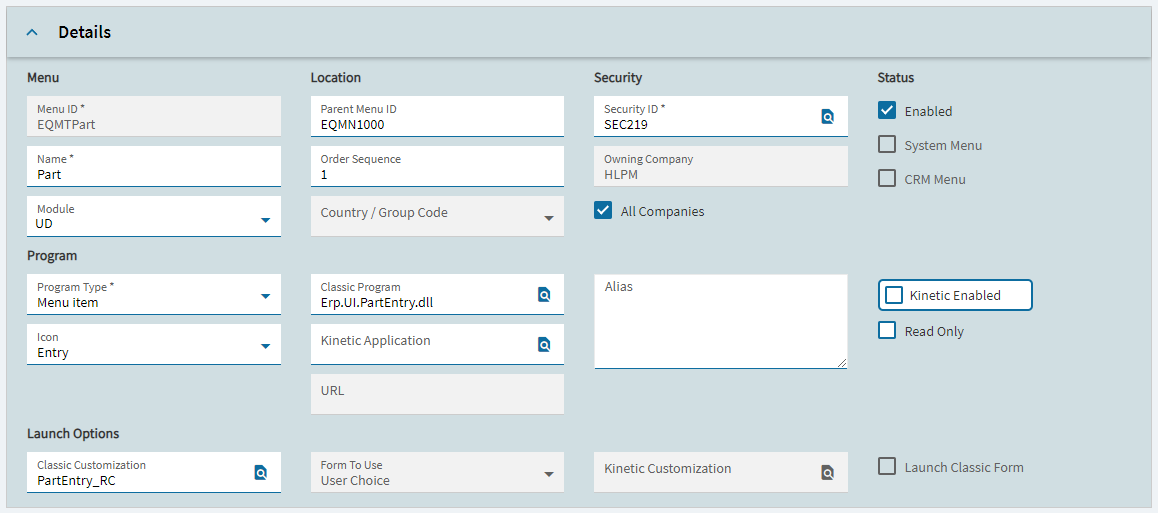
I made a new menu item pointing to Erp.UI.PartEntry (the classic form) and set the Classic Customization to one of ours, PartEntry_RC. When I launch it the classic screen comes up fine, but the customization just isn’t there. Base form every time.
The part that’s getting me is the customization itself is fine. If I turn on Developer Mode, open the form and pick PartEntry_RC manually, it loads exactly like it should. So it’s not a broken customization, it’s like the menu item isn’t handing it to the form at all.
Stuff I’ve already tried:
Closed/reopened Kinetic a bunch and cleared cache
Picked the customization from the search button instead of typing it, so it’s not a typo
Toggled Launch Classic Form on and off, no difference
Switched Form To Use between User Choice and Classic (had to check Kinetic Enabled to even get Classic as an option), no difference
Confirmed customizations aren’t globally disabled, other classic customizations apply fine elsewhere
Settings stick in Menu Maintenance between tests, nothing’s reverting
What’s really bugging me is that nothing I change on the menu changes what happens. Doesn’t matter what I set it to, I get the base form. Feels like the launcher isn’t even reading the customization off the menu, but I’m out of ideas.
So, has anyone gotten a classic customization to apply from a menu item in 2025.2? Known bug, or am I missing something obvious? Open to anything at this point. TIA.
It’s some conversion to save customizations to DB or something like that, I’m not saying it’s warranted and I’m not saying it won’t cause other issues with other layers all of a sudden. You could ask support. Would def try in test environment first.
That is how the menu is currently set up. I have tried every combination of settings for Kinetic Enabled, Launch Classic Form, Form To Use, etc. Each time it just brings up the base, not the customized one.
I have tried everything suggested here, to no avail. In the end I think it was related to a different Base Layer being used in E10 (I have never used base layers..just created the customization on top of the default menu)…I noticed that the URL field in Menu Maintenance had stuff in it that the others didn’t have.
So, I rebuilt the customization on the stock base layer and applied that, and it is working as expected now. Luckily it was a very easy customization.