I am looking for some clarification on the ACH CTX Addenda format. Hoping someone can help. We are using the CTX Addenda record and adding the APTran.Description which isn’t included in the standard Payment_US_ACH_Domestic.
I want to include the yellow highlighted fields in the CTX Addenda record for each Invoice Payment.
Should my Addenda record look like example 1 or 2?
My confusion is when to use the \ separator. I know it needs to be at the end of each line. But in example 2 there is a \ in between the Invoice number and Description for the same line.
example 1:
example 2:
Typically it’s example 1 for domestic payments and example 3 for IAT international payments.
Neither looks like your format though. I do a LOT of these with a bunch of different (Canadian) formats, and I have never seen any file formatted like yours.
I suggest you get the PDF file that describes the format from your bank, and go from there. ACH094 is a fixed-length records format, so you need to pad/truncate your fields left or right with spaces or zeroes.
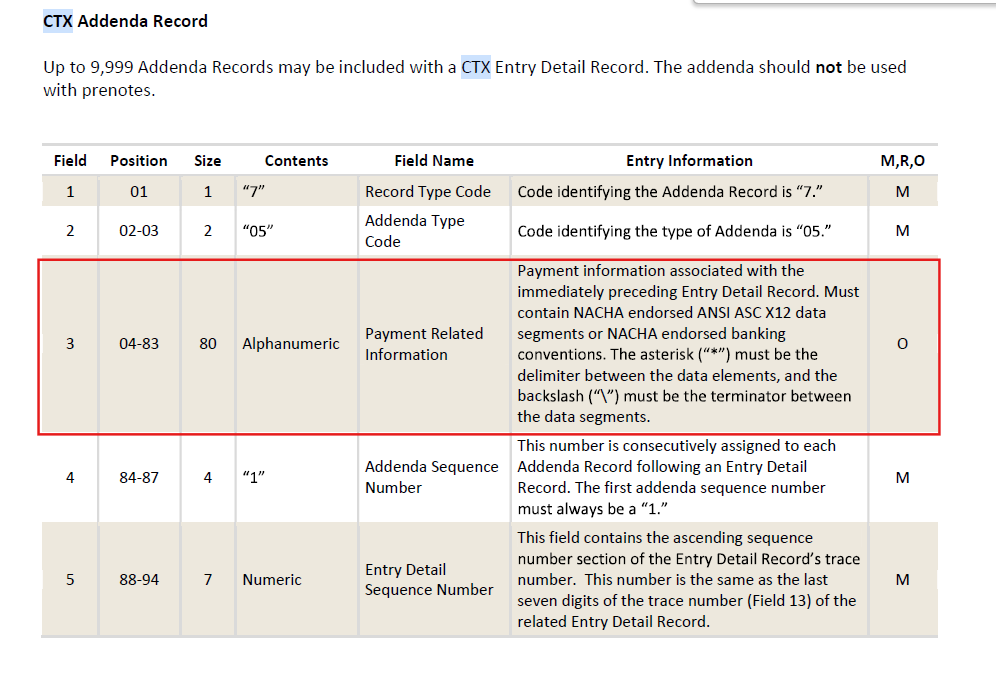
Thanks but I do have a pdf from the bank. My example is only one record in the file which is the CTX Addenda record. We are using the Payment_US_ACH_Domestic.cs program in Epicor. My question is in a field that is 80 characters for Payment Related Information so can contain various data. Positions 04-83 in the screen shot from my bank PDF.
So according to that you pack your elements inside the field with asterisks, and then pad the field with spaces to the right up to 80 characters length:
705ELEMENT1*ELEMENT2*ELEMENT3\ 0001...
You can see how that works with the 716 addenda in example 3 of the link I posted.
I must confess I have given up on trying to get the Epicor NACHA to work with banks. These days companies change banks like changing sox.
I have found that most banks have a Payment Portal that allows uploading Excel,CSV,Etc files.
So I use a BAQ to create the fields for whatever the “Bank of the Day” is and format the fields. Example one bank wanted the dollar amount with 3 decimals, no tri-state indicator - commas and the supplier name limited to 43 characters with no commas.
I still use the Epicor system, although I no longer use the “stock” .cs files. Instead I wrote a “universal” electronic interface that offloads file creation to a UBAQ. The code in the .cs file calls the UBAQ through REST using parameters passed through from the Payment Method through electronic interface properties. This way we only got one .cs file to upload everywhere, and one UBAQ to which we add modes to. Each “mode” is a file format, for example ACP005, ACH094IAT, ISO20022, etc… Each mode has a matching GetList BPM in the UBAQ, and each BPM is responsible for building file lines. The generated lines are returned to the electronic interface code, and then that code can remove accents or special characters as needed, write the file with the chosen encoding (ANSI, UTF8, UTF8-BOM, etc).
So instead of having to manage a million versions of a million different .cs files, we only have one .cs file, and one UBAQ to keep updated. It has dramatically helped, because before that managing EFT for all our customers was a giant clusterf**k…