Hello. I am currently attempting to add part images into our Job Traveler. I have been messing around with Report Data Definition and Report Style Maintenance for days on end now and seem to be getting nowhere.
I’ve uploaded a couple of test photos to part records in Part Maintenance… that part was simple. However, I can’t seem to get the relationships between tables correct or tie it to the actual Job Traveler to display the image.
We’re using an older version of Epicor… 10.2.600.11, and this seems to cause the setup to be different than that of other threads I’ve seen regarding this.
I guess my question is, has anyone done this and know how to get the result I’m looking for?
We are doing something similar but on our quote form. We show an image of the part. We aren’t storing the image in Epicor. We pull the image from a network path. We store the base path in a UD field on plant.
This is wonderful! I will test this as soon as I can,
This may be a silly question… I have never had to edit an already existing report. Once I get to the part where I add an image to the report, and set the MIME type, where do I do this? I see a lot of talk about Microsoft Report Builder or Visual Studio. Must I do it with one of these?
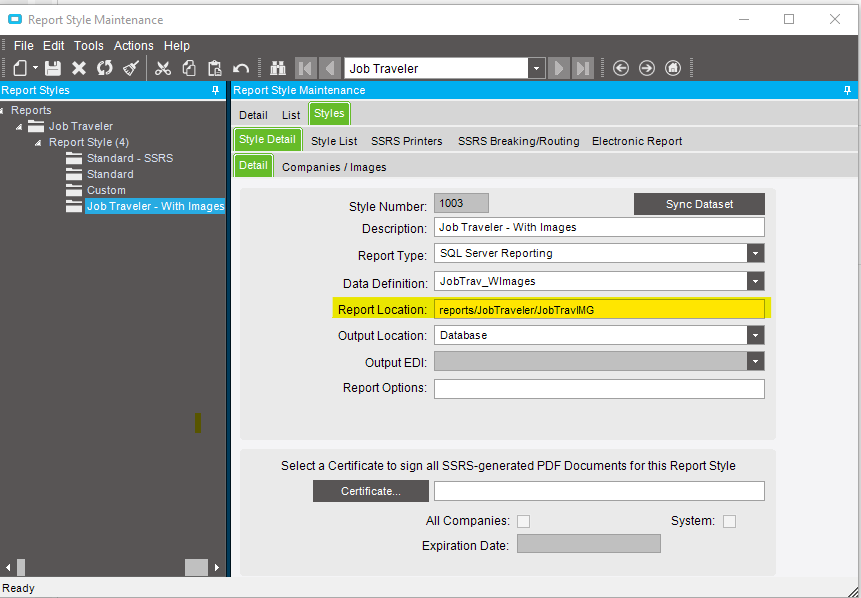
On to the next hurdle… I’ve got the report customized, however when I want to test print Epicor just thinks and can’t identify a printer. I’m wondering if this has something to do with my file path? Here is what I have:
I’m not sure what I’m doing wrong here? I tried having our plant manager upload this to our Epicor server but that did not seem to work either! I can’t imagine what else would be preventing Epicor from identifying the report and allowing a print/print preview…