loop through the Plants associated to a Part and get all of the Warehouses.
If Part and Warehouse aren’t associated, create the relationship.
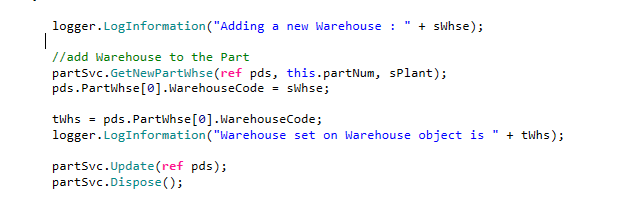
But the Update method fails with error “Warehouse is required”. I’m quite stumped on what’s missing?
I created a Part service and set ds PartTableset.
Then I called the method GetNewPartWhse
Set the one field that is required WarehouseCode
Then tried to update the object it errors with “Warehouse is required.”
I verified required fields (Company, Part, Plant, Warehouse Code) are set on the pds.PartWhse.
ANY ideas on how else to root cause this issue? The trace does show at Erp.Services.BO.PartSvc.Update(PartTableset& ds) in C:_releases\ERP\ERP12.1.100.10\Source\Server\Services\BO\Part\Part.Designer.cs:line 6365
I was trying to use a Function instead and in theory should be able to. I’ll have to rewrite the BPM looping through Plants/Warehouses to dynamically set the values. The BPM is hardcoded.
Are you sure you’re getting a new row with RowMod = “A”? I have a function that does the same thing (albeit using mostly widgets ). In between the GetNewPartWhse and Update calls I have the following:
var addedRow = dsPart.PartWhse.FirstOrDefault(partWH => partWH.Added());

if(addedRow == null)
{
    throw new Ice.BLException("Added row not found.");
}

addedRow.WarehouseCode = warehouse;
// CALL PART SERVICE
this.CallService<Erp.Contracts.PartSvcContract>(pc => {

  // define ds
  Erp.Tablesets.PartTableset tsPart = new Erp.Tablesets.PartTableset();

  // get part ds
  tsPart = pc.GetByID("YourPartNo");

  // add new partwhse
  pc.GetNewPartWhse(ref tsPart, "YourPartNo", "YourPlant");

  // set new whse
  tsPart.PartWhse[tsPart.PartWhse.Count-1].WarehouseCode = "YourWarehouseCode";

  // save
  pc.Update(ref tsPart);

// END CALL PART SERVICE
});
 ). In between the GetNewPartWhse and Update calls I have the following: