I almost have it working how i need, but when i update my UD table, i call the event type “erp-baq: get” to refresh the grids, but my default view option isn’t loading properly. basically, my BAQ has all of a thing in it, but i only want it to show the open records unless someone chooses the “resolved” view options. It works great when you fist open the page, it chooses the default view option. but when it is refreshed by my event, it shows all records even though, it says it should be displaying only the open ones.
now, am i doing the correct event type to refresh my grids? or how do i make the default view option apply?
Can you give screenshots with how you have the grid setup?
I’ve ran into a bug where the client filters in views are combined as you switch between them, which could be what you’re having a problem with. For example, if I had a view for open jobs (JobClosed = 0) and closed (JobClosed = 1), Epicor will AND the filters as I switch views.
So first run would filter with JobClosed = 0. Swap the view and I got JobClosed = 0 AND JobClosed = 1. Swap again, JobClosed = 0 AND JobClosed = 1 AND JobClosed = 0. So anything after the first run returned all data.
There are a lot of posts (and confusion) surrounding refreshing grids and things may be changing “under the hood” as “Kinetic” has evolved over time.
Below is a good example of such a post that may be helpful:
I think the uncertainty is based on how the grid is being populated.
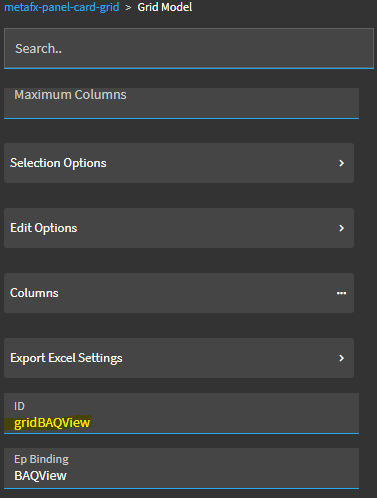
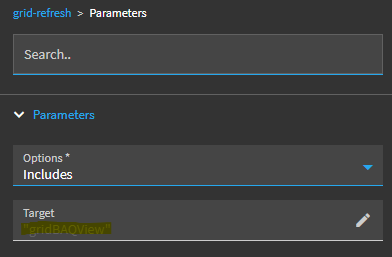
The grid could be populated by the grid’sProvider Model calling a BAQ. In this case, I would first attempt to use a Grid-Refresh event action. You need to make sure your grid has an ID, and then call out that gridID in the grid-refresh action.
I’ve also seen posts where users have noted that refreshing the grid doesn’t necessarily force the grid to rerun the BAQ. They’ve gotten around this by using a property-set to set the grid’s Invalidated property to “true” which then triggers the Provider Model to call the BAQ.
The grid could be populated by a bound dataview which is set in the Grid Model properties. In this case, I would first attempt the Kinetic-BAQ event action to refresh the dataview, the grid should pick up those changes.
~*~
The problem, I think, may come from having a “mixed” setup. A grid that is set up to use the Provider Model as the primary “source of truth”… the grid is tied to a dataview… then you use an erp-BAQ event which updates the dataview… but the grid may be still treating the Provider Model as the source of truth and isn’t reapplying your View Options.
I would try swapping out your erp-baq (kinetic-baq) event action with a grid-refresh action and see if (A) your grid refreshes… and (B) your View Options are then honored after the refresh.
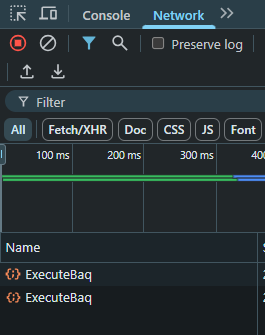
I just set this up real quick on a button click event… but the key is, when your event fires, you should be able to see the ExecuteBAQ in your debugger/network tab:
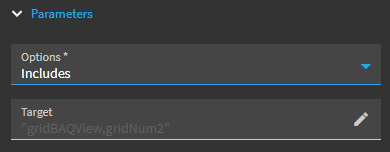
ah, ok that was what i was trying to figure out, if i needed to give my grid a ID. i will try that and see how it goes. can you make 2 grids refresh in the save event or would you do 2 different ones?
yes they are, it was just i was calling the wrong type of event. thanks for your help on this thread and the other one. i had been trying to make this dashboard for a bit and was struggling with how to update the UD table for awhile.



 thanks so much for the help