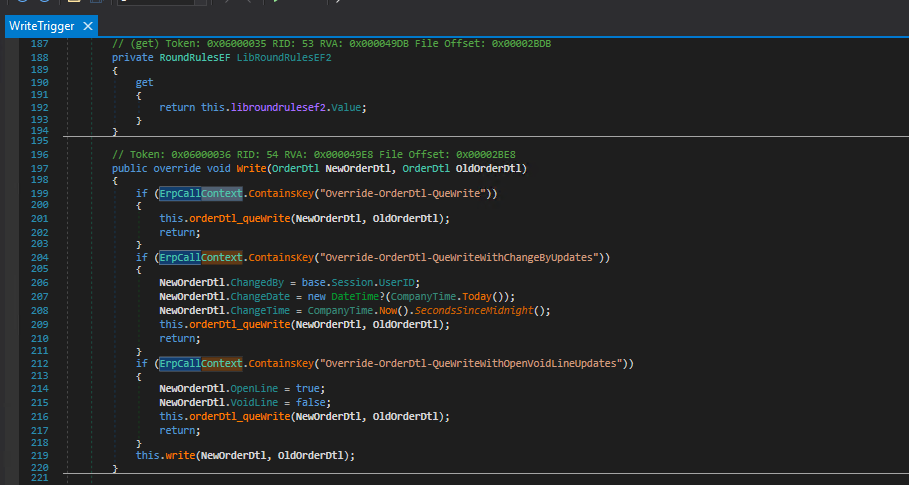
What is this wizardry? Why have I not seen this before?
Holding out I see.

What is this wizardry? Why have I not seen this before?
Holding out I see.
I have kept this one close to the vest for a long time, cause Epicor uses it internally and if you put the “wrong” value in the key you can cause all sorts of fun fireworks.
But this is the mechanism by which Epicor sends “extra info” along in their calls. For example in that same OrderDtl Write Trigger. Epicor looks for these keys, do do some “special” behavior
So Peter Parker rules apply. The Life TIme of the ERPCallContext is a Single Session I believe.
I have used, grudgingly, environment variables for this, when the call context failed me, but this will be a welcome addition to my tool chest.
Just don’t forget to remove the keys.
If the keys are truly unique, and the lifecycle is short, does it truly matter?
Wondering if I am misunderstanding.
The keys are unique, but you can override one of theirs, or add one with the “wrong” name at the right time.
And there isn’t a list anywhere. here’s a fun one if you use PCID, it stops PCID logic from firing when the PartTran updates (useful) / dangerous
ErpCallContext.Add($"SkipUpdatePackageControl-PartTran-{partTran.SysRowID}");
ErpCallContext.Add($"SkipUpdatePartAlloc-PartTran-{partTran.SysRowID}");
Db.Validate(partTran);
ErpCallContext.RemoveValue($"SkipUpdatePackageControl-PartTran-{partTran.SysRowID}");
ErpCallContext.RemoveValue($"SkipUpdatePartAlloc-PartTran-{partTran.SysRowID}");
droppin state secrets a like a Friday News Dump
Bookmarked! Thanks @josecgomez and @jkane
Although, I have found that we get a lot of mistyped entries too. 
If you wanted to STOP this behavior, we could write a bpm to check if it exists before update, and if it doesn’t, just clear it.
If anyone comes across this little gem  , I had to make one change.
this.ttCustXPrt.FirstOrDefault().PartDescription
to
this.ttCustXPrt[0].PartDescription