Yes, use the property set widget instead of the row-update widget.
While this does update the value displayed on the screen nicely (with the breaks!) it does not save, even when I click save. If I manually click in the line comments and edit after doing my file insert, then I can add some text, and then save it. It’s like the save button doesn’t respond until I manually make a change to the text.
nice! what do we think is the finding here? epbinding from a dataview drops the line feeds, but property-set from same dataview does not?
1 Like
We might have to walk through your full use case so I can understand what you want to happen. My full use case is when someone is putting in info and they say there are n buildings when n>1, I run a function to generate the template of
Building 1
Building 2
Building n
So they can fill out the details of the buildings. I have the text area bound to the field I want to save the info in, but I never really tried just saving the record directly after the function response filled it. I suppose you could try doing a row-update and then a property set, but I’m not sure if that would do it correctly or not.
To be clear, row-update to save actionResult.functionresponse to yourdataview.yourfield, then property set to set value equal to yourdataview.yourfield
Check out the thread: Add File to Line Comments in PO Entry - Kinetic ERP - Epicor User Help Forum
Basically, my users used to right-click to add a file to the comment fields. In Epicor’s infinite wisdom, they decided we don’t need that feature and removed it in Kinetic. I am just trying to bring it back. I don’t want to get into all the right-click complexities, so I am just triggering based on a button.
I have tried placing the row update before and after the property set, but neither work. The property set, shows the data perfectly with line breaks, but as soon as I process the row-update, the data reverts back to not having any line breaks, not even the original one in the text.
2 Likes
inquiring minds wanna know, is the row-update dropping the line feeds on the way to dataview or the epbinding dropping on the way back
EDIT: neither, use Value prop rather than Expression on row-update
2 Likes
I am not sure how to find out. Here is what I can show. For property-set, The Prop is value and the Value is “{PODetail.CommentText} {actionResult.OutText}”
For row-update,
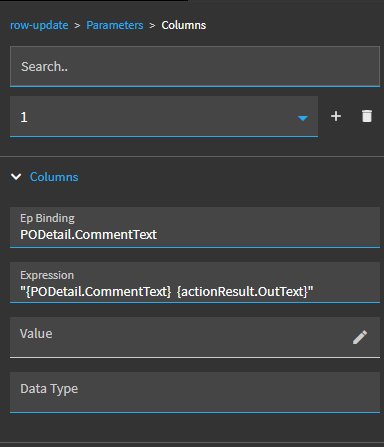
What can I do to answer your question?
Oh I can see \r\n in the OutText in my dev tools from my AddFile function response.
Ohh I got it! I have property set first, then row update. I moved the expression to the value instead and it seems to be working!
3 Likes
Write up a Wiki and reap all the praise for resolving this issue finally.

2 Likes
If I felt like I understood at all what I just did, I could confidently write it up. Since I barely have a grasp on this, I will let others glean what they can from my notes. Sorry others…
2 Likes
makes sense I think. silly me told you in your other thread to try Expression cuz json validator on Value doesn’t like the #_ tokens but turns out they’re not needed. maybe.
I wonder if that’s the fix and you don’t need property-set(?)
2 Likes
YES! Property set not needed! I just removed it and left the rowupdate in there. Still working correctly! Thank you!
3 Likes
Right cuz new value bubbles up from data view via epbinding. We all learned something on this one. Thanks!


Seriously though, every time I think I learn something in Kinetic, it turns out to be a hack or a workaround. This feels kind of like a proper solution. IDK why Epicor wouldn’t just bring over the add file feature from classic.
2 Likes
1 Like
TBH, I’d much rather have these text blobs kept in a UD code and expanded on the fly. If the file isn’t kept in a central location, you’ll have a hard time updating notes for consistency.
This is even worse if they are local copies as when people move to a new machine, the notes may note move with them. With UDCodes, you could add some instance logic to act differently when in Pilot for example.