Application Studio dependent dataview

This might be a basic question but the answer has been eluding me for a while. I want to put a shape on the OrderHed screen whenever I there is one or more OrderRels without a ReqDate (ship by date). The same is called “Unscheduled Releases”.

It seems that I should be able to calculate this without any additional calls due to the initial GetByID call which returns all the OrderRels. However, it appears I’ll have to make an additional function, Rest, or BAQ call to figure this out.

I started with a BAQ and have a custom AfterGetByID event that calls next-event (CheckOrderRelReqDate) which calls the BAQ. My first problem is that the BAQ has one parameeter (OrderNum) but I can’t seem to pass OrderHed.OrderNum from the main AfterGetByID to the next-event (CheckOrderRelReqDate) event.

Am I even close on how to do this? I’d hate to resort to yet another BPM and UD field on OrderHed, but I will if I have to.

Since you’ve got all the OrderRels from the GetByID, you are correct that you should be able to calculate this without additional calls. You can contain the logic entirely within the AppStudio layer.

Let’s re-use the existing TransView DataView for this.
You can add fields to a dataview just by using a row-update on it, if you row-update a field that isn’t there, it will make it.
Shape: should be EpBinding’d to a TransView field like TransView.MyShapeName. Should not be set to hidden.
Event: AfterGetByID should do this: “walk through all OrderRel rows. If any of them have a null or empty ReqDate, set TransView.ReqDateMissing = true” - we will need to split this into two tasks. 1: Walk through all OrderRel rows. 2: the rest
DataRule: “If TransView.ReqDateMissing = false, set field SettingStyle.Invisible for TransView.MyShapeName”

Event: AfterGetByID Setup (Trigger: Event, After, GetByID)

  • row-update: TransView.ReqDateMissing = false (set it to false as a default, because we don’t want the shape to show up unless one is missing = true)
  • dataview-condition: Dataview: OrderRel, Result: matches, Expression: (blank), Iterative Event: CheckForMissingReqDate

Event: CheckForMissingReqDate Setup: Trigger: None

condition: Expression: "{matches.ReqDate}" === "undefined" || "{matches.ReqDate}" === ""
true->:
row-update: EpBinding: TransView.ReqDateMissing, Value: true

DataRule:

Action Data View: TransView
Condition: DataView: TransView, Field: ReqDateMissing, Operator: =, Value/Field: Value, Value: false
Action: SettingStyle.Invisible
Field: MyShapeName

In summary, add 2 fields to an existing dataview (dynamically at runtime using row-update, not manually in the DataView screen). EpBind one field to your shape, this field controls it’s visibility. The other field is used to store a true/false to determine if we want to show or hide it. The AfterGetByID Event sends a copy of each OrderRel row, one by one, to the CheckForMissingReqDate event. (the copy is stored in a DataView called matches, which you are never manually creating, and only exists for the moment that the CheckForMissingReqDate event fires, after which it is destroyed (and re-created for the next row until all rows are processed)) The CheckForMissingReqDate event looks at each row for a missing ReqDate. If any one of the rows have a missing ReqDate, the true/false field gets set true. The Data Rule hides the shape if false (all rows have a req date)

2 Likes

I’m not sure this is working. The iteration only runs once. I’m sure there are two OrderRel rows but the OrderRel dataview only ever seems to have one of them at a time. I’m starting to think this is not possible.

Also, why couldn’t I just put the Expression on the first dataview-condition and just test the none, one, or multiple results? I’m not sure why the iteration is necessary.

Thank you!

Part of my problem was that apparently there’s a built-in event that uses “matches”. When I changed it to something else, I got multiple calls to the iterative event.

2 Likes

First question - Why Iterate?
We want to check all OrderRels, and show the shape if one or more have a missing ReqDate, so need to iterate to check all rows.

Assuming you have all the OrderRels may be both correct and incorrect at the same time, and the iteration is occurring as expected, but there is only one row available to us. See below:

Use Dev Tools to check, F12, console, epDebug.setDebugStatus(true), epDebug.views

When I open Order Entry, on an order with Line 1, release 1, Line 2, Releases 1 and 2, in the OrderRel DataView I only see line1/rel1. I do not see Line2/Rel1 or Line2/Rel2.
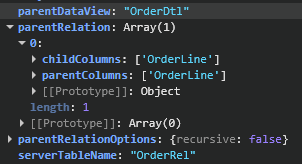
OrderEntry is making a GetByID call, pulling in the full OrderHead/Line/Rel DataSet, however is doing some in-memory filtering, so this is why OrderRel is not available when you look at epDebug.views.
If you look at the set up of the DataView in Dev Tools, it is set up parent/child, so since the PO loads the header, and line 1, you only see the releases associated to line 1 (even though they are loaded in memory, just filtered out):

So, let’s not try to use the out of box DataView at all, as we don’t want to make any changes there, which would likely break the set up of Order Entry.

Instead, let’s make a new dataview, call it “MyOrderRel” or similar. The only thing you should change from default us to uncheck the “Dirty Rows” checkbox, and give it a name.

Now, in your AfterGetByID, lets pull the data we want into that DataView.
Set up a kinetic-rest component, call Erp.BO.SalesOrderSvc/GetByID.
For parameter orderNum - {OrderHed.OrderNum}
In Kinetic REST Arguments - check “Process REST Response” box.
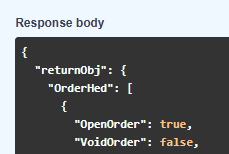
“Parse from Response Path” should be ‘returnObj’ - we know this because if we check REST API Help, Erp.BO.SalesOrderSvc - GetByID, “Try it out”, fill out the API Key, Company, and OrderNum, and Execute - we can see the response comes in the “returnObj” object:

in response parameters of your kinetic-rest component: (do not click DataSet button, if you do, delete the whole component and start over, this will cause a bug.)
Parameter Name: OrderRel
View Name: MyOrderRel
Merge Behavior: replace

now, your orderrel dataview will have the data you expect in it. Change the previous set up that walked through OrderRel/matches to instead walk through MyOrderRel/matches.
He’ll then need to keep it in sync with changes to be accurate.

2 Likes

I was hoping to avoid the extra call to the server but it’s looking like that’s not possible. I try going with the custom view, but I’ll use a BAQ to return the OrderRels without a ReqDate. That will cut down on the data and allow me to potentiallys how a list across all OrderDtl lines in the future.

Thanks for the help!