Note
I’m a bit long-winded here, since I find every bit of documentation helps. If you just want to see the error, it’s all at the end.
The beginning
Our development team decided that the quality and inspections process in Epicor needed an overhaul, so we’ve been making a handful of customizations based on ideas or concerns our quality team has regarding the functionality.
One of these concerns is that there is no way to see how the specifications will visually appear when an operator is inspecting until a job has been created. On top of this, since jobs are snapshots of the method, any change to a specification would have to wait until the next job is created. In order to avoid either a bunch of test jobs being created or having to make changes on the fly, the quality team posed the suggestion to have a preview button on the Specification app itself (I actually posted this on the Epicor Ideas Portal as well: Preview Window in Specification Entry | Epicor Ideas Portal).
I started building this out in Application Studio – since it would take at least another major release if the Epicor Idea caught on – and am now running into some issues with the Dynamic Panel functionality within Events.
The inspiration
My goal was to attempt to reverse engineer the same functionality that exists in the InspResultsEntry app, which our operators primarily access through Data Collection. When the Enter Results button is pressed, it pulls up a grid where the operators can enter the results for the whole set.
However, with the 2025.2 update, there is now a button that allows you to open a “Dynamic Panel” form with each item as its own form.
This is the functionality I wanted to replicate, and after some investigating using Epicor’s debugging menu, I found how everything was formatted and started on the next step.
The customization
The actual background functionality of the customization is rather simple. I created a function that looks at the current specification, gets all of the specification attributes, and formats them as JSON (dynamic panel’s preferred format (allegedly)). I had to get a bit specific with certain field types, but after plenty of experimentation, I was able to return a value that matched the values used in InspResultsEntry (except for the GUIDS, just in case that’s important).
The second half of the customization should also be simple in theory. A button in the Revisions card of the Specification app that would call the function with the selected specification and revision and return the JSON object to the dynamic panel. Seemed simple enough.
The error
At this point I noticed something different about the dynamic panel within InspResultsEntry. The ResultsEntry.EnterResultsPanelTool event in Application Studio did a row-update, setting a TransView.DynamicFileContents field to the value of InspPlanSampleLst.SpecRevDynamicPanelContents which made enough sense. But looking at the dynamic panel itself, there is nothing in the Components field where you would expect to see a field or value.
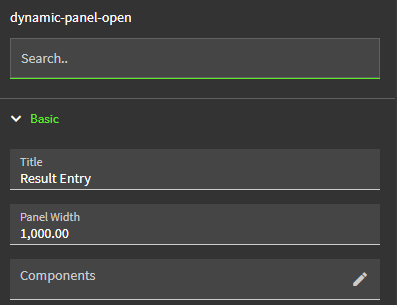
On the other hand, when I tried this same logic, I was met with a completely blank panel. I attempted to pass the parameter of
TransView.DynamicFileContents that held the result of my function, and even tried passing the function result directly to the function. Unfortunately, both of these were met with the error message, "Cannot assign to read only property '0' of string '{TransView.DynamicFileContents}'". This sounds like it’s trying to parse through the string name of the variable as an array instead of treating it like an actual variable.
I did try prepending it with question marks like some locations in Application Studio require, but to no avail.
I tried adding the raw JSON directly into the Components field, and it was able to render how I expected it (albeit as read-only, but I’ll cross that bridge when I get to it), but naturally that does not help in creating actual dynamic fields. I confirmed using the debug tool that TransView.DynamicFileContents is indeed a valid array of objects, but I have been unsuccessful in getting the panel to understand it.
The conclusion
At this point, I am unable to get the dynamic panel to respond to anything other than direct JSON. I need it to be able to read a dynamically created string in some way in order to complete this functionality. What step am I missing compared to InspResultsEntry? Is there something I’m missing in this development? Or is this simply not a feature this logic was designed for?