Application Studio Grid Client Filter by CurrentUser?

I am going in circles… is it even possible to setup a Grid’s Client Filter by CurrentUser?
I’ve tried so many different types of syntax to try to do this and it is completely eluding me.
I really miss the way classic did this with CallContextClient and Global Variables.

In the Client Filter I would like to have something like:
Calculated_UserFilter = = ‘{CallContextClientData.CurrentUserID}’

But different iterations I try just don’t do anything.
Thanks!

2 Likes

For client-side expression try %session.context.user%

If you need other user fields you can call userfile like so

1 Like

that didn’t work either… all records still display:

I really wish there was proper documentation on this.
I did test setting the filter to my userId statically, and it works as it should as I do have some records in the dataset that match to my userID:
Calculated_UserFilter = ‘Rick.Bird’

I would do it on the BAQ but in this dashboard we have 1 BAQ that we are filtering status & ownership across multiple cards, I really want to keep it to just one BAQ… and something like this should be dobable.
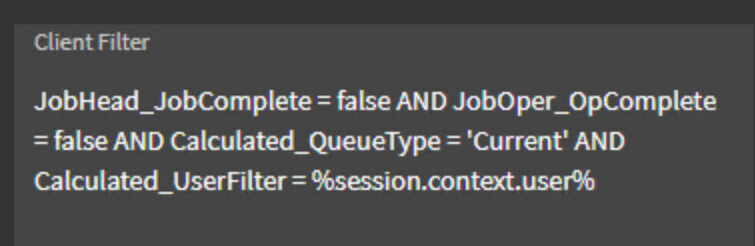
1 Like

Yeah real docs would be nice. Here’s a start:AppStudio - Expression Patterns

Perhaps the client filter property doesn’t evaluate expressions like others. Try in Where value or Where List value properties.

EDIT: oh and add single quotes around the expression.

Tuesday Bump!
Has anyone else determined how to use Session or CallClientContext Variables in an App Studio Grid’s Client Filter
(or the DataView Where Clause)??

1 Like

I had to find an example to play with… but this is the Client Filter in a grid Provider Model:

Have you tried using Constant.CurrentUserID ?

Without Filter:

With Filter:

3 Likes

No, but what is that syntax? Enlighten me on how I would have come up with that?
I just don’t understand this syntax nor how someone would determine this is what to type in here.

Best explanation on the syntax: