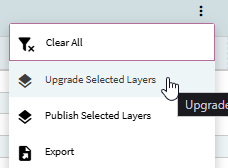
I am trying to make some updates to some Application Studio layers, and sometimes when I publish changes they are not showing in the live pages. If I go to Application Studio I can see those changes in the layer still. Potential contributing factors:
This is in our THIRD or Test database, we are trying to go live and wrapping some final stuff
We recently did a data wipe and restored many of these layers from Solutions
The user attempting to make the changes is not the original layer creator
What I have done as a work around:
I was able to create a new layer from that layer, the changes traveled to that new layer, then I published that layer and updated the menu to reflect the new layer.
I have ran into this many times even on my own layers. Sometimes publishing from the app studio landing page works when publishing from within the layer doesn’t. Sometimes it shows an error there even though it doesn’t show an error when publishing in the layer. Sometimes the layer has gotten marked system and I have to get a data fix from support. Another workaround, which is probably not any less work than what you came up with, is to export it, delete it, then reimport it again. As far as my thoughts?
I also export all layers via App Studio as a backup. I’ve had more than one get corrupted to the point I just had to reimport it from my backup directory.