Is there a way to create a “reusable” event rule in application studio?
I’ve found myself creating the same rule over and over again and have started to wonder if there is a more efficient way of implementing this.
As it stands, several BAQ dashboards require a date input which is evaluated against the where clause in the BAQ. Currently, I set the default values for the date picker component through a rule that is essentially → if CallContextBpmData.Date01 is empty, set it to something.
This works, but repeating this for every date component feels really inefficient. Is there a better way to approach this?
Just to clear up some potential terminology confusion. There are Events in application studio (the screen will have a series of widgets chained together) and there are Data Rules which is a different tab where you have conditions and actions for a rule.
I’m gonna assume you are working with events and not data rules and the answer is yes you can and should reuse the same event if it’s applicable multiple places. Set up your date filling event with no trigger, then anywhere you want to use it you can use an event-next widget and call the date filling event.
At the moment, I’m actually using Data Rules to evaluate the date picker component’s condition and set the value, as this is the only way I’ve managed to get it working.
I’m still learning the software so correct me if I’m wrong but, with a trigger event like that, it would have to be local to the application? I wouldn’t be able to reuse it on a different dashboard.
Originally, I tried creating a custom function via function maintenance and implement it that way, but couldn’t figure out a way to set the value on page load / initialization of the component. I figure this is because I need to do it after but could not find that as a trigger option. Any ideas?
So you have several dashboards that have BAQs that require a date input and you want to make sure that date is there when the dashboard loads and calls the baq the first time?
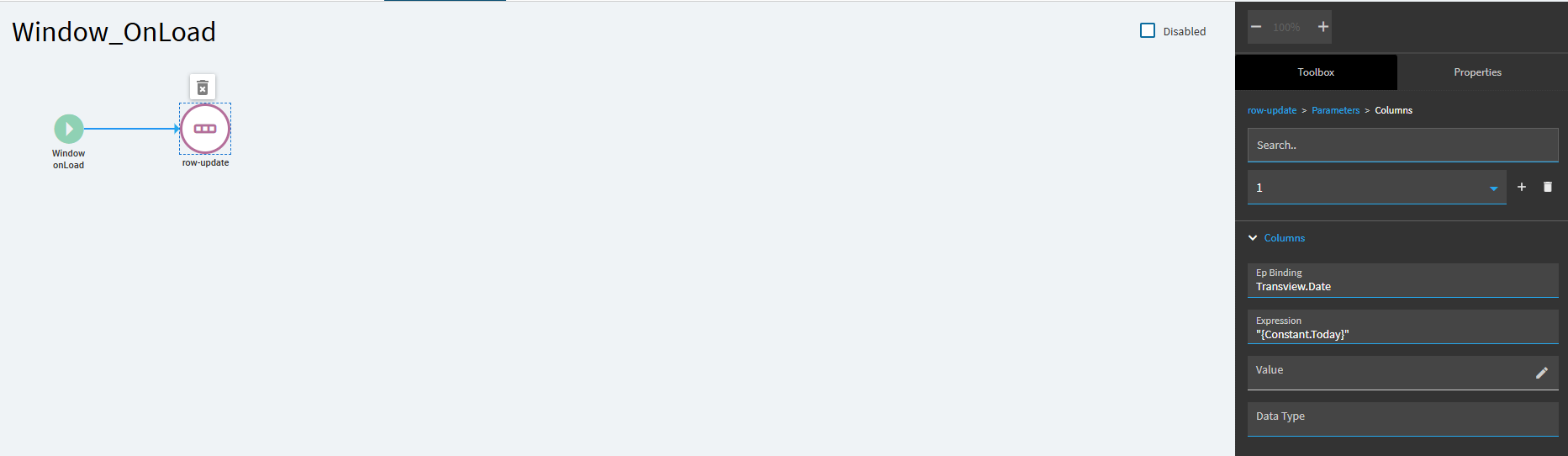
A function would work but feels like overkill. I would create an event that is triggered early in the window loading process, this will vary depending on how the dashboard is setup but if there’s not already an event like Form_onLoad or Window_onLoad you can create one with Window OnLoad as the trigger and then use a row-update widget to set your filter field to the current date.
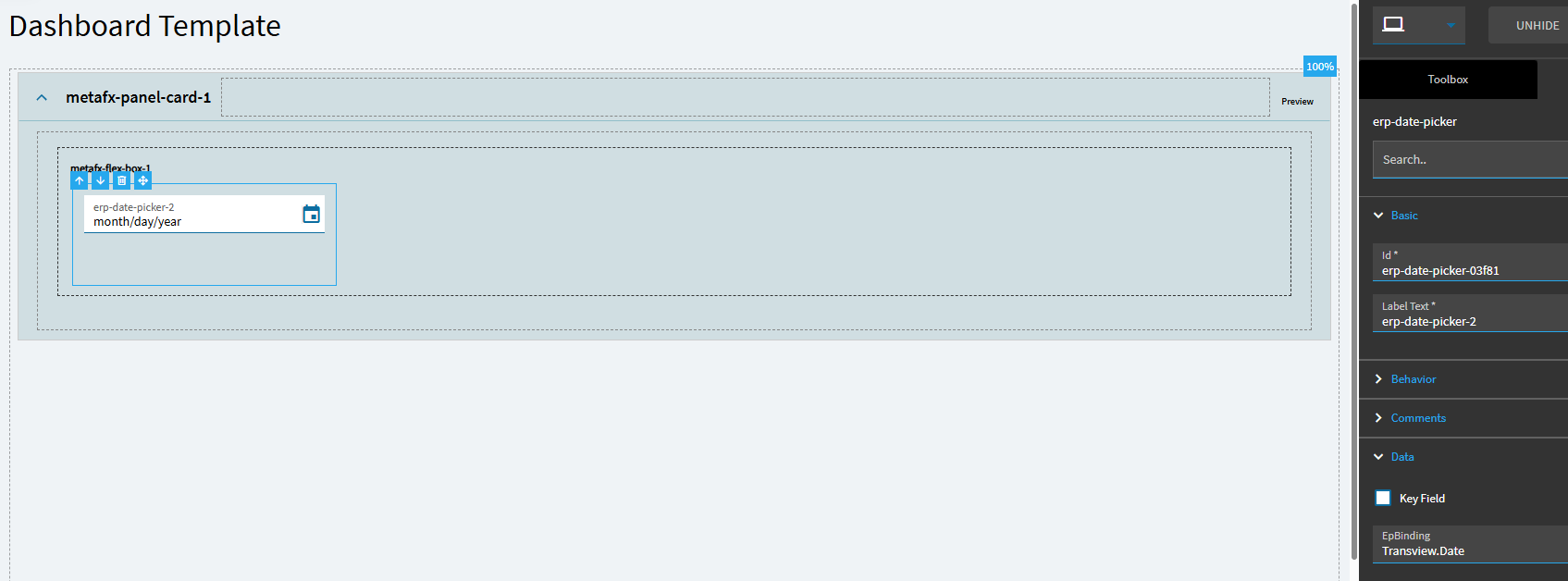
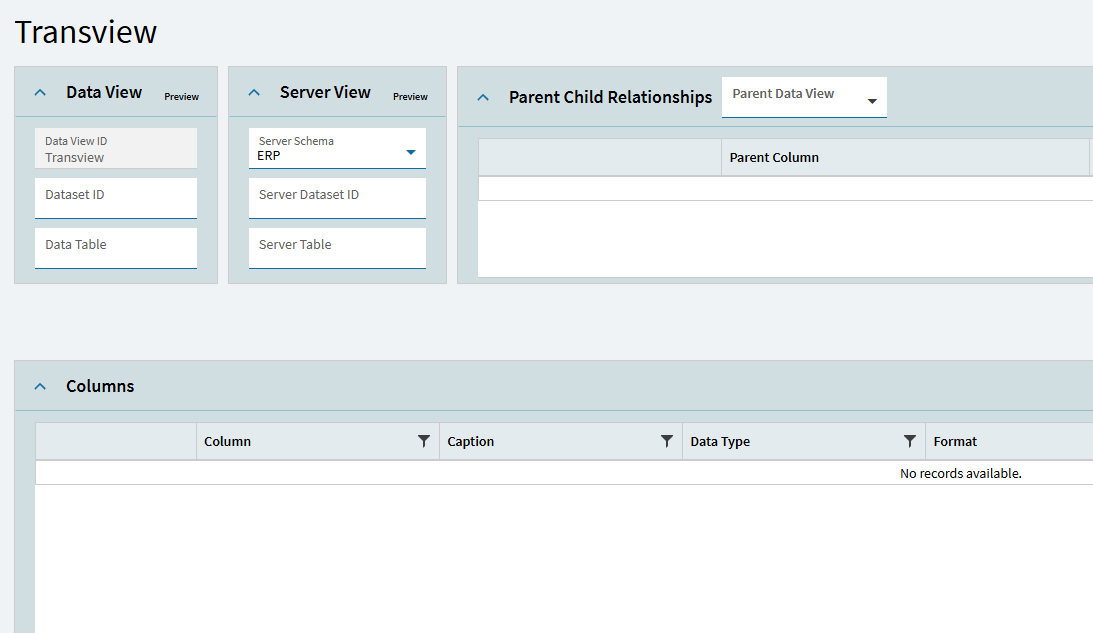
As an aside I would not use a callcontextbpmdata field as the binding for an on screen control because it’s not very durable. Everytime the browser does a keep alive message it resets those fields, they’re really only guaranteed to stay during a chain of calls. So if you set it as part of the save event, it will stay through a pre-processing bpm, the base process, and a post-processing bpm, but then it will be cleared. I’d make it a transview field if you don’t have something in an existing dataview to bind it to.
So you have several dashboards that have BAQs that require a date input and you want to make sure that date is there when the dashboard loads and calls the BAQ the first time?
That’s correct!
I’ve tried to implement the Windows_OnLoad event but for the life of me I can’t get it to work. No matter what I try, it just doesn’t populate the date picker component.
Here’s what I’ve tried:
Created a Window_OnLoad event → linked it to a SetDefaultDate event → tried row-update to set the value
Swapped out row-update with a property-set component
Tried using Component_OnLoad and AfterLoad events instead of Window_OnLoad
In some cases, there is a brief moment (like 1ms) where the field populates with the desired value but immediately gets cleared. I’ve checked to make sure nothing is overriding it and believe it’s down to the component not having completely loaded - I don’t suppose there is a delay-event component?
All of these just don’t seem to have the desired effect. The only way I’ve managed to get the field to populate is either through a manual button event or via Data Rules.
It’s a shame, I feel like it should be a simple process to set a default value for a component - why is this not a feature? I’ve seen a few posts floating around looking for ways to set a default value. It feels like a very convoluted approach.
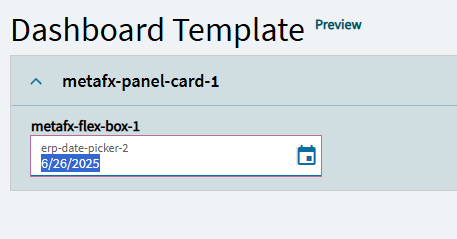
I think this is related to it being bound to the callcontextbpmdata field. Here’s what I put together and a quick example.
EDIT
As noted by @Zachariades below, these instructions work on a dashboard created without the app wizard, if you used the wizard you will need to trigger off of a different event.
I tested this out in a fresh dashboard and it worked like a charm, but when I tried to implement this in a dashboard created via the wizard it doesn’t work - the component becomes disabled / read-only and no date is populated.
Ticking Key Field on the component enables it again and allows me to enter data but it still doesn’t populate.
I checked the TransView table in debug mode with epDebug.views to see what data it’s holding and it has nothing.
I messed around with it a little more and finally got it working!!!
Instead of doing it on Windows_OnLoad, I had to do it on Event → After → Refresh_[tableview] (where table name is the name of the Data View that is automatically created by the application wizard).
I’ve marked your most recent reply as the solution but it might be worth mentioning the above for future viewers.
Thanks a lot of your help, Cory! I super appreciate the time and effort you put into helping me with the problem.
I’ve found that the app wizard isn’t usually helpful for the dashboards I’ve wanted to make so I’ve avoided it. I’m assuming the wizard created some of it’s own loading style events (form_onLoad maybe?) that conflict with a user defined windows_onLoad event. The more detail you can give on how you got to where you are, the easier it will be to get help on future questions.