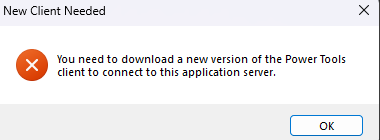
Has anyone been able to get their power tools client to successfully update from the deployment server? It’s not really helpful to manually update power tools each release.
I updated deploymentServer uri in the .sysconfig file as follows.
  <deploymentSettings>
    <!-- Enter the fully qualified path of your deployment server here.  Value is similar to "\\MNSonoma\Epicor\Epicor10000" -->
    <deploymentServer uri="\\server\ERP12.1.100.0Deployment" alt_uri="" />
    <deploymentType value="zip" options="xcopy|zip" />
    <deploymentPackage value="ReleaseClient.zip" />
...
  </deploymentSettings>
One benefit is the startup time. Power tools starts a lot faster. If I can’t update easily across all of our developers, then yes there’s no point and I’ll be going back to the full client.
Well maybe not. I went back and looked at the thread I was thinking of and nobody from epicor said it was going to be fixed. More fun things to look forward to in the first year of A.C. (after classic).
2 Likes
pferrington
(Bob Hidingski (formerly known as Patrick))
8
The Power Tools client does not support the auto update capability of the classic client. Its installer has been designed to support overwriting the existing client. A mechanism is coming in 2026.1 to make it quick and easy to get the latest power tools client and install it.