Relatively new to BAQ and I’m not having any luck with formatting integers as percent.
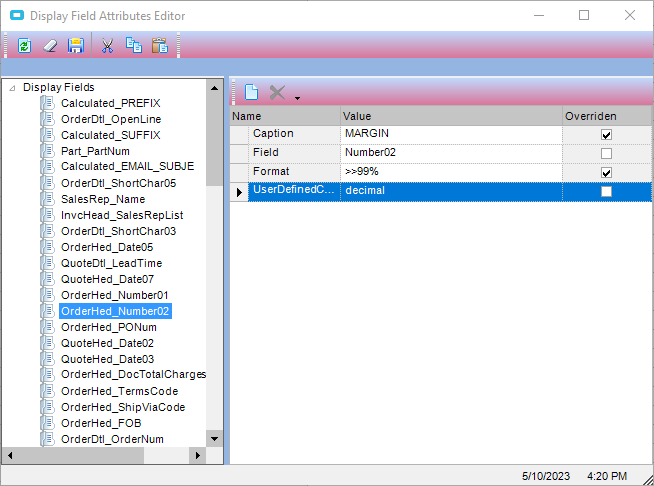
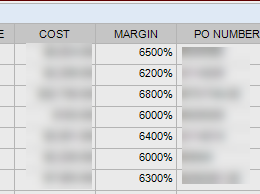
I used the Display Field Attributes Editor and tried variations of the syntax. I landed on >>99, but it doesn’t show the percent sign. If I enter >>99%, it adds two zeros. So, 2% is 200%, and 32% is 3200% etc. I’m missing the correct syntax. Thank you in advance!
Normally percentages are stored as a decimal/fraction, so 20% = .2, for example. If your values are stored as whole numbers, you will need to divide by 100.
If it were me, I would create a calculated field that references your Number02 field. Something like:
I tried your suggestion and got this error:
Severity: Error, Text: Input string was not in a correct format.Couldn’t store <65.00%> in Calculated_MARGIN Column. Expected type is Int32.
As a side note, I didn’t know that you could add % to the end and it would multiply by 100 and add the % sign. I needed this today, so that was a pleasant surprise.
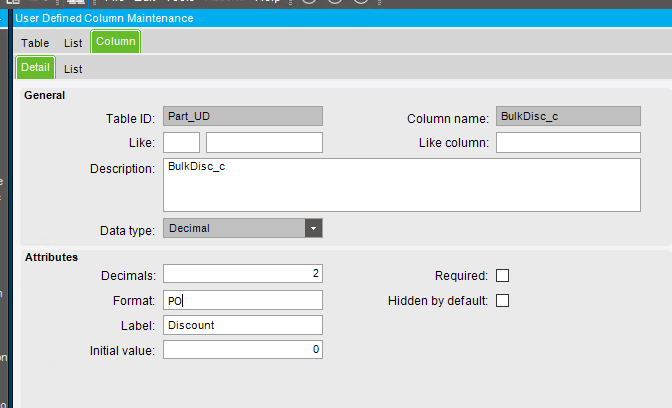
Hi There. Can you please help me? I believe your post is what I need but it’s not working as you mention. I have a UD field that I need it to be in porcentage. When I tried in format to put: >>99% it didn’t work, also it doesn’t work if I try to put format = PO.
Any thoughts? thanks a lot.
They are doing the formatting in the BAQ, not in the UD field. You will have to change the formatting where you are displaying it, not in the UD field.
In a new grid area I built in Part Module.
I would like to have user enter let’s say 10% and the table will convert it behind the scenes into 0.10. Is it possible?