Nah… don’t bother. I’ll just keep this offer for some of your time as an IOU. 
Alright, so I’m going to re-open this can of worms. I have a query that works great for an excel process, but I want to move it to bartender. Because of hiccups that I’m having in bartender, I need to make multiple rows in to a single row, so that I have a columns for the extra rows.
What I am trying to do is, add parameters for job1 job2 or job3. The underlying subqueries will use and or filter to get all of the jobs inputted. Then I want to bring that same subquery in 3 times, and filter each of them for only 1 of the jobs. Then make an our join on part number, so any parts that are shared between jobs show up on the same line. Otherwise, they just show in the columns specific to their subquery.
I just have 2 in here for testing
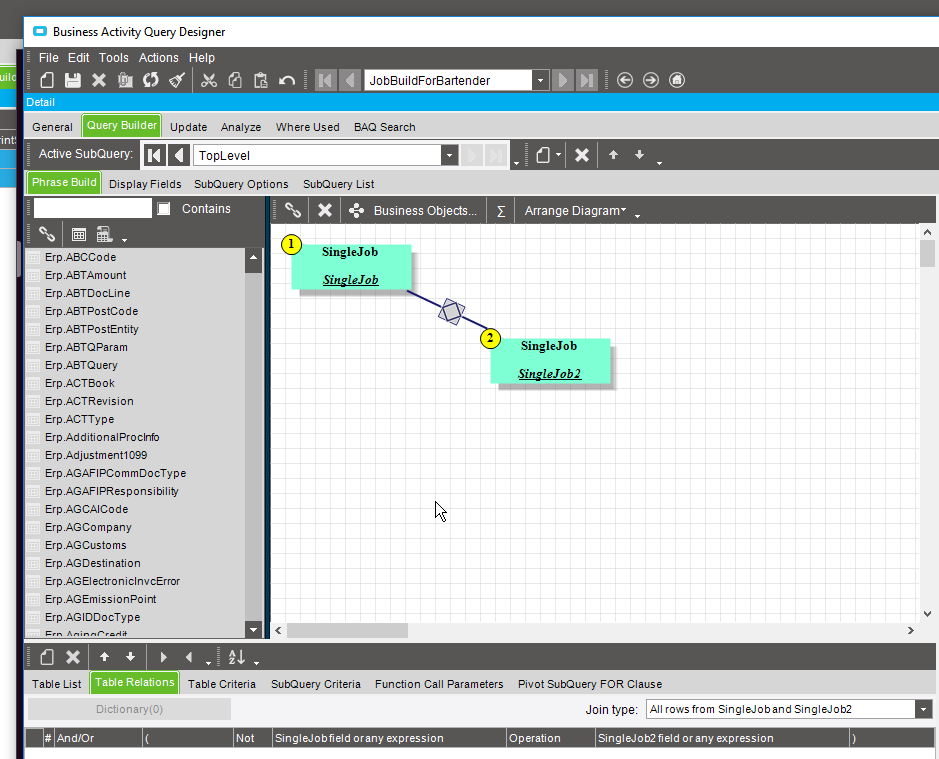
the problem is, only the first table shows up. The second table will only show up if it matches the first table. Like an left join. But I need both. In the screen shot, I have the the criteria in the sub query criteria tab. But I’ve tried it both there, and on the table criteria tab with the same results.
Do I have to bring in another layer so I can filter a later down to get this to work as true outer layers?
edit well, that’s what I did. It seems dumb and redundant, but whatever…
I ended up finding this thread because I had a BAQ where I needed at the Top Level query to filter out some some specific values in a field that also had nulls, but it ended up unintentionally excluding rows that had nulls in that field too.
In my case the solution for me was to, in the existing subquery, create a calculated field where I COALESCE(same table.field, ‘Does not matter here’). Then in the Top Level Query, add SubQuery criteria on that Calculated field to filter out what I wanted.
Hope this helps someone.