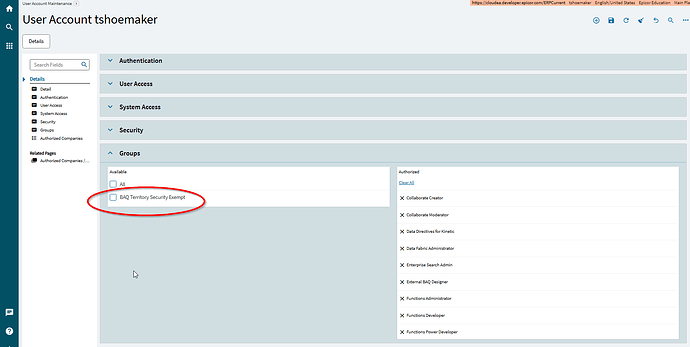
BAQ Performance Notification

Good morning,
I got an email from Epicor last week notifying me that two of my BAQs are long running and can affect system performance. They show a max and average time that is way higher than anything I regularly experience. I just went to try to optimize my BAQ, but it runs plenty fast. Is this a warning based on a test run that I might have done that took too long to respond?
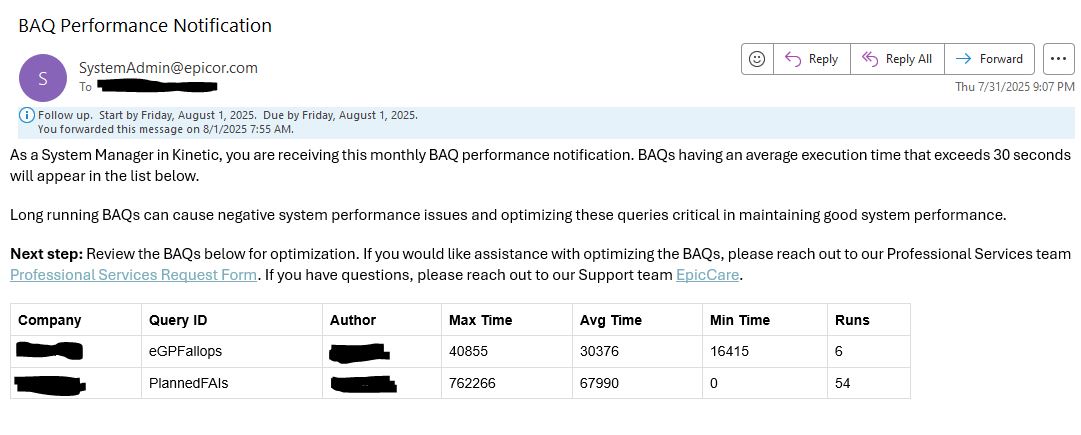
Do you see anything in this BAQ that looks wrong? I know I am pulling over a hundred thousand lines of part trans, but it still runs fast in my experience.

This BAQ is called Planned FAIs. The goal is to look ahead at the orders we have, and then look back at the part transactions. MFG transactions in the last 2 years mean that we do not need to do a new First Article Inspection, anything older than 2 years mean we do need the FAI. This attempts to look ahead and quantify the potential sales value of orders with upcoming FAIs. It does the job alright for now.

/*
 * Disclaimer!!!
 * This is not a real query being executed, but a simplified version for general vision.
 * Executing it with any other tool may produce a different result.
 */
 
select 
	[Orders].[OrderDtl_PartNum] as [OrderDtl_PartNum],
	[PartTransactions].[PartTran_RevisionNum] as [PartTran_RevisionNum],
	[Orders].[OrderDtl_UnitPrice] as [OrderDtl_UnitPrice],
	(sum(Orders.Calculated_Remain)) as [Calculated_RemainToShip],
	(Orders.OrderDtl_UnitPrice* RemainToShip) as [Calculated_RemainSOValue],
	(min(Orders.OrderRel_ReqDate)) as [Calculated_NextRelDate],
	[PartTransactions].[Calculated_LMD] as [Calculated_LMD],
	[PartTransactions].[Calculated_NeedFAI] as [Calculated_NeedFAI]
from  (select 
	[OrderHed].[Company] as [OrderHed_Company],
	[OrderDtl].[OrderNum] as [OrderDtl_OrderNum],
	[OrderDtl].[PartNum] as [OrderDtl_PartNum],
	[OrderDtl].[RevisionNum] as [OrderDtl_RevisionNum],
	[OrderRel].[ReqDate] as [OrderRel_ReqDate],
	[OrderRel].[OurReqQty] as [OrderRel_OurReqQty],
	(OrderRel.OurJobShippedQty+ OrderRel.OurStockShippedQty) as [Calculated_Shipped],
	(OrderRel.OurReqQty- Shipped) as [Calculated_Remain],
	[OrderDtl].[UnitPrice] as [OrderDtl_UnitPrice]
from Erp.OrderHed as OrderHed
inner join Erp.OrderDtl as OrderDtl on 
	OrderHed.Company = OrderDtl.Company
	and OrderHed.OrderNum = OrderDtl.OrderNum
	and ( OrderDtl.OpenLine = true  )

inner join Erp.OrderRel as OrderRel on 
	OrderDtl.Company = OrderRel.Company
	and OrderDtl.OrderNum = OrderRel.OrderNum
	and OrderDtl.OrderLine = OrderRel.OrderLine
	and ( OrderRel.OpenRelease = true  )

where (OrderHed.OpenOrder = true))  as Orders
left outer join  (select 
	[PartTran].[Company] as [PartTran_Company],
	[PartTran].[PartNum] as [PartTran_PartNum],
	[PartTran].[RevisionNum] as [PartTran_RevisionNum],
	(max(PartTran.TranDate)) as [Calculated_LMD],
	(iif(datediff(day, LMD, Constants.Today)>=730,1,0)) as [Calculated_NeedFAI]
from Erp.PartTran as PartTran
where (PartTran.TranType in ('MFG-CUS', 'MFG-STK'))
group by [PartTran].[Company],
	[PartTran].[PartNum],
	[PartTran].[RevisionNum])  as PartTransactions on 
	Orders.OrderHed_Company = PartTransactions.PartTran_Company
	and Orders.OrderDtl_PartNum = PartTransactions.PartTran_PartNum
	and Orders.OrderDtl_RevisionNum = PartTransactions.PartTran_RevisionNum
	and ( PartTransactions.Calculated_NeedFAI >= 1  )

where (PartTransactions.Calculated_NeedFAI = 1)

group by [Orders].[OrderDtl_PartNum],
	[PartTransactions].[PartTran_RevisionNum],
	[Orders].[OrderDtl_UnitPrice],
	[PartTransactions].[Calculated_LMD],
	[PartTransactions].[Calculated_NeedFAI]

PlannedFAIs.baq (44.2 KB)
1 Like

I use subqueries to reduce the number of records to a minimum and then add it the “extra” stuff. For example, try creating a subquery with just OrderDtl where the line is open and link to PartTran where the TranType is MFG-CUS or MFG-STK. Make sure to use the PartTran index in the join that starts with Company and Part. Run this first and see how long that takes. Next, use your open order to do your outer join to the subquery. Finally, add in your grouping.

I have found that outer joins, calculations in where clauses, and not prioritizing the tables by least number of records first can kill performance.

2 Likes

This is a new “Feature” no one requested @jgiese.wci found it a while back its all hard coded too which is kind of obnoxious. There’s a topic about it here on EpiUsers somewhere. looking

5 Likes

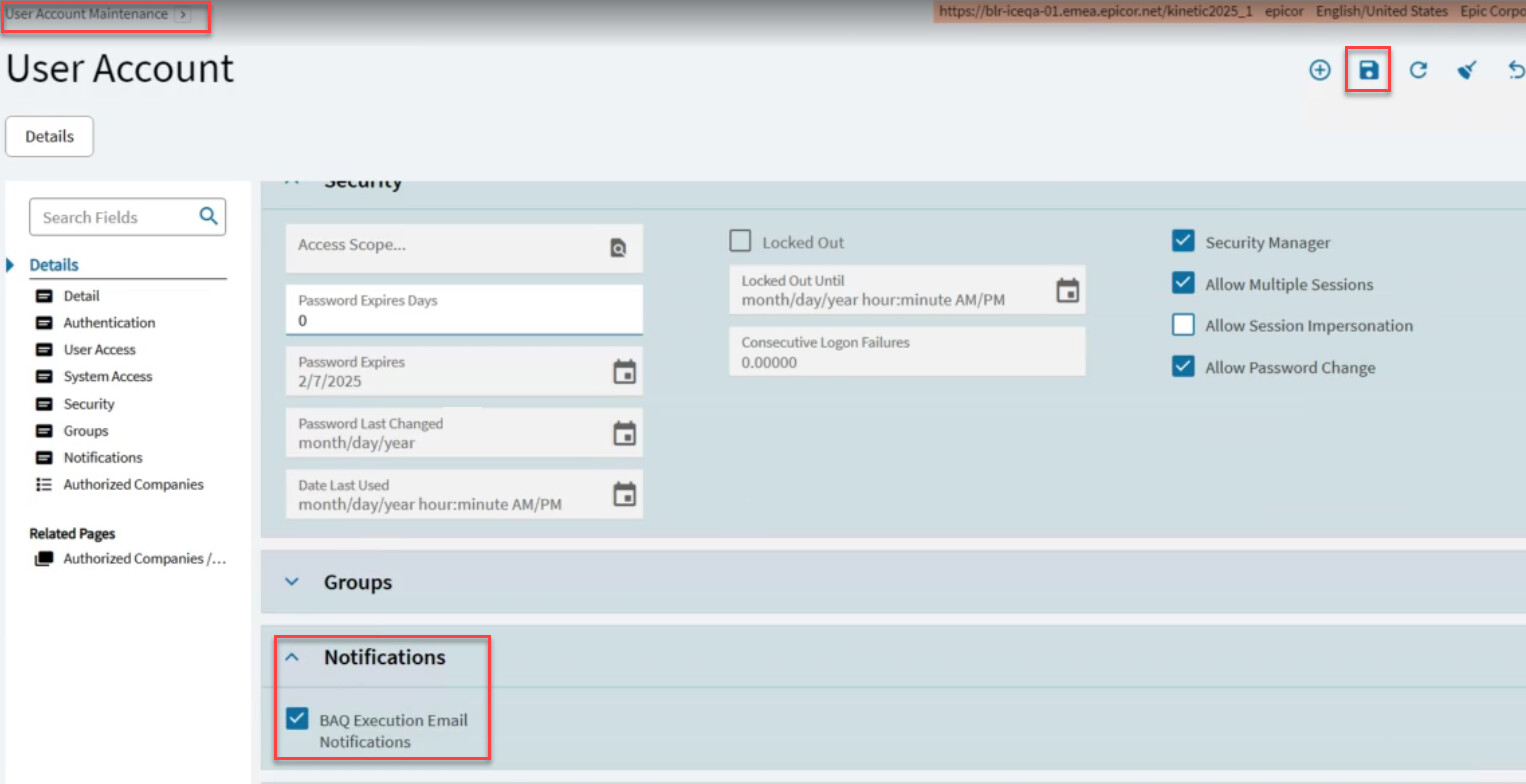
You can turn the emails off here

Kinetic monitors the performance time, or execution time, of each custom (non-system) business activity query (BAQ) that runs against your database. Kinetic has an Execution Time Threshold that defines how quickly each BAQ should run so that it does not slow the performance. This default threshold value is 30 seconds.

If the average execution time of a BAQ is longer than this 30 second threshold value, Kinetic captures this information and sends a BAQ Execution Summary email to users with Security Manager access. These individuals can then explore ways to improve the performance of these slow BAQs.

Kinetic sends out this BAQ Execution Summary email once a month. This email will usually arrive on the 1st of the month. However, the first time Kinetic runs this performance test, the email may appear on a later date.

In my experience you can largely ignore those emails they are usually hella wrong, between parameter sniffing issues and other lovely BAQ “Features” these are… less than helpful.

4 Likes

Could it be performing poorly due to the BAQ Territory Security thing?

1 Like

:100: agree with Jose, but I think in this particular case, we could make this particular BAQ more efficient.
2 Likes

Grouping of PartTran is not a light operation for sure. BAQ probably added filter by company but there is still a lot of rows to go through. Also it is worth to check what Query Execution plan shows you.
In any case you are grouping to get Max value, I am sure there is a better way for it

3 Likes

All right @Olga made me feel bad about telling you to ignnore the advice :unamused_face:

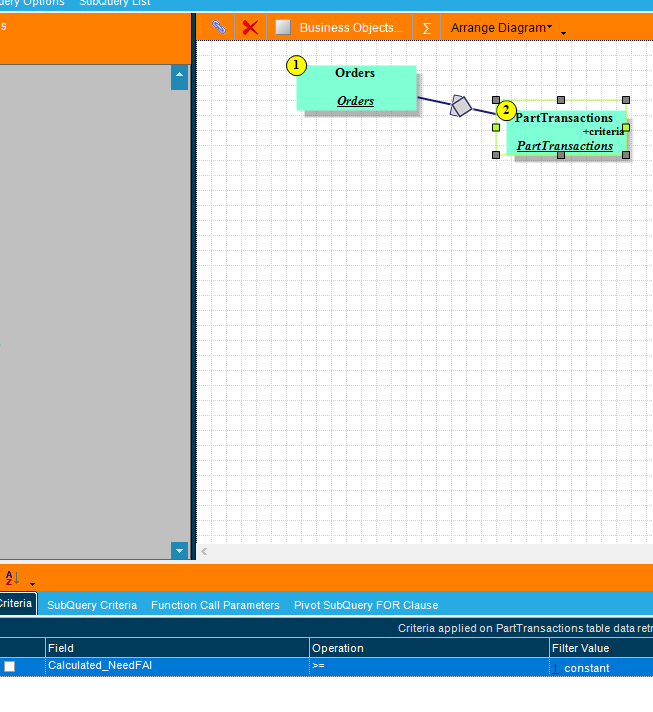
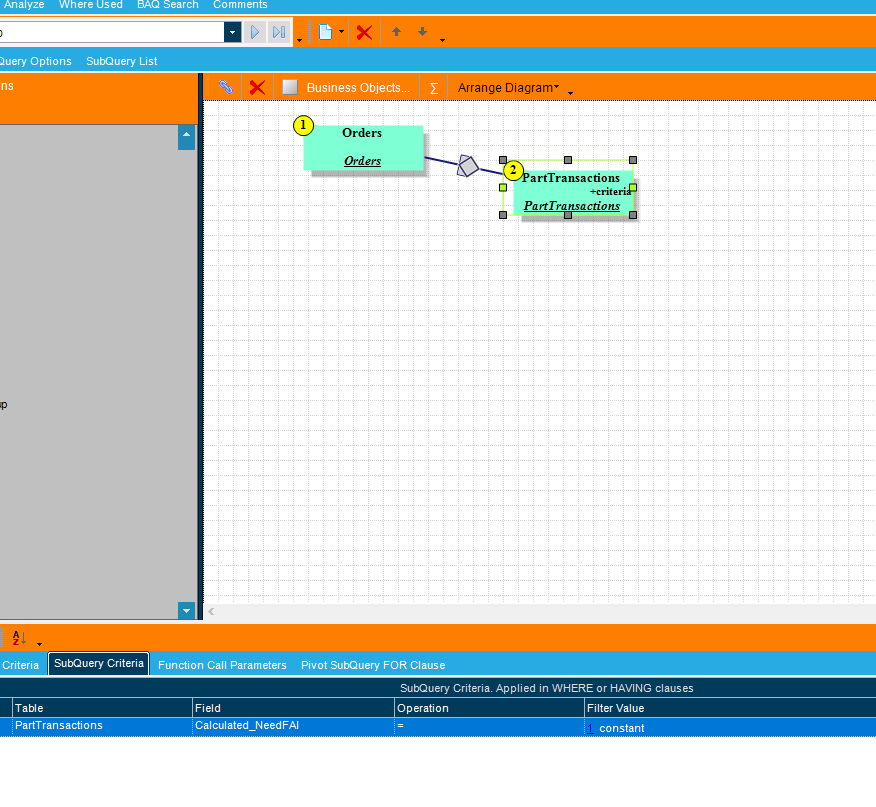
In your BAQ you are Filtering the PartTransaction subquery where Calculated_NeedFAI >= 1

But then in the Subquery criteria you are only returning data where Calculated_NeedFAI =1 that seems contradictory / redundant.

4 Likes

I made some edits based on what I think Mark and Jose were saying, but my BAQ runs much slower now.

/*  
 * Disclaimer!!! 
 * This is not a real query being executed, but a simplified version for general vision. 
 * Executing it with any other tool may produce a different result. 
 */

select  
	(sum(OrderRel.OurReqQty-OrderRel.OurJobShippedQty-OrderRel.OurStockShippedQty)) as [Calculated_RemainToShip], 
	(PartTransactions.OrderDtl_UnitPrice* RemainToShip) as [Calculated_RemainSOValue], 
	(min(OrderRel.ReqDate)) as [Calculated_NextRelDate], 
	[PartTransactions].[OrderDtl_OrderNum] as [OrderDtl_OrderNum], 
	[PartTransactions].[OrderDtl_PartNum] as [OrderDtl_PartNum], 
	[PartTransactions].[OrderDtl_RevisionNum] as [OrderDtl_RevisionNum], 
	[PartTransactions].[OrderDtl_UnitPrice] as [OrderDtl_UnitPrice], 
	(iif(datediff(year, PartTransactions.PartTran_TranDate, Constants.Today)>=2,1,0)) as [Calculated_NeedFAI] 

from Erp.OrderHed as [OrderHed]
left outer join  (select  
	[OrderDtl].[Company] as [OrderDtl_Company], 
	[OrderDtl].[OrderNum] as [OrderDtl_OrderNum], 
	[OrderDtl].[PartNum] as [OrderDtl_PartNum], 
	[OrderDtl].[RevisionNum] as [OrderDtl_RevisionNum], 
	[OrderDtl].[UnitPrice] as [OrderDtl_UnitPrice], 
	[PartTran].[TranDate] as [PartTran_TranDate] 

from Erp.OrderDtl as [OrderDtl]
inner join Erp.PartTran as [PartTran] on 
	  OrderDtl.Company = PartTran.Company
	and  OrderDtl.PartNum = PartTran.PartNum
	and  OrderDtl.RevisionNum = PartTran.RevisionNum
	and ( PartTran.TranType IN ('MFG-STK', 'MFG-CUS')  )
where (OrderDtl.OpenLine = true))  as [PartTransactions] on 
	  PartTransactions.OrderDtl_Company = OrderHed.Company
	and  PartTransactions.OrderDtl_OrderNum = OrderHed.OrderNum
inner join Erp.OrderRel as [OrderRel] on 
	  OrderHed.Company = OrderRel.Company
	and  OrderHed.OrderNum = OrderRel.OrderNum
	and ( OrderRel.OpenRelease = true  )
where (OrderHed.OpenOrder = true) and ( iif(datediff(year, PartTransactions.PartTran_TranDate, Constants.Today)>=2,1,0) = 1  )
group by 
	[PartTransactions].[OrderDtl_OrderNum], 
	[PartTransactions].[OrderDtl_PartNum], 
	[PartTransactions].[OrderDtl_RevisionNum], 
	[PartTransactions].[OrderDtl_UnitPrice], 
	(iif(datediff(year, PartTransactions.PartTran_TranDate, Constants.Today)>=2,1,0))

PlannedFAIs-FAST.baq (11.7 KB)

I see that I still have calculations in my where clauses. I am not sure how to get rid of them.

1 Like

I try to build the query one step at a time so I can see which condition, outer join, etc. adds or reduces time.

1 Like

That’s not a bad thing by default.
Generally it’s good to apply calculations to something that isn’t a part of the data you’re querying to arrive at a static comparison point. Tends to produce plans that do the math once then compare over a set.
Applying a calculation on a data field can sometimes end up applying that calculation row by agonizing row.

I also generally recommend selecting native SQL features over Epicor’s whenever possible, but that’s probably splitting hairs.
Could do something like this?

PartTransactions.PartTran_TranDate >= dateadd(year, -2, current_timestamp)

I’d also consider transferring that condition upstream to your “PartTransactions” subquery. PartTran indexes are unfortunately more sparse and :poop: than average and often benefit from directly applying known scope at the source.

2 Likes