Does anyone know how to write a BAQ that will only show me jobs where the DueDate field is null. I have tried searching here and google. I didn’t find anything here and the suggestions on google did not work.
SELECT *
FROM JobHead
where DueDate is null
I know I can do that in SQL Server but I’m trying to think ahead to maybe the users needing a dashboard so they can go fix these jobs.
in the BAQ criteria for the table, you can choose IS NULL in the operator box- the same box you’d usually choose >,<,=,<>,CONTAINS, ETC.
I tried that but get no results, but if leave that out and search for a specific create date I know there are jobs that have a null date. They show up in the sea of correct results.
So you’re seeing null or you’re seeing blank?
Blank as in returned 0 results.
What? So you’re saying that because your query returns 0 rows for the create date you’re searching on, then they must be null?
No, when i add criteria for JobHead.DueDate ISNULL I get 0 results.
Not all dates are nullable.
2 Likes

The ISNULL condition is working for me in 2023.1
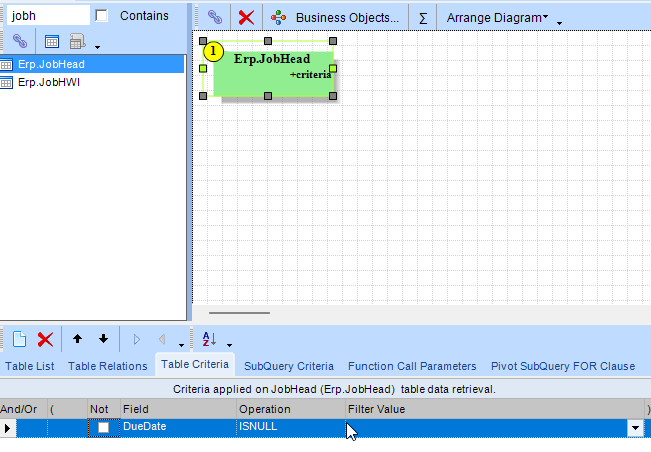
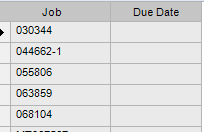
Any other conditions or links set on your BAQ that could be causing 0 records?
1 Like
The only other criteria I have is Company.
So it does work if that is the only Criteria I set.
What do you see if you say
select
min(DueDate)
from Erp.JobHead
Possibly, probably not but just in case also something like
select
min(isnull(DueDate, 0))
from Erp.JobHead
I’m sure it would work in SQL Server, but I will most likely need to build a dashboard for the users to find these jobs without calling me.
Thank you everyone for the help. I will just slowly build this BAQ adding things one at a time and see what works.
It’s the same thing. The stuff that @utaylor and @kananga are suggesting can be written in BAQs.
They keep asking you to show what you’re doing. Post some screen shots, or go to the general tab and post the SQL there. Like @kananga showed, what you are trying to do is perfectly doable, you’re just missing something (or not telling us the whole story)
The version I am on will definitely not let me just type SQL statements in the General Tab unfortuantely. I did get it to work enough for what is needed.
Well, no, you can’t just type it into the general tab, you have to use the GUI to do it, but it’s still the same thing.
2 Likes