Is anyone using Bartender to print labels on a shop floor when a job is complete? If so do you notice a significant difference in print time over using the edge agent? We are cloud customers considering the change.
1 Like
Yes Classic printed faster in all aspects compared to Kinetic.
1 Like
Even on-prem we have to use Edge Agent for some things just due to how the browser works. It’s slow even for us running locally. Just how it is unfortunately.
2 Likes
Using the Epicor officially supported Bartender integration methods run it through the System Agent to generate the output files, it’s not terribly efficient, flexible, or consistent with timing.
I generally set up my bartender integrations on a BPM post, and assembled the appropriate file to feed into bartender manually using the Filespec. (I like .btxml format if using a FileStore integration)
This will be nearly instantaneous on the Epicor → Azure File Share side, the only delay being the integration picking up the file(s).
I think last go-around I set up a Function that would accept a few string variables and a dataset for input, the string variables being things like “LabelName”, “DataSet Name”, “Printer Name”, etc. - with the dataset being a bunch of rows with each column being key/value pairs to represent the Fields/Data printing on the label, one row for each label.
That way I could use one function to dynamically assemble the label data and store it in the correct folder.
Our folder structure in the file share was set up with a folder for each environment like /Live/LabelName, /Pilot/LabelName, etc. - the function dumped it to the appropriate Environment folder based on the Session.AppServerURL, and i ran a separate integration in bartender for each environment. I overrode the destination printer for non-prod environments so that I could test to a printer on my desk and deploy the unmodified code to live.
I set this one up using a serialized json dataview input to a function string variable because that was before i figured out how to use appstudio to pass a dataset in and out of a function, don’t need the deserializing bits that way.
Code Snippets:
  if (Session.AppServerURL.ToUpper().Contains("CENTRALUSDAPP40.EPICORSAAS.COM/SAAS5001")) { env = "Production"; };

  if (Session.AppServerURL.ToUpper().Contains("CENTRALUSDTPILOT40.EPICORSAAS.COM/SAAS5001PILOT")) { env = "Pilot"; };

  string BaseFolder = "D:\\Bartender\\Reports\\";
  string envfolder = BaseFolder + env + "\\";
  List<string> headers = new List<string>();
  List<string> values = new List<string>();
  List<string[]> csvrows = new List<string[]>();
  if (inJSONds != null) {
    using (DataSet ds = JsonConvert.DeserializeObject<DataSet>(inJSONds))
    {
      using (DataTable dt = ds.Tables[0])
      {
        foreach (DataColumn column in dt.Columns)
        {
          headers.Add(column.ColumnName);
        }
        foreach (DataRow row in dt.Rows)
        {
          for (var i = 0; i < dt.Columns.Count; i++)
          {
              values.Add(row[i].ToString());
          }
          csvrows.Add(values.ToArray());
          values.Clear();
        }
      }
    }
  }
  string valuestring = "";
  foreach (string[] row in csvrows) {
    valuestring = valuestring + CsvWriter.GetCSVLine(row.ToArray()) + "\r\n";
  }
  string csvout = CsvWriter.GetCSVLine(headers.ToArray()) + "\r\n" + valuestring;

  XDocument btxml = new XDocument(
    new XDeclaration("1.0", "utf-8", "yes"),
      new XElement("XMLScript",
        new XAttribute("Version", "2.0"),
        new XAttribute("Name", DateTime.Now.ToString("yyyyMMddHHmmss") + JobName),
        new XElement("Command",
          new XAttribute("Name", JobName),
          new XElement("Print",
            new XElement("Format", BaseFolder + LabelName + ".btw"),
            new XElement("RecordSet",
              new XAttribute("Name", "InputData"),
              new XAttribute("Type", "btTextFile"),
              new XElement("Delimitation", "btDelimComma"),
              new XElement("UseFieldNamesFromFirstRecord", "true"),
              new XElement("TextData", new XCData(csvout))
            ),
            new XElement("PrintSetup",
              new XElement("Printer", PrinterName)
            )
          )
        )
      )
    );
7 Likes
Switch that to json, and I’m with ya.
3 Likes
If you’re interested in side work I’d like to talk
2 Likes
No just use the bartender rest API, apologies on advance TLDR your code…
https://www.epiusers.help/t/insights-2024-rest-api-bartender/115692
4 Likes
That’s what we ended up doing as well, on the floor we run a small batch file that we type / scan the job number into, that then uses curl to call the API and write a text file to a watch folder, bartender picks up that JSON response text file and parses through Bartender Integration Studio to print. Sounds a bit complicated but the response is pretty instantaneous and leaves us in complete control of the process.
3 Likes
I am very interested in this method. Would you be willing to share a sanitized version of your batch file so I can get an idea of what to do next?
The heavy lifting is done in Bartender Enterprise (you need access to integration services)
Config.ini file in the same dir as the batch
InboxPath="\BartenderServer\Bartender\Inbox"
cURLUser=username
cURLPass=password
BoxBAQ=https://epicorserver/live/api/v1/BaqSvc/labelbaq(company)/
BoxExt=CUSTFILEEX ::To handle multiple labels in one config.ini file (excluded other label types here, but you can set up different vars for different label types)
Printlabel.bat
:begin
@echo off
:: This line set the type of label printer, this will drive the name of the ini file that the default printer for this type is saved.
set PrinterVar=“BoxPrinter”
:: Check to see if there is already a default printer set for this label type
if exist %homedrive%%homepath%%PrinterVar%.ini (
set /p Printer=<%homedrive%%homepath%%PrinterVar%.ini
) else (
cls
call PrinterList.bat
)
:: Legacy, or if you want to hardcode the printer for testing
REM set Printer=“EpiLblTest3”
:: This Loads parameters for the config.ini file in the same folder as this executable, BAQURL and others can be found here.
for /f “delims== tokens=1,2” %%G in (Config.ini) do set %%G=%%H
cls
:: This loads the logo ascii art
type \BartenderServer\Bartender\Integrations\Scripts\logo\LogoInAsciiText.txt
echo .
echo ***********************************
echo Label: STD BOX LABEL
echo Printer: %Printer%
echo ***********************************
echo Enter/Scan Job Number Below:
:: Prompt for Job Number
set /p JobNo=Enter Job Number:
:: if job number is 123456789 then we will reset the default printer for this label type
if %JobNo% EQU 123456789 (GOTO resetlabel)
:: Prompt for Assembly number
set AssemblyNo=0
set /p AssemblyNo=Enter Assembly Number:
:: Prompt for number of copies
set /p Copies=How Many Labels:
:: Sets a variable with the printer and number of copies that gets appended to the process file before the JSON that comes back from the API call
set FileString=“%Copies%|%Printer%|”
:: Show the user some feedback
echo Printing: %JobNo%
:: Create a new file to be procesed start with some header labels
echo “Copies|Printer|Data~~~” > “%InboxPath%%JobNo%.%BoxExt%”
:: Append the data from the FileString variable above to the file to be processed.
echo %FileString% >> “%InboxPath%%JobNo%.%BoxExt%”
:: Call the BAQ API URL using varibles gathered from the user as well as variables configured in the config.ini
curl -X GET --header “accept: application/json” “%BoxBAQ%?vJobNum=%JobNo%&vAssembly=%AssemblyNo%” -u %cURLUser%:%cURLPass% >> “%InboxPath%%JobNo%.%BoxExt%”
::Pause the script 3 seconds to give it time to process
ping 127.0.0.1 -n 3 > nul
:: Clear screen
cls
:: Return the script to the beginning for the next run
GOTO begin
:: This section backs up and resets the default printer ini file
:resetlabel
echo this will reset your default label printer for %PrinterVar%, close this window if you do not want this to happen, or press any key to continue.
pause
:: move the existing file to a bak file with overwrite if we have been down this path before
move /Y %homedrive%%homepath%%PrinterVar%.ini %homedrive%%homepath%%PrinterVar%.bak
:: with the file moved to backup, go to the beginning where the script will detect no printer default file.
1 Like
I’m curious if Network Edge agent is faster than on the Client…
or not so much?
We tested and it wasn’t but YMMV 
Thanks, mostly curious if it’s going to help on that front. at this point hoping to avoid Bartender as it’s another thing that needs maintaining and their “we’ll stop printing if there is a license hiccup” has never sat well with me
having said that we already own it but use it for non-business critical stuff heh.
1 Like
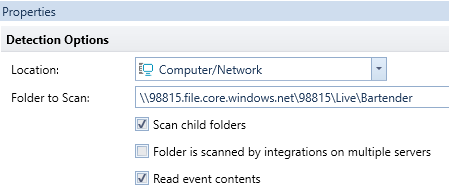
Morning - we have been using bartender for some years now and migrated to the cloud last year and was pleasantly surprised how easy it was using the fileshare drive which the reports send to then bartender reads from there - so far no speed issues - just normal delay once the files are picked up by bartender and sent to the printer. As long as the folder to scan is specified as below then no issues for bartender to access the files to print
1 Like
Great to hear Gillian!
We’re seeing the same performance as @gillian does - once the files are written to the Azure fileshare, BarTender’s scooped them up quickly. I guess your mileage may vary depending on volume etc
The only caveat I would note here is that Epicor states that the Azure File Share storage must be treated as transient and not to expect any file retention period, but in my experience there’s no automated cleanup and Bartender Integrations start to slow down when they are looking for new files somewhere around several thousand files in the same folder. So, ideally when you print, set up the success/fail file integration to move those files to an archive folder, or run a cleanup periodically. Otherwise it’ll start to slow down over time (months)
2 Likes
Good point…will have to see if that was done at setup. Don’t want to clutter up Azure any more than we have to
EDIT - it was…Azure side’s clean as a whistle, Bartender side is likely set with a cleanup as our labels are one-and-done
2 Likes
We are using bartender in the Shop and not having any issues. We do have open that is running on an integration from Epiocr to Bartender. Print time for us has been better since we upgraded the bartender server.
1 Like