Best approach for a cut-to-length part (cost following raw material) in Engineering Workbench?

Hi all,

Looking for input on the right approach for a specific scenario in Kinetic.

Scenario

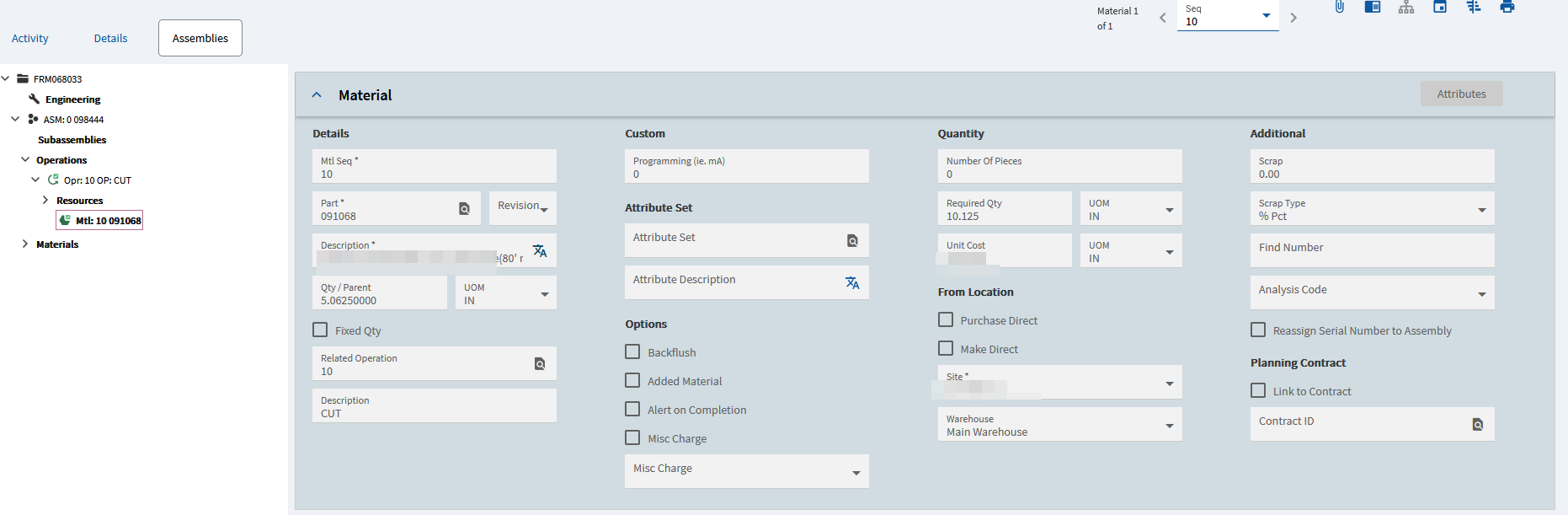
We have a part, let’s call it PART-10, which is cut from a longer raw material stock item, PART-20. Right now PART-10 is set up as a standalone Purchased part with no BOM, so its cost has no relationship to the raw material it’s actually cut from, and the cutting charge isn’t captured anywhere.

What we want to achieve, for just this one part

  • PART-10’s cost should reflect a proportional share of PART-20’s cost (e.g., half the raw material, since it’s half the length), plus a fixed cutting charge
  • This cost needs to flow correctly into Job costing when a job is created for PART-10

Our current plan

  1. Reclassify PART-10 from Purchased → Manufactured
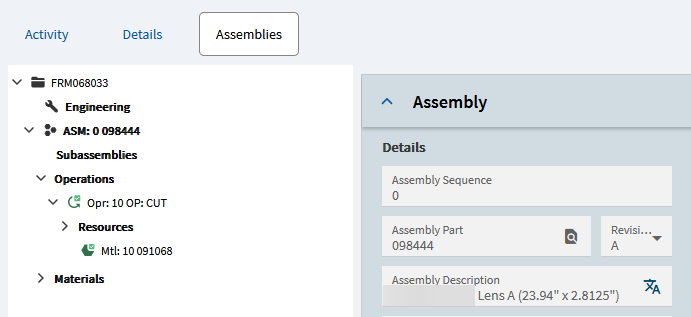
  2. Build a Method of Manufacturing:
    • PartMtl line pointing to PART-20 (QtyPer = 0.5)
    • PartOpr line for a CUTTING operation carrying the fixed charge
  3. Run Cost Rollup and confirm Job Entry pulls the method correctly

Questions for the community

  1. Is this the right way to model a “fractional length” BOM relationship, or is there a better native pattern for this (e.g., Configurator) even for a single, fixed-length part?
  2. Any gotchas with QtyPer/UOM when the quantity represents a proportional length rather than a whole unit?
  3. Best way to capture the fixed cutting charge on the operation — Misc Charge vs. calculated setup/run hours?
  4. Anything to watch for with MRP once PART-20 has independent demand (sold on its own) in addition to being consumed by PART-10?

Once we’ve got this working cleanly for one part, we’re looking to apply the same pattern across a larger set of similar parts — but want to get the single-part approach validated first.

Thanks for any insight!

Tags: Engineering Workbench, BOM, Costing, Method of Manufacturing, MRP

My immediate thought is co-parts..

Used it one a loooong time ago now. I am sure there are others that use it on a regular basis here.

For me I have, questions regarding the bigger picture here.

First it sounds like your UOM for these parts should really be smaller. Having a decimal Each is not typically recommended for Inventory purposes. If this is a length part not a count part then will your UOM for inventory be in inches or feet perhaps? So you may have a 20 Ft part and then (2) 10 Ft parts after cutting?

For the cutting, it looks like you are on the right track there with an operation and BOM. I have seen cut to length situations where the job was done as a Kanban Receipt to minimize the job entry/reporting impact. In that case the cut to length was done as a part of a material handling operators job and not your typical machine operator and they were not concerned about labor cost as it was being expensed.

Once you figure out your inventory UOM plan then your Engineering material BOM will likely fall into place.

Brad great to see your avatar pop up. Hope you are doing well.

Thanks. Keep meaning to connect, busy, busy…

That’s good Brad! Glad to hear it.

Pointing Up GIFs - Find & Share on GIPHY

Thanks very much Bard on this,
Can you expatiate more as I am a bit new to the system.
So our typical process now is the we marked every part inputted as purchased. but in that, some parts are gotten by cutting others. for instance, the example I gave above we get the 10 by cutting the 20. We want this build to also align with our MRP later. So the aim to convert parts like the 10 TO MAUFACTURED and the build out the BOM and the operation.
I would appreciate any guide you will give to me on this.
Thanks very much

We have a revision to make the cut part that uses material that is received in inches.

Just to provide another potential approach, since you’re evaluating potential methods…

For our set-up, we purchase a wide variety of “bar stock”. We then cut that to length for a given job.

So, these are purchased parts with a UOM of Length, typically inches.

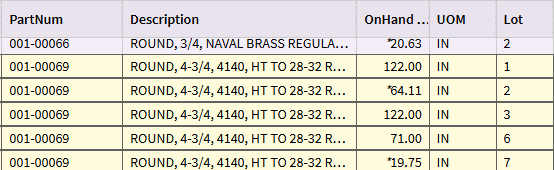
We tried Advanced UOM (in its infancy) and it wasn’t working well at the time. So, what we did was “Lot Track” these parts. For example, we might purchase 10 bars, each would be 122 inches in length. Each bar gets an independent lot number.

Example Job: Requires 51 inches of this part number.

We only issue 51 inches to the job… from a specific lot number (which is basically a bar/stick number). So we had a bar of 122 inches… we issue 51 inches… we know we still have a bar of this part number/lot number that is still 71 inches in total length left in inventory (lot number 6 in the table below).

We end up with partial bars… but because they’re lot tracked, we know the length of each bar sitting in inventory.

The downside of this method is that we have to turn off suggestions for these parts. They have to be manually tracked. This is because the next job may require a bar that is 130 inches in total length. Our inventory (just evaluating the part number) would think we had ample supply and we would not get any PO Suggestions for this part.

But, in truth, we don’t have a single bar of this part number that is >= 130 inches. So, our staff evaluates on-hand inventory by lot number (bar length) and Purchasing will see they need to create a PO for it in this case.

If we have a job requiring 60 inches, our staff is trained to look at which lot number (bar/stick) is closest and they would hopefully pull the 64.11 inch bar and cut from that.

So… material cost is purchased, inventoried, and applied to the job per inch.

The cutting cost gets added to the job via the Saw operation. For us, its not a static cost. We track the hours the operator takes to pull the material & cut it.

Tracking inventory is manual… but clear. We audit our “saw yard” regularly to ensure we don’t get way out of whack… but we typically know how many bars we have of each material and what the length of each one is. When we get to a bunch of small stubs that we want to scrap, we’ll adjust those bars/lots out of inventory.

To me, as a consultant, this is a GREAT solution. COULD Advanced UOM do this? Almost certainly, BUT the time and effort to set it up, test (iterate those two steps a few times) and then train the users is no free lunch.

I’m a big fan of what works, and this fits. If at some point the benefits of going to Advanced UOM look interesting, it’ll still be there.

Thanks very much team for the replies, I have been away for a while on vacation. We currently have our UOM set up as each for all the parts, even the manufactured ones. So the approach I am looking to implement, is to first get all the parts in an excel sheet. extracted the manufactured parts and change them in the part list to manufactured and the material that is the parent. I have already created a CUTTING Operation that I will include in the jobs. So I have one more question, How can I do this on many parts or do I carry this out one by one

Hi Team, Please I will sincerely appreciate any input on my above question. Is there way I can handle all the parts together or do I need to perform this one by one on each manufactured Part

Multiple parts can be updated via DMT, once you have everything ironed out.

You’ll need multiple DMT templates…

  1. Part (to update the parts from Purchased to Manufactured). If you use the Part-Combined template, you can add a new revision of those newly manufactured parts. You’ll have to include PartRev Columns like the below:

1A. Alternately, you can run the PartRev DMT separately to create the new part revision.

  1. You’ll then need to Create an ECO Group (so you have one ready).

  2. Then, you can DMT Operations into the method (BOO):

  3. Then you can DMT Materials into the method (BOM):
    image

Your columns may vary… but above are snips from the templates I used.

Another similar topic that discusses Cut Plans via AUOM or Customization
For Reference:

Thank you so much, I will work on this and if I face any challenges, i will notfy you.
Thanks very very much

Thank you very much

Hi Dave, Please when are you always available, so we can talk more on this

“Always” is a loose term… but I’m eastern time. Fire away if you have questions. We can all chip in to help where we can!

Thank you very much