Hey everyone. Long time since I’ve contributed here, as I’ve been working on other things, but this year we’ve added a company (three of them) and so we’ve got the upgrade / expansion bug. Going to these new Kinetic screens, honestly, I really like them. The homepage layouts are my favorite. I feel as though these layouts are a great way for us to streamline job roles and publish data right in front of our users faces.
The change from classic allows for a more agile publish and subscribe system for curating your… dare I even say it… UX. shivers
In all seriousness, I thought I’d share something of my workflow. We maintain an “All Screen” which has every role, every layout. If a manager needs to step into a subordinate role, its easy to click into another tab to be that person for the day.
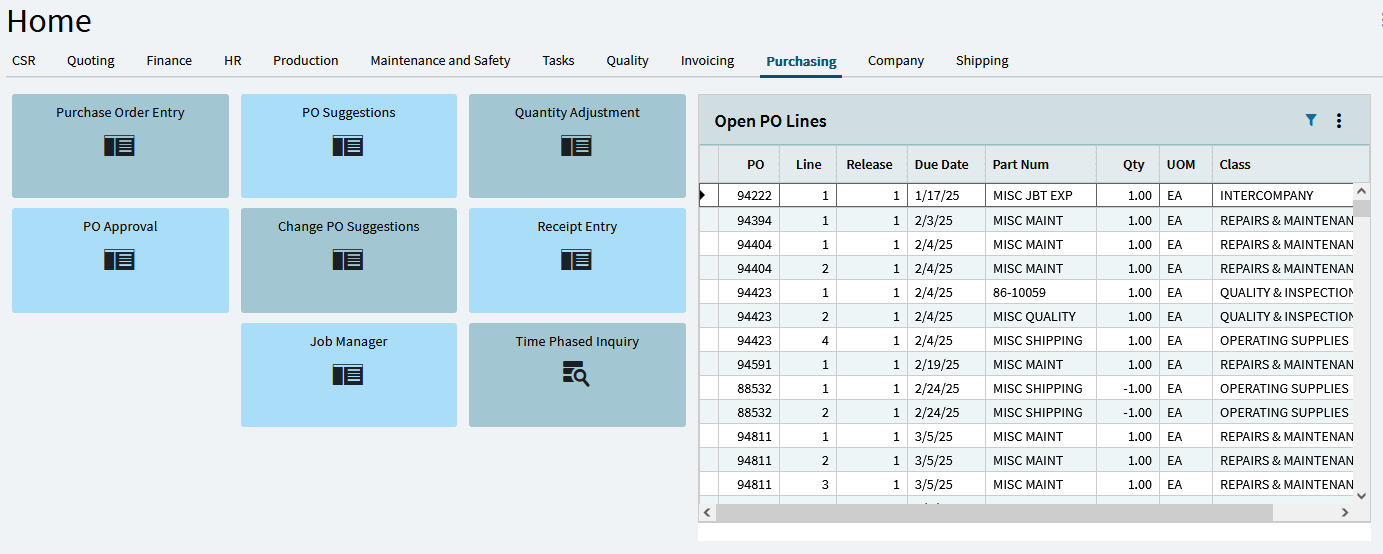
But, now that I have this layout, I essentially make changes and delete tabs so that I can publish the individual tabs for a given role. This is kind of a pain, because I’m either unable to make changes on the users computer because it wont replicate to my layout, or every time I want to update that users layout, I need to delete tabs and republish. This is especially annoying when I want to always include informational tabs on all/certain user’s layouts. in order to mitigate this mild annoyance-
INTRODUCING my moderately helpful tool for exporting, splitting and importing new layout tabs. This is a python script which can be pointed at a .layout file which splits it into many smaller layouts which can be reimported. It also allows for the specification of “always included” or persistent tabs, so that everyone will see the Task List Tab for example.
This script might be used to modify the tabs as well, if you wanted to re-sequence, adjust URLs, or whathaveyou. It doesnt have a GUI, so in order to use it, you need to edit the code, but only the two lines which relate to the name of your exported layout file and the GroupIDs of the layouts you want to have stick around.
I hope this is useful to somebody else out there.