I am working on a BPM that populates a UD Field from the Sales Kit qtys. (OrderDtl.KitQtyPer). I am having difficulty with the BPM to review and sum the qtys. I have a condition that checks the kitqtyper and if it is greater than zero, it proceeds to the next step. My question is the next step. I am unsure of how to write the BPM. Do I use another condition, execute custom code, or a combination of several things. I can share what I done but it is not much as I am a little lost.
You can chain the BPM widgets (blocks like Condition, Show a message, etc…) even bringing 2 branches back together.
Here is what I’ve done so far. It’s the next step that has me worried. Everyone I have talked to tells me I’m going to have to write code… C# and I do not mix.

The problem I am having is that I cannot see where I can take each component qty and sum them into the UD Field I created. I created a condition which I know is the start, but what do I put next? Another condition, or do I put a caller (Execute Custom code) and take a crack at writing the code?
What exactly are the “next steps” trying to accomplish?
I need to SUM the quantities of each component in the Sales Kit and basically put it in the UD Field I created.
For Example:
Sales Kit 123
Component 1 = 5 Qty
Component 2 = 5 Qty
Component 3 = 5 Qty
UD Field TotalCompQty = 15
Does that make sense?
Does the stored result need to be multiplied by the order Qty of SK 123?
Or is the UD field the “sum per”?
Sum Per
Here is what I have worked on as far as code with one of my developers.
decimal TotalQty = 0;
var Lines = (from tRow in ttOrderDtl
where tRow.KitFlag == “C” select tRow);
foreach(var Line in Lines)
{
TotalQty += Line.KitQtyPer;
}
using (var txScope = IceContext.CreateDefaultTransactionScope())
{
foreach(var Line in (from row in ttOrderDtl where row.KitFlag == “C” select row))
{
Line.TotalQtyUnits_c = Decimal.ToInt32(TotalQty);
}
Db.Validate();
txScope.Complete();
}
I am getting an error that states:
‘OrderDtlRow’ does cot contain a definition for 'TotalQtyUnits_c (this is my UD Field I’m trying to populate) and no extension methiod 'TotalQtyUnits_c accepting a first argument of type ‘OrderDtlRow’ could be found
So I am now at a stopping point…
OrderDtlRow
This is what I made (falls short of actually setting a UD value as my OrderDtl table doesn’t have a UD field.
/* vars this.Msg, this.KitLines, and this.UDTotal are variables of this BPM
they are just so I can display their values using the "Show Message" blocks
*/
decimal TotalQty = 0;
this.Msg = "Initialized: "; // only used for debugging
int thisOrderNum = 0;	// the OrderNum of the line whose KitQtyPer is changed
int thisLineNum = 0;	// the OrderLine of the line whose KitQtyPer is changed
int thisParentLine = 0;	// the OrderLine of that is the parent to the line whose KitQtyPer is changed
decimal thisKitQtyPer = 0;	// the KitQtyPer of the changed line

var Ords = (from tRow in ttOrderDtl
where tRow.KitFlag == "C" select tRow);

foreach(var Line in Ords){
	thisOrderNum = Line.OrderNum;
	thisParentLine = Line.KitParentLine;
	thisLineNum = Line.OrderLine;
	thisKitQtyPer = Line.KitQtyPer;
	}


// Get the OrderDtls for the SK component lines
Erp.Tables.OrderDtl OrderDtl;

var Lines = (from tRow in Db.OrderDtl
	where tRow.Company == Session.CompanyID
	 && tRow.OrderNum == thisOrderNum
	 && tRow.KitParentLine == thisParentLine
	 && tRow.OrderLine != thisParentLine	// ignore the parent line
	 && tRow.OrderLine != thisLineNum		// ignore the line being changed - it has the unchanged value
	select tRow);

foreach (var Line in Lines){	// cycle through the found Order lines
		this.Msg += (Line.OrderLine + ", "); // for debugging
		this.KitLines += 1;
		this.UDTotal += Line.KitQtyPer;
	}
UDTotal += thisKitQtyPer;
Here’s what I get after changing the QtyPer of Kit component Line 37 from 0 to 1:
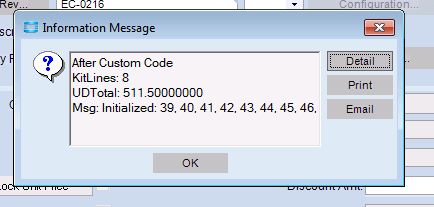
The UDTotal is the sum of the KitQtyPer, for records that have the same KitParentLine
Here’s the Lines \Kits Detail \ List tab
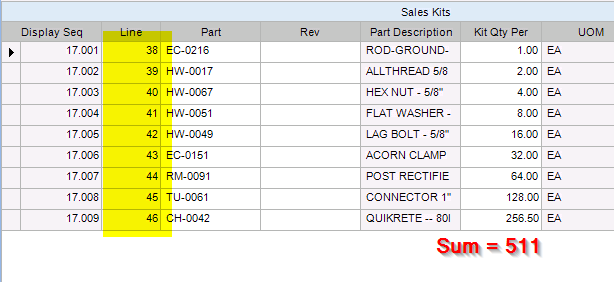
The sum of the Qty Per column = the UDTotal field I shows in the Message above. The KitLines will be one less than the number because it only counts the other lines for OrderDtl (it excludes the line being changed), The Msg: … Field shows the lines used from OrderDtl. Note that the line that was changed (#37) is excluded.
Thanks for the information. I think I see where we may be missing something. I think we still need to identify the parent kit line so the system knows what to do. Let me work on it some more this is a great help.
Charles
@ckrusen, If I only want the line total not the order total as you have stated in this, would I eliminate all the OrderDtl information in regard to OrderNum and only have it pull from LineNum?
When a SalesKit part is added to an order, an OrderDtl (order line) is created for each component item in the kit. These kit component lines are hidden on the order entry screen and most reports.
The loop of
foreach(var Line in Ords){
only cycles through the order lines of the kit’s components.
When the KitQtyPer changes on a kit component, you have to calculate the sum of components by adding up all the lines where KitParentLine are equal. I exclude the actual kit component line being changed, because the OrderDtl table hasn’t yet been updated, so add in the value from the ttOrderDtl table.
Some important notes:
- This code was in a SalesOrder.ChangeKitQtyPer Post-Proc directive. It fires when a kit component qty changes, but not when it’s created.
- This only displays the total, it does not change the UD field of the parent line.
Ok… I think I understand. So for it to return in the UD Field, Can I just enter the following code after the following Code:
var Lines = (from tRow in Db.OrderDtl
where tRow.Company == Session.CompanyID
&& tRow.OrderNum == thisOrderNum
&& tRow.KitParentLine == thisParentLine
&& tRow.OrderLine != thisParentLine
&& tRow.OrderLine != thisLineNum
select tRow);
foreach (var Line in Lines)
// This is the line. TotalQtyUnits_c is my user defined field.
Line.TotalQtyUnits_c += TotalQty;
}
Line.TotalQtyUnits will start with whatever value was there before. So it needs to be zeroed out before running that loop. I’d go with a temp variable to hold the running total while you cycle through the component lines. Then assign the TotalQtyUnits_c value of the parent line. You need a new query to get that line, as the original one excludes it.
I would go with
decimal thisKitQtyPer = 0;
foreach (var Line in Lines){
    // This is the line. TotalQtyUnits_c is my user defined field.
    Line.TotalQtyUnits_c += TotalQty;
    thisKitQtyPer += Line.KitQtyPer;
    }

var ParentLines = (from tRow in Db.OrderDtl
	where tRow.Company == Session.CompanyID
	 && tRow.OrderNum == thisOrderNum
	 && tRow.OrderLine == thisParentLine	// get only the parent line
	select tRow);

foreach (var Line in ParentLines){
	this.KitLines += 1;
	Line.TotalQtyUnits_c = thisKitQtyPer;
	}
(the above is untested)
Thanks again. You have been a tremendous help.
ok… I have tested the syntax and validated the code. It appears correct. but it does populate the UD Field. I am about ready to give up and let them freeform it. Here is the code:
int TotalQty = 0;
int thisOrderNum = 0;
int thisLineNum = 0;
int thisParentLine = 0;
decimal thisKitQtyPer = 0;
var Ords = (from tRow in ttOrderDtl
where tRow.KitFlag == “C” select tRow);
Erp.Tables.OrderDtl OrderDtl;
var Lines = (from tRow in Db.OrderDtl
where tRow.Company == Session.CompanyID
&& tRow.OrderNum == thisOrderNum
&& tRow.KitParentLine == thisParentLine
&& tRow.OrderLine != thisParentLine
&& tRow.OrderLine != thisLineNum
select tRow);
decimal thisKitLines = 0;
foreach (var Line in Lines)
{
Line.TotalQtyUnits_c += TotalQty;
thisKitQtyPer += Line.KitQtyPer;
}
var ParentLines = (from tRow in Db.OrderDtl
where tRow.Company == Session.CompanyID
&& tRow.OrderNum == thisOrderNum
&& tRow.OrderLine == thisParentLine
select tRow);
foreach (var Line in ParentLines)
{
thisKitLines =+ 1;
Line.TotalQtyUnits_c = Decimal.ToInt32(thisKitLines);
}
Db.SaveChanges();
My UD Field is TotalQtyUnits_c…
Do you mean “…does not populate…” ?
I think that updating a row in the the OrderDtl table won’t work the way I suggested. It needs to go through the business object - to make sure data integrity is maintained.
Making sure I understand your end goal…
- A UD field named TotalQtyUnits_c has been added to the OderDtl table.
- The database ahs gone through the rebuild processes (the thing you do in Admin Console after adding a UD field)
3.When a SK part number is set on an Order Line, the QtyPer of each component is added up and saved in the TotalQtyUnits_c field of the parent line. - If the qty of a component is changed, the TotalQtyUnits_c is recalculated.
Sound right?
Yes it does NOT populate…
After thinking about it for a bit, where will you need this summed up number? Any report could do the summation for you.
Yes you are right. I thought about the Business Object as well. And we had code to grab it and I posted the code but it gave me an error. I will repost that part of the code below:
string (var txScope = IceContext.CreateDefaultTransactionScope())
{
foreach(var Line in (from row in ttOrderDtl where row.KitFlag == “C” select row))
{
Line.TotalQtyUnits_c = Decimal.ToInt32(TotalQty);
}
Db.Validate();
txScope.Complete();
}
It gives the error:
‘OrderDtlRow’ does cot contain a definition for 'TotalQtyUnits_c (this is my UD Field I’m trying to populate) and no extension methiod 'TotalQtyUnits_c accepting a first argument of type ‘OrderDtlRow’ could be found