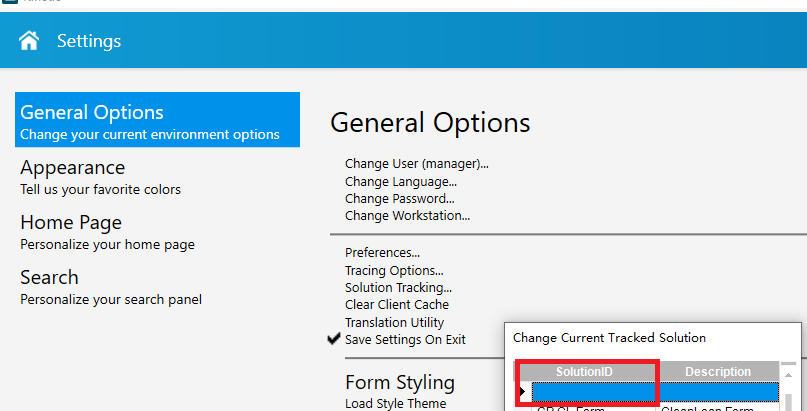
I am testing to apply an upgrade to Kinetic 2023.2.5, I have this error/exception in each table where I have a simple ChangeLog data directive, this occurs only in my “production” database, in the demo database the BPM works correctly :

## System Information ##
==================

AppServer Connection: https://myservername.mydomainname/KNTCLive
Form Name: AR Invoice Entry
Customization Name: csgInvoiceEntry
Menu ID: CSG121
Software Version: 11.2.400.0

============

Server Side Exception

BPM runtime caught an unexpected exception of 'BLException' type.
See more info in the Inner Exception section of Exception Details.

Exception caught in: Epicor.ServiceModel

## Error Detail ##
============

##!Correlation ID:##!  288481bb-6bae-45cd-a7c1-24a62658222b
##!Description:##!  BPM runtime caught an unexpected exception of 'BLException' type.
See more info in the Inner Exception section of Exception Details.
##!Inner Exception:##!  Error accessing the database: Timeout expired.  The timeout period elapsed prior to completion of the operation or the server is not responding.
Operation cancelled by user.
The statement has been terminated.
Timeout expired.  The timeout period elapsed prior to completion of the operation or the server is not responding.
Operation cancelled by user.
The statement has been terminated.
The wait operation timed out.
##!Program:##!  Epicor.Ice.dll
##!Method:##!  UpdateActivity
##!Line Number:##!  162
##!Column Number:##!  9
##!Server Trace Stack:##!     at Ice.Tracking.ActivityTracker.UpdateActivity(ActivityEvent activityEvent, SysActivityTracker sysActivityTracker) in C:\_releases\ICE\ICE4.2.400.5\Source\Server\Framework\Epicor.Ice\Tracking\ActivityTracker.cs:line 162
   at Epicor.Customization.Bpm.BpmActivityTracker.Log(DirectiveDescription directiveDesc, String userId, String activityId) in C:\_releases\ICE\ICE4.2.400.0FW\Source\Server\Internal\Lib\Epicor.Customization.Bpm\BpmActivityTracker.cs:line 29

Inner Trace:
Error accessing the database: Timeout expired.  The timeout period elapsed prior to completion of the operation or the server is not responding.
Operation cancelled by user.
The statement has been terminated.
:   at Ice.Lib.SolutionTracker.ExecSqlCommand(SqlCommand cmd, SqlConnection sqlCnx) in C:\_releases\ICE\ICE4.2.400.0FW\Source\Server\Internal\Lib\SolutionTracker\SolutionTracker.cs:line 83
   at Ice.Triggers.Default.WriteTrigger`2.Write(TRec newRecord, TRec oldRecord) in C:\_releases\ICE\ICE4.2.400.0FW\Source\Server\Db\Triggers\Default\Write.cs:line 22
   at Ice.DataTrigger`2.Ice.ILinqTrigger.Write(LinqRow newRecord, LinqRow oldRecord) in C:\_releases\ICE\ICE4.2.400.5\Source\Server\Framework\Epicor.Ice\Triggers\TriggerBase.cs:line 21
   at Ice.Triggers.TriggerQueue.ExecuteWriteTrigger(IceDataContext context, LinqRow modifiedRecord, LinqRow originalRecord) in C:\_releases\ICE\ICE4.2.400.0FW\Source\Server\Framework\Epicor.System\Triggers\TriggerQueue.cs:line 305
   at Ice.Triggers.TriggerQueue.RunWriteTriggerInNewLevel(IceDataContext context, LinqRow modifiedRecord, LinqRow originalRecord, Boolean forAddedRow) in C:\_releases\ICE\ICE4.2.400.0FW\Source\Server\Framework\Epicor.System\Triggers\TriggerQueue.cs:line 180
   at Ice.Triggers.TriggerQueue.<>c__DisplayClass9_0.<RunWriteTrigger>b__1() in C:\_releases\ICE\ICE4.2.400.0FW\Source\Server\Framework\Epicor.System\Triggers\TriggerQueue.cs:line 147
   at Ice.Triggers.TriggerQueue.RunAtNewLevel(Func`1 buildTriggerRunState, Action action) in C:\_releases\ICE\ICE4.2.400.0FW\Source\Server\Framework\Epicor.System\Triggers\TriggerQueue.cs:line 508
   at Ice.Triggers.TriggerQueue.RunTriggers(IceDataContext context) in C:\_releases\ICE\ICE4.2.400.0FW\Source\Server\Framework\Epicor.System\Triggers\TriggerQueue.cs:line 76
   at Ice.IceDataContext.RunUntilAllTriggersHaveExecuted() in C:\_releases\ICE\ICE4.2.400.0FW\Source\Server\Framework\Epicor.System\Data\IceDataContext.cs:line 527
   at Ice.Triggers.TriggerQueue.RunAtNewLevel(Func`1 buildTriggerRunState, Action action) in C:\_releases\ICE\ICE4.2.400.0FW\Source\Server\Framework\Epicor.System\Triggers\TriggerQueue.cs:line 508
   at Ice.IceDataContext.Validate[TLinqRow](TLinqRow row) in C:\_releases\ICE\ICE4.2.400.0FW\Source\Server\Framework\Epicor.System\Data\IceDataContext.cs:line 292
   at Ice.Tracking.ActivityTracker.UpdateActivity(ActivityEvent activityEvent, SysActivityTracker sysActivityTracker) in C:\_releases\ICE\ICE4.2.400.5\Source\Server\Framework\Epicor.Ice\Tracking\ActivityTracker.cs:line 162

Timeout expired.  The timeout period elapsed prior to completion of the operation or the server is not responding.
Operation cancelled by user.
The statement has been terminated.
:   at System.Data.SqlClient.SqlConnection.OnError(SqlException exception, Boolean breakConnection, Action`1 wrapCloseInAction)
   at System.Data.SqlClient.TdsParser.ThrowExceptionAndWarning(TdsParserStateObject stateObj, Boolean callerHasConnectionLock, Boolean asyncClose)
   at System.Data.SqlClient.TdsParser.TryRun(RunBehavior runBehavior, SqlCommand cmdHandler, SqlDataReader dataStream, BulkCopySimpleResultSet bulkCopyHandler, TdsParserStateObject stateObj, Boolean& dataReady)
   at System.Data.SqlClient.SqlCommand.FinishExecuteReader(SqlDataReader ds, RunBehavior runBehavior, String resetOptionsString)
   at System.Data.SqlClient.SqlCommand.RunExecuteReaderTds(CommandBehavior cmdBehavior, RunBehavior runBehavior, Boolean returnStream, Boolean async, Int32 timeout, Task& task, Boolean asyncWrite, SqlDataReader ds)
   at System.Data.SqlClient.SqlCommand.InternalExecuteNonQuery(TaskCompletionSource`1 completion, Boolean sendToPipe, Int32 timeout, Boolean asyncWrite, String methodName)
   at System.Data.SqlClient.SqlCommand.ExecuteNonQuery()
   at Ice.Lib.SolutionTracker.ExecSqlCommand(SqlCommand cmd, SqlConnection sqlCnx) in C:\_releases\ICE\ICE4.2.400.0FW\Source\Server\Internal\Lib\SolutionTracker\SolutionTracker.cs:line 83

The wait operation timed out.
:


## Client Stack Trace ##
==================
   at Ice.Cloud.ProxyBase`1.CallWithCommunicationFailureRetry(String methodName, ProxyValuesIn valuesIn, ProxyValuesOut valuesOut, RestRpcValueSerializer serializer)
   at Ice.Cloud.ProxyBase`1.CallWithMultistepBpmHandling(String methodName, ProxyValuesIn valuesIn, ProxyValuesOut valuesOut, Boolean useSparseCopy)
   at Ice.Cloud.ProxyBase`1.Call(String methodName, ProxyValuesIn valuesIn, ProxyValuesOut valuesOut, Boolean useSparseCopy)
   at Erp.Proxy.BO.ARInvoiceImpl.UpdateMaster(ARInvoiceDataSet ds, String cGroupID, String cTableName, Boolean runCheckAmortSched, Boolean runChkLtrOfCredit, Boolean& genAmortSched, Boolean lRASchedExists, Int32 ipInvoiceNum, Int32 ipInvoiceLine, String cARLOCID, Boolean suppressUserPrompts, Decimal dTotalCharges, Boolean lGetDefaultAccount, Decimal& grpTotalInvAmt, String& opGenMessage, String& opLtrCrdMsg, Boolean& lUpdateRan)
   at Erp.Adapters.ARInvoiceAdapter.UpdateMaster(String cGroupID, String cTableName, Boolean runCheckAmortSched, Boolean runChkLtrOfCredit, Boolean& genAmortSched, Boolean lRASchedExists, Int32 ipInvoiceNum, Int32 ipInvoiceLine, String cARLOCID, Boolean suppressUserPrompts, Decimal dTotalCharges, Boolean lGetDefaultAccount, Decimal& grpTotalInvAmt, String& opGenMessage, String& opLtrCrdMsg, Boolean& lUpdateRan)
   at Erp.Adapters.ARInvoiceAdapter.UpdateMasterUsingPasteInsert(String cGroupID, String cTableName, Boolean runCheckAmortSched, Boolean runChkLtrOfCredit, Boolean& genAmortSched, Boolean lRASchedExists, Int32 ipInvoiceNum, Int32 ipInvoiceLine, String cARLOCID, Boolean suppressUserPrompts, Decimal dTotalCharges, Boolean lGetDefaultAccount, Decimal& grpTotalInvAmt, String& opGenMessage, String& opLtrCrdMsg, Boolean& lUpdateRan, String pasteInsertColumnsToValidate)
   at Erp.UI.App.ARInvoiceEntry.Transaction.Update(Boolean refreshGroup)

## Inner Exception ##
===============
Unable to update activity with type: '1'. ActivityID: 'BPM' Key1: '00373518-19f7-4067-933e-5132d7841d16'