Good morning everyone!
I have an interesting BAQ problem. When we ship parts, we ship them by Order-Line-Release, then look at the ReqDates to determine which releases to fill first. For example if we have 100 parts in a pile ready to ship, we might look at our open releases, sorted by date, and see that 10 parts go with order 1, line 1, release 1. While 90 parts go with order 2, line 1, release 1. In reality there may be two or three order/line/releases that need to be filled by the available parts to ship.
Right now we look at the list in Sales Order Status, filtered by part number. Someone has to manually look down the list and subtract the amounts for each open release until they have used all the parts ready to ship. This might result in parts being shipped in multiple orders based on what was due to ship first.
My goal is to provide a dashboard (starting with a BAQ) that will ask the user for the part number, and the total parts ready to ship. From that the BAQ should look down the list sorted by due date, and subtract each open release from the available amount, until there is none left to ship. The result should be a total by order. Using the example above, 10 parts for order 1 and 90 parts for order 2.
I am not sure how to approach this. I am thinking of inserting a calculated running total, then taking all the parts with a running total less than the user input amount of parts available to ship.
Is there another way to go about this? It seems crazy that we have to do manual calculations just to figure out what goes in each box.
Thanks!
Nate
The way I would approach your issue is this: It is not a dashboard per say, but would work like one.
Use a UD form, having a grid with your list of orders to ship with that part (part would be a dropdown on top of the form, to choose from, having as well your running total showing and a print button)
The grid would have a new column added (during load of form) where when checked, would deduct the running total left to ship. At the end, when the running total is met, the user would press the print button (top of form) to generate the the picklist reports of the orders that were checked.
We are using similar functionality to print jobs trackers reports for the day. selecting the checkbox of the jobs we need to print the report.
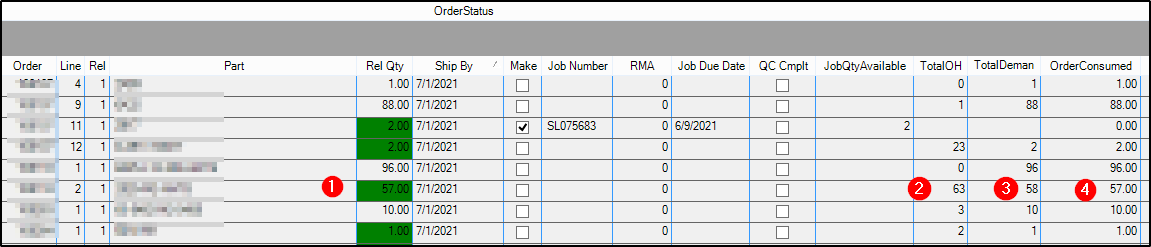
The order consumed column goes down the list for each stocked part and calculates what has been consumed thru that date / order / release. There is another condition on the release qty field to turn green if we can ship the entire amount.
Formula for the Order consumed column
Case
When OrderRel.OpenRelease = 1 and OrderRel.Make = 0
Then Sum (OrderRel.OurReqQty) OVER (PARTITION BY OrderRel.PartNum ORDER BY OrderRel.ReqDate,OrderHed.OrderNum,OrderDtl.OrderLine,OrderRel.OrderRelNum)
Else 0
End
I have created a solution that seems to be working for us. I have attached the BAQ that feeds a customized dashboard. When the user types in the number of parts they have, and the part number, they will get back a list of releases and the open ship qty for each. The dashboard groups everything by order number and provides a sum, so the user knows how many parts go in each order. ReadyToShip_2.baq (68.9 KB) App.ReadyToShip.MainController_Customization_custom1_CustomExport.xml (40.7 KB) ReadyToShip.dbd (138.8 KB)
Thank you all for your ideas!
Nate