My company has recently ran into some issues with parts not having pricing info set up before we purchase which has resulted in some large variances upon receipt.
I have set up a BAQ with parameter which will examine all line items on the PO and compare the PO unit price to the part’s standard price (we’re on standard pricing currently). Then it will return any lines in which there is greater than a 10% difference between these figures. I’m satisfied with my BAQ, but I’d like to incorporate it into a BPM to automatically prompt our purchasers if there are any hits so we can fix any pricing issues prior to sending out the PO.
While I’m pretty comfortable with making custom BAQs, I’m a bit newer to the world of BPMs. I’m really struggling to understand how to call my BAQ within the BPM and see if there are any lines to report to the user in a warning message.
How can I call my previously created BAQ and obtain any resulting rows into a BPM table variable? The behavior I am looking for would be something as such:
User triggers BPM by changing a PO from unconfirmed to confirmed.
BPM will feed the PO number from dsPOHeaderRow.PONum into my custom query as the parameter.
Custom query will execute and return any rows that hit as defined within the query.
BPM will check if any rows are present from (3) above and notify the user through an optional show message which PNs need fixing. If (3) has not hits, then user receives no message.
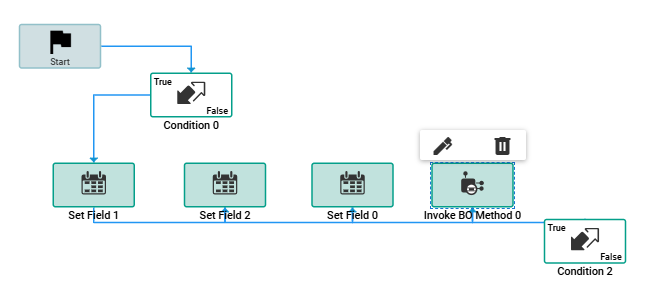
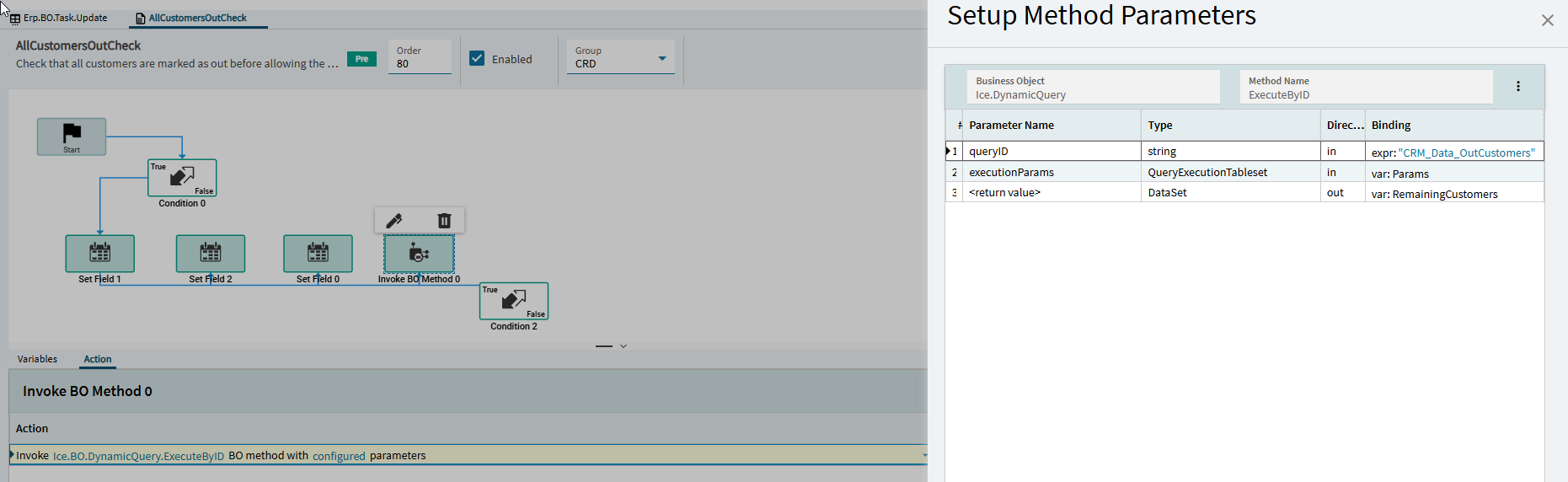
The first condition is just making sure this fires on the right update.
The three set field widgets all set parts of a QueryExecutionTableset variable; ParameterID, ValueType, and ParameterValue. In my case I have QuoteNum as a parameter so that’s QuoteNum (that’s what I named the parameter in the baq), int, and then the quote number associated with this update method.
The only way I could figure out to return the data if there was any was a condition widget where custom code is valid. I had to add System.text to the using directives.
// Check if the BAQ returned any rows
bool hasRows = RemainingCustomers != null
    && RemainingCustomers.Tables.Count > 0
    && RemainingCustomers.Tables[0].Rows.Count > 0;

if (hasRows)
{
    DataTable t = RemainingCustomers.Tables[0];
    string msg = "The following customers are still active on this quote:\n";

    // You can limit rows if desired for readability
    int limit = 20;
    int shown = 0;

    foreach (DataRow row in t.Rows)
    {
        if (shown++ >= limit) break;

        string custName = Convert.ToString(row["cd_AllQuoteCustomers_Customer_Name"]);
        string salesRep = Convert.ToString(row["SalesRep_Name"]);

        msg += $"• {custName} — {salesRep}\n";
    }

    if (t.Rows.Count > limit)
        msg += $"(+ {t.Rows.Count - limit} more)";

    throw new Ice.BLException(msg);
}

return !hasRows; // condition passes only if there are no remaining customers
If it returns data it raises an exception which stops the method from executing (warning here that this would make the purchaser lose their progress so be selective on what you’re triggering from). If it’s valid then no popup and the method continues.