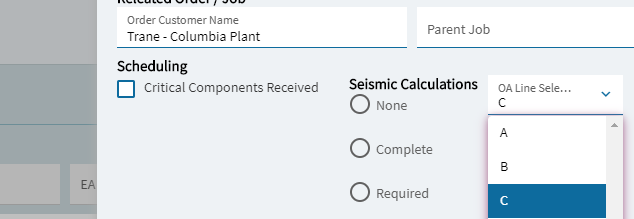
In the Job Entry screen, I’ve created a slide out with a Dropdown list that is generated via user codes. This is working fine; it’s bound to a UD field.
When the user hits save on the job entry screen, I want to update two fields in the JobOpDtl table based on what they selected in the dropdown list. What is the best way to accomplish this?
I’ve thought of a BPM on Erp.BO.JobEntry.Update, but I’m not sure how to accomplish that or if that is the best way.
Something like an If, Switch, Case?
String op = jobOpDtl.OprSeq
String line = jobhead.character05
if(line == ‘A’)
{
switch((int)edvJobOp.dataView.Table.Rows[i][“OprSeq”])
{
Case 40
jobOp.ResouceID = ‘LTA01’
JobOp.ProdStandard = ‘210’
Break;
  Case 41
  jobOp.ResouceID = ‘LTA02’
  JobOp.ProdStandard = ‘210’
  Break;
Definitely use a BPM. If you’re going to be writing code, I’d suggest you put your logic into a function and have the BPM call that. You don’t want a bunch of code sitting out on random methods when upgrade time rolls around again.
If you have questions about syntax or anything else, let me know and I can point you in the right direction.
Well, neat thing about BPM’s is that you have the dataset front and center. If you do it right, it’s also strongly typed, so it will tell you right away if you’re trying to shove a string into a numeric field. I literally ran into that while typing this sample up. I forgot ProdStandard was decimal.
//Accessing your UD field
string lineSelect = ds.JobHead.FirstOrDefault().Character05_c

//If you only need one row, you can just grab it directly.
var row = ds.JobOpDtl.Where(r => r.OprSeq == 40).FirstOrDefault();
row.ResourceID = "LTA01";
row.ProdStandard = 210;

//You can also loop
foreach (var opDtl in ds.JobOpDtl)
{
    if (opDtl.OprSeq == 40)
    {
        opDtl.ResourceID = "LTA01";
        opDtl.ProdStandard = 210;
    }
    if (opDtl.OprSeq == 41)
    {
        opDtl.ResourceID = "LTA02";
        opDtl.ProdStandard = 210;
    }
}
As to switches vs if statements…depends on what you’re doing. 90% of the time I’m using if blocks as shown above. I find it more readable most of the time.
That’s one of those “depends on your implementation” things. The example I used was written right into the BPM method itself. “Ds” represents the PartTableSet that’s within the Update method.
If you were going to move that into a function, you’d want to pull the Part service into your library, and add a partTableSet as an input and output to the signature of your function. Then when you call it from the BPM, it’s grabbing the tableset from the method, modifying it, then returning it back so the BPM can continue the update process.
As a rule, I never write to Db. That’s the database, and writing to that can bypass all the rules in the system. I will read from it tho.