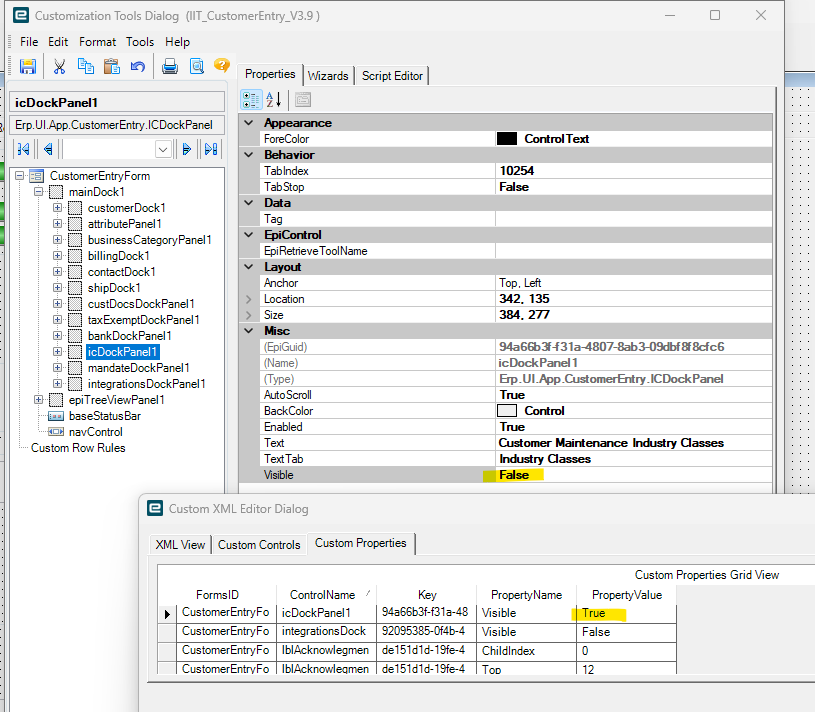
In Classic screen customization we got a bit overzealous in hiding some dock panels. I’m trying to un-hide one and make it Visible again. No matter what i do changing it to Visible on the Dock panel or via the XML editor it won’t stick and stay visible. I go back and Save Layouts too once i close the customization tools screen.
You can try modifying it from Customization Maintenance maybe? Search for you customization then go to Actions > Show Custom Data. It’s pretty much the same XML editor, but could get it unstuck for you.
Just because it has bit me before, have you cleared cache after making the change? I OFTEN need to clear cache to see screen changes that I just did in Customization.
I’m not a coder, but pretty sure this is it. doesn’t say Visible = False like other dock panels, the icDockPanel1 is the one i’m trying to bring back and make Visible