I got a bit of an interesting request internally, we have a few dashboards that have been converted to Kinetic and have calculated fields. Is it possible to add a static note if you hover over the column header?
The goal is to add a description/note of what the calculated field is doing. For example, if there is a calculated field labeled “Budgeted Hours” we want to see something like “SUM(Table.Field) - Table.Field” or even something less technical but descriptive.
The business case is people will frequently ask how that column is being calculated as there can be filters in the background that they’re not aware of.
I’m open to other suggestions apart from that pop up if there are other ways to solve this use case.
I haven’t seen any ways of inserting hover text / tool tips in Kinetic.
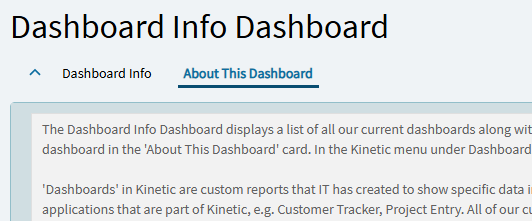
The best idea I’ve seen is from @mbayley & @tpogue where they added an “About” tab to their dashboard which contained a Text Area bound to TransView.DashboardInfo (or whatever you want to call your column).
You just need an event after the form loads where you row-update the value of TransView.DashboardInfo to whatever you want to display via the row-update’s json expression editor.
That’s a great idea! This should be good enough for our requirements, because even a “About this dashboard” tab will be good enough for some static comments.