Testing out adding UD fields for CustNum or CustID to Part:
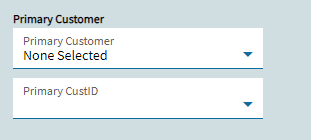
Both of these are combo boxes driven by the same BAQ, which lists out Custnum, CustID, and Name values from the Customer table.
Differences in behavior
CustNum_c UD field:
- An empty CustNum_c (integer value) displays “None Selected”.
- The dropdown list has “None Selected” as the topmost choice in the list.
CustID_c UD field:
- An empty CustID_c (integer value) displays .
- There is no ‘none selected’ choice at the top of the dropdown list. Instead, I need to edit combobox > Advanced > List, and use “+” to add an entry which shows at the top of the dropdown list. No matter what I put in the list entry, this displays as a blank entry at the top of the dropdown list, but it does correctly set the UD field value to an empty string.
Any thoughts on why there is no ‘None Selected’ choice by default on the CustID_c field when there is one on the CustNum_c?
Also, any idea on syntax issues that could cause the added List value to be blank?