I’m playing around with DMT Pilot and a required column “Company” is needed. How do I find my Company Identifier?
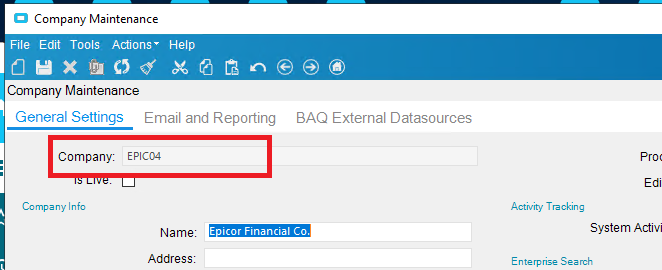
In Company Maintenance it shows the company ID in the top left.
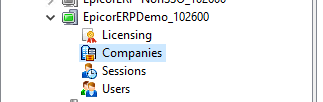
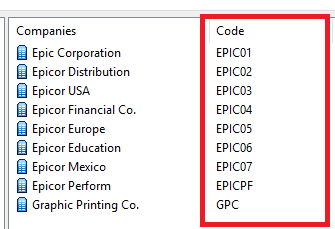
Or you can find it in the EAC under Server > Companies.
Thanks @chaddb
Can you also aid in how I can find the “Plant” Identifier?
Plant Maintenance form.
Ditto for Warehouse
1 Like
@gcanindin - while knowing how E10 DB’s are structured and the basics of how the Business Objects work aren’t absolutely necessary for using DMT, they will go a long way in limiting any errors you might introduce via DMT.
So make sure you know what you’re doing with DMT as it could make things go really bad, really quick.
edit
fixed “are” -> “aren’t”
1 Like

1 Like
Thanks for the reminder @ckrusen & @chaddb. I’m playing around in DMT Pilot and it’s reset every month, thank goodness.
Currently, I’m trying to figure how to upload QTY ADJ. It says PLANT is required but the DEMO doesn’t display PLANT in the loaded template. And when I PROCESS, this error appears: “lot required for a lot tracked part.” But the LOT is set to “not tracked”. Do you know why?
WHen testing DMT’s I first hand test what I want the DMT to do. By “hand test”, I mean I use the User interface to do the same thing. If I can do a Qty Adj on part ABC-123 by hand, then I should be able to do it with a DMT. If you enable tracing, you can get a feel for what E10 does in the background.
For example:
-
I launch Qty Adjustment, and fill it in BUT DON’T hit the Adjust button just yet.
-
Enable Tracing, with just “Track Changes” enabled

-
Click the Apply button, then the Clear Log button
-
Jump back to the Qty Adjust window and click the Adjust button
-
Back in the Tracing Options window, uncheck the “Enable Trace Logging” box , and click Apply
-
Click the View button.
You’ll see several sections like:
<-- Click arrow to see the XML from the trace log
<tracePacket>
  <businessObject>Erp.Proxy.BO.InventoryQtyAdjImpl</businessObject>
  <methodName>NegativeInventoryTest</methodName>
  <appServerUri>net.tcp://usdcaaps00371/UAT_102300/</appServerUri>
  <returnType>System.Void</returnType>
  <localTime>2/8/2021 13:02:43:3884130 PM</localTime>
  <threadID>1</threadID>
  <executionTime total="98" roundTrip="97" channel="0" bpm="0" other="1" />
  <retries>0</retries>
  <parameters>
    <parameter name="pcPartNum" type="System.String"><![CDATA[CB-0001]]></parameter>
    <parameter name="pcWhseCode" type="System.String"><![CDATA[mfg]]></parameter>
    <parameter name="pcBinNum" type="System.String"><![CDATA[D0201]]></parameter>
    <parameter name="pcLotNum" type="System.String"><![CDATA[]]></parameter>
    <parameter name="pcPCID" type="System.String"><![CDATA[]]></parameter>
    <parameter name="pcDimCode" type="System.String"><![CDATA[FT]]></parameter>
    <parameter name="pdDimConvFactor" type="System.Int32"><![CDATA[1]]></parameter>
    <parameter name="ipSellingQuantity" type="System.Decimal"><![CDATA[-1000.00]]></parameter>
    <parameter name="pcNeqQtyAction" type="System.String"><![CDATA[]]></parameter>
    <parameter name="pcMessage" type="System.String"><![CDATA[]]></parameter>
  </parameters>
</tracePacket>

<tracePacket>
  <businessObject>Erp.Proxy.BO.InventoryQtyAdjImpl</businessObject>
  <methodName>PreSetInventoryQtyAdj</methodName>
  <appServerUri>net.tcp://usdcaaps00371/UAT_102300/</appServerUri>
  <returnType>System.Void</returnType>
  <localTime>2/8/2021 13:02:43:4977876 PM</localTime>
  <threadID>1</threadID>
  <executionTime total="75" roundTrip="34" channel="0" bpm="0" other="41" />
  <retries>0</retries>
  <parameters>
    <parameter name="ds" type="Erp.BO.InventoryQtyAdjDataSet">
      <InventoryQtyAdjDataSet xmlns="http://www.epicor.com/Ice/300/BO/InventoryQtyAdj/InventoryQtyAdj" />
    </parameter>
    <parameter name="requiresUserInput" type="System.Boolean"><![CDATA[False]]></parameter>
  </parameters>
  <paramDataSetChanges>
    <paramDataSet name="ds" useDataSetNbr="0">
      <changedValue tableName="InventoryQtyAdj" rowState="Modified" rowNum="0" colName="AdjustQuantity"><![CDATA[1000.00]]></changedValue>
      <changedValue tableName="InventoryQtyAdj" rowState="Modified" rowNum="0" colName="ReasonCode"><![CDATA[SCRAP]]></changedValue>
      <changedValue tableName="InventoryQtyAdj" rowState="Modified" rowNum="0" colName="ReasonCodeDescription"><![CDATA[ISSUED AS SCRAP]]></changedValue>
    </paramDataSet>
  </paramDataSetChanges>
</tracePacket>

<tracePacket>
  <businessObject>Erp.Proxy.BO.InventoryQtyAdjImpl</businessObject>
  <methodName>SetInventoryQtyAdj</methodName>
  <appServerUri>net.tcp://usdcaaps00371/UAT_102300/</appServerUri>
  <returnType>System.Void</returnType>
  <localTime>2/8/2021 13:02:43:5759055 PM</localTime>
  <threadID>1</threadID>
  <executionTime total="618" roundTrip="605" channel="0" bpm="10" other="3" />
  <retries>0</retries>
  <parameters>
    <parameter name="ds" type="Erp.BO.InventoryQtyAdjDataSet">
      <InventoryQtyAdjDataSet xmlns="http://www.epicor.com/Ice/300/BO/InventoryQtyAdj/InventoryQtyAdj" />
    </parameter>
    <parameter name="partTranPKs" type="System.String"><![CDATA[]]></parameter>
  </parameters>
  <paramDataSetChanges>
    <paramDataSet name="ds" useDataSetNbr="0">
      <changedValue tableName="InventoryQtyAdj" rowState="Modified" rowNum="0" colName="AdjustQuantity"><![CDATA[1000.00]]></changedValue>
      <changedValue tableName="InventoryQtyAdj" rowState="Modified" rowNum="0" colName="ReasonCode"><![CDATA[SCRAP]]></changedValue>
      <changedValue tableName="InventoryQtyAdj" rowState="Modified" rowNum="0" colName="ReasonCodeDescription"><![CDATA[ISSUED AS SCRAP]]></changedValue>
      <changedValue tableName="InventoryQtyAdj" rowState="Modified" rowNum="0" colName="RowMod"><![CDATA[U]]></changedValue>
    </paramDataSet>
  </paramDataSetChanges>
</tracePacket>

<tracePacket>
  <businessObject>Erp.Proxy.BO.InventoryQtyAdjImpl</businessObject>
  <methodName>GetInventoryQtyAdj</methodName>
  <appServerUri>net.tcp://usdcaaps00371/UAT_102300/</appServerUri>
  <returnType>Erp.Tablesets.InventoryQtyAdjTableset</returnType>
  <localTime>2/8/2021 13:02:44:2009113 PM</localTime>
  <threadID>1</threadID>
  <executionTime total="50" roundTrip="49" channel="0" bpm="0" other="1" />
  <retries>0</retries>
  <parameters>
    <parameter name="partnumber" type="System.String"><![CDATA[CB-0001]]></parameter>
    <parameter name="uomCode" type="System.String"><![CDATA[]]></parameter>
  </parameters>
</tracePacket>
Of particular note is the section
``` xml
<parameter name="pcPartNum" type="System.String"><![CDATA[CB-0001]]></parameter>
    <parameter name="pcWhseCode" type="System.String"><![CDATA[mfg]]></parameter>
    <parameter name="pcBinNum" type="System.String"><![CDATA[D0201]]></parameter>
    <parameter name="pcLotNum" type="System.String"><![CDATA[]]></parameter>
    <parameter name="pcPCID" type="System.String"><![CDATA[]]></parameter>
    <parameter name="pcDimCode" type="System.String"><![CDATA[FT]]></parameter>
That shows that I’d need to specify a partNum (CB-0001), Wharehouse code (mfg), BinNum(D0201), Dim Code (i.e UOM FT)
Plant isn’t shown because I selected “Track Changes Only”, and the plant is set by the form and doesn’t change. If you select “Write Full DataSet”, you’d see all the values used to do the Qty Update (but the trace log file gets really big and a little harder to disect).