I’m working with the Classic Configurator in Kinetic.
I made my changes in Pilot and exported the XML file.
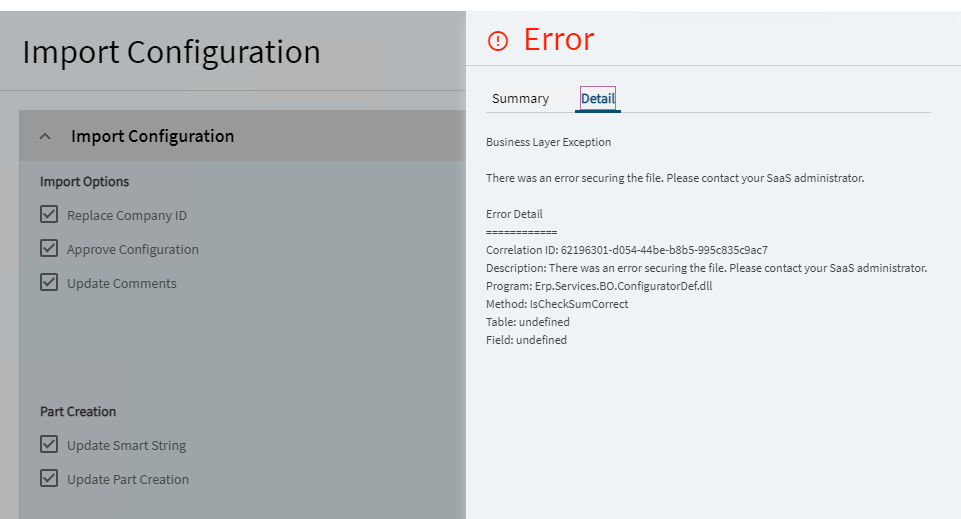
However, when I try to import it into Production, I get the following error:
Business Layer Exception There was an error securing the file. Please contact your SaaS administrator. Error Detail ============ Correlation ID: a950ae49-ca33-452e-9291-70fda6081e4e Description: There was an error securing the file. Please contact your SaaS administrator. Program: Erp.Services.BO.ConfiguratorDef.dll Method: IsCheckSumCorrect Table: undefined Field: undefined
We are also seeing this. We have a case with Epicor support, but they haven’t given us much to go on for fixing it. The only suspicion they have is if we edited the XML directly, which we haven’t and I doubt you have. We’ve been forced to make our changes in production as well, unfortunately. Have you been getting random generic errors when editing your configurators by any chance? If I open one and just click on a control, I’ll get an error nearly every time.
I get the error without even opening the XML file…
Thanks for answering, just tried importing a Kinetic configurator and is failing too!
So frustrating…
I am also getting the same error when importing into Prod from one that I updated in Pilot. I updated after the hotfix was installed on Pilot, could that be the reason it’s failing? (Pilot has the hotfix, but Production does not until this weekend.)
I also tried to import into Pilot a Configurator Lookup Table but was not successful. However, I was able to import it into Prod…so this may be related to the Linux OS or hotfix (hopefully Linux and they fix it before we can’t import into Prod).
I guess I’ll have to submit a case for the two issues I’ve encountered.
Yes, previously when you exported the configurator, the exported XML file used 0D0A for new lines. After they switched to Linux, I noticed that my configurator XML now only uses 0A00 for new lines.
Since I am moving from on‑prem to the cloud, I cannot import any of the configurator exports from the previous version because they do not contain any checksum data.
The solution we got from Epicor support was having them importing the file directly in the database.
Now the configurator crashes the application designer…
Well, I’m more happy we decided not to do that after all. Not being able to edit in production aside, did their import actually move your update into production and the configurator itself functions?
I was also recommended to do the same thing. I sent the files but asked them to hold off after seeing your post.
Did they fix the current issue in Production?
Epicor was able to successfully import my configurator from Pilot to Live.
They say the issue was fixed in Kinetic 2025.2.14.
My Live version is 2025.2.10 but they were able to make it work.
It took them several attempts but finally it looks fine. Good look everyone.