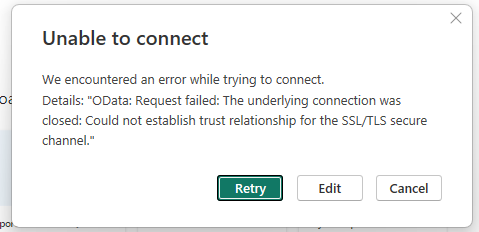
I’m attempting to use the Rest API to run a BAQ for use in Power BI, but I’ve been getting the above error message. I’m a bit out of my depth with this sort of thing and was hoping someone may know how to resolve this issue, or at least point me in the right direction.
You need to have a real ssl cert on the server, not a self signed.
I have also found Odata to powerbi to be very slow and moved all of this to SQL views. converting keys baqs to sql views isnt terrible, mostly a copy and paste with a view table name updates.
just want to add the powerbi doesnt (or didnt when i set it up) cache the data from Odata.
Thanks, I’ll have to take a look at that.
I had originally attempted to recreate the BAQ as a view in SQL like you suggested but when I looked at the BAQ with the SQL profiler there were a number of added bits to the query that I can’t seem to make work as a view.
Alex, maybe you know this but it might be helpful for others.
I can usually copy and paste the query phrase from the baq screen into a sql query and update the table names. ERP.Part for example. If you have UD fields added to a table, you would need to reference the sql view epicor creates by using DBO.Part.
1 Like