I have tried the suggestions such as the variance report and PCID count report (which never seems to generate anything.)
I have two count cycles exhibiting these issues that I need to close out because I believe they are interfering with my ability to generate a full physical inventory count for our main warehouse.
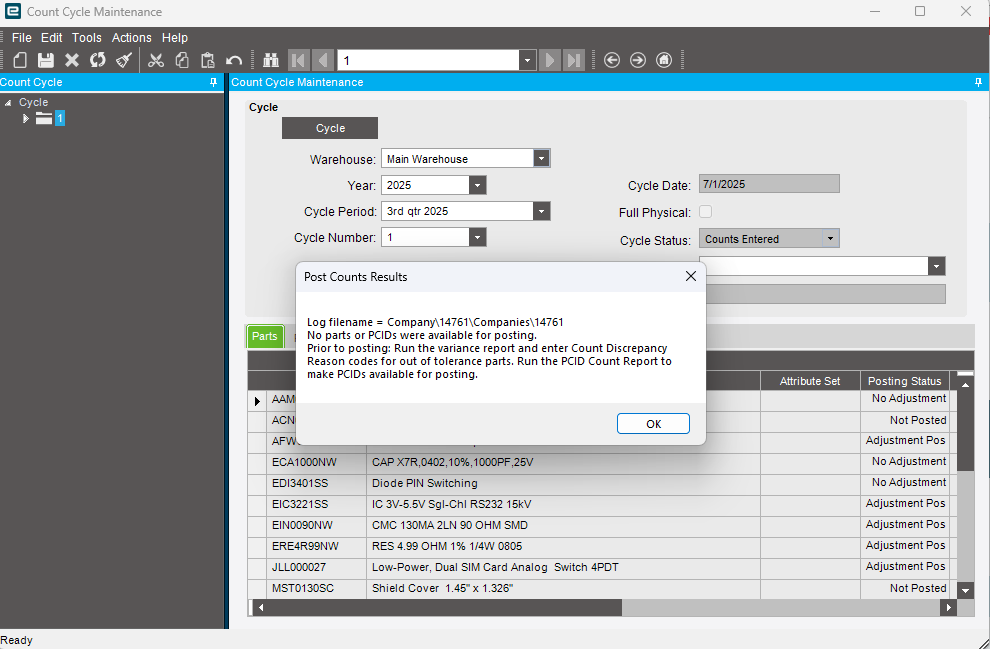
When attempting to post a cycle or physical count a Post Count Results message appears that states “No parts or PCIDs were available for posting.
Prior to posting: Run the variance report and enter Count Discrepancy Reason codes for out of tolerance parts.” (Refer to the message screenshot in the notes).
Resolution
Go to Count Tag Entry from General Operations and pull up this count.
Verify all tags on this count have been marked Returned.
Verify all Returned tags have a Counted Qty value, Counted By value and Counted Date selected.
Click the Save icon.
Go to Count Cycle Maintenance from General Operations and pull up this count.
Run the Count Variance Calculation/Report from the Actions menu.
Note: You can click the Print Preview icon to both generate the report and also display the report on your screen.
Go to Count Discrepancy Reason from General Operations and pull up this count.
Enter Reason Codes for any outstanding ‘Out of Tolerance’ parts.
Click the Save icon.
Navigate to the Count Cycle Maintenance screen for this count and click the Refresh icon.
Select Post Counts from the Actions menu.
Verify the Transaction Date in the Post Count Inventory Adjustments window.
Click the Post button.
Note: At this point if the same message displays that No parts or PCIDs were available for posting then this is most likely because there is an issue with current allocation on the part. If the quantity you are trying to Post would go below the current allocation levels on the part then the system will give you this message and result by design.
Go to Part Tracker from General Operations and enter the part number in the Part field.
Navigate to the Warehouses page from the On Hand tab.
Verify any current allocation or picking status for this part in the following fields: Allocated Qty, Picking Qty, Picked Qty, Sales Picking Qty, Sales Picked Qty, Sales Allocated Qty, Job Allocated Qty, Job Picking Qty, Job Picked Qty, Transfer Order Allocated Qty, Transfer Order Picking Qty and Transfer Order Picked Qty fields.
For example, you have a part with a snapshot value of ‘1’ and the counted qty for this part is zero. There also is Allocation in the system for the one unit of this part.
The count will not let you reduce the quantity below the allowable allocation limit.
Notes
For any parts that did not originally post because of their current allocation please be aware this situation is the natural result of allocating and picking material that is being counted when the original system totals were off on the part. Therefore this is working as designed.
If this is the case the user will need to un-allocate and un-pick the parts to allow the post to complete.
Please note, a part’s allocation is also automatically relieved when it is shipped.
Demand Qty on the part is not considered by the Count Process and will not affect the part’s ability to successfully Post on the count.
Any blank tags remaining on the count either need to be marked as ‘Returned’ with a counted qty or they need to be Voided off of the count prior to posting using Void Blank Tags from the Actions menu in Count Cycle Maintenance.
You must run the Count Variance Calculation/Report prior to any attempt to Post the count.
You did not run the variance calculation again, after fixing a mistake
There is “not enough unallocated inventory in the bin,” i.e.
a. Parts are arrived but not received
b. Parts are picked but not shipped
c. There are other ways to “allocate” or “reserve” parts, like Fulfillment Workbench or Material Queue
The count is right. No, seriously, it’s a bug in Epicor.
a. Sometimes you can’t enter a reason code when the counts match but the activity is nonzero
b. You’ll have to fudge the numbers and add one to BOTH the count AND the activity for that tag. Then it will let you add a reason (or no longer require it)