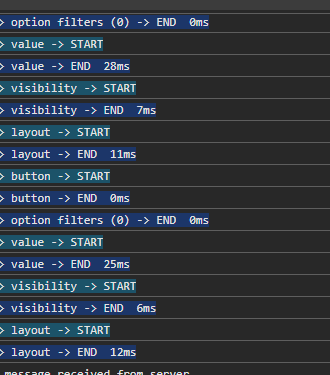
I remember reading an article somewhere about a method of logging / displaying the time (in ms) that a CPQ rule takes to run, but I could not find any record of this in zendesk or in the tech ref guides.
Where is this information located or how can I determine how long a rule takes to run?
(I want to identify which rules are taking “too long” to run or which need optimization.)
Epicor closed the previous ticket after they were unable to locate the information linked above–I have since reopened it, supplied the link, and await a response regarding server-side tracing or accessing additional information.
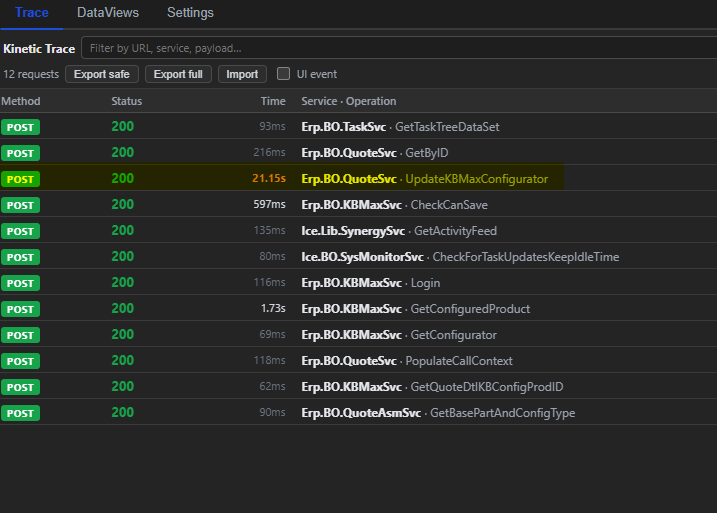
On the Kinetic side, you can check which BOs are taking the longest, but that’s more of a confirmation than anything:
Are you attempting to optimize the performance of Kinetic processing the CPQ product configuration? Have you had any luck increasing the performance of the Erp.BO.QuoteSvc/UpdateKBMaxConfigurator proccess?
Ultimately, yes, that is the process which takes the longest.
I can speed up the standalone “processes” in CPQ by using more efficient logic, but I seem to be at the mercy of Epicor’s servers when it comes to the actual sync between CPQ and Kinetic.
This is still on my radar, but we have several more configurators that we need to push out.